

Mi Band 4 FAQ
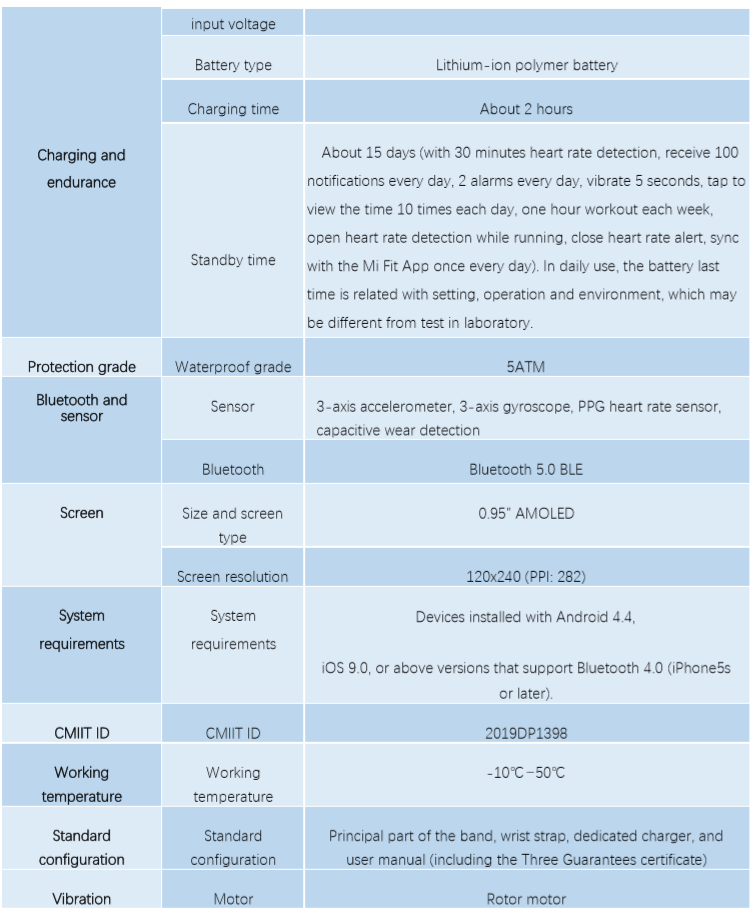
Specifications of Mi Band 4
Does Mi Band 4 harm the human body?
Mi Band 4 applies Bluetooth Low Energy 5.0. Its radiation is much lower than that of a Bluetooth headset, and its signal strength is less than one thousandth of that of a mobile phone. After more
than ten years of studies and surveys, the World Health Organization finds that Bluetooth signals will not do any harm to the human body. Therefore, please rest assured to use this band.
What is the standard configuration for Mi Band 4, and what color is the wrist strap?
The standard Mi Band 4 contains the principal part of the band, wrist strap, charger, and user manual (including the Three Guarantees certificate). The color of the wrist strap is subject to the sold one.
How to operate the screen and buttons of Mi Band 4?
Operation method: slide up and down to switch between functions (Band display, Status, Heart rate, Workout, Weather, Notifications, More), tap the function button to enter the function interface, and slide right to exit the function interface; tap the touch button to return.
Can the band display style of Mi Band 4 be changed?
Yes. In the band display interface of Mi Smart Band 4. Please slide down to enter More - Band
display, and then select favorite band display style, or tap the Mi Fit App - Profile -
Mi Smart Band 4 - Band display setting to download the custom band display.
What is the "workout vice-screen", and how does it work?
After Mi Band 4 is paired with the Mi Fit App, if any of the modes such as Outdoor running,
Treadmill, Cycling, and Walking is enabled under the workout mode, and just lift wrist to
view all the key data on the band (such as workout duration, mileage, pace, heart rate, heart rate
zone, average pace, current time, etc.) during workouts.
Is the wrist strap of Mi Band 4 compatible with that of other bands?
The wrist strap of Mi Band 4 is compatible with that of Mi Band 3, but is incompatible with that of other bands such as Mi Band 2, Mi Band 1S, Mi Band.
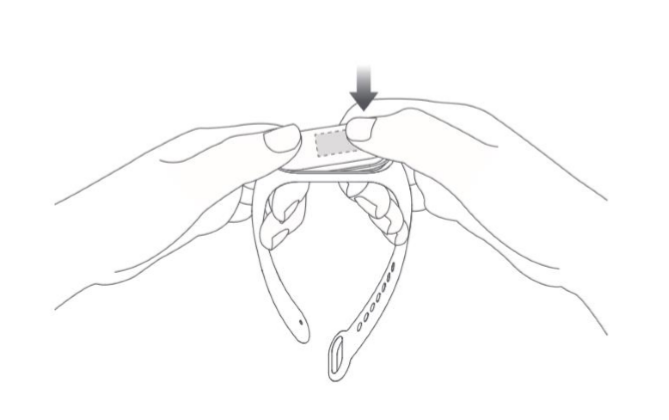
How to install and disassemble the wrist strap of Mi Band 4?
Installation:
Insert one end of the tracker unit into the slot on the wrist strap.
Press firmly on the other end to make the entire unit enter the slot and secure it.
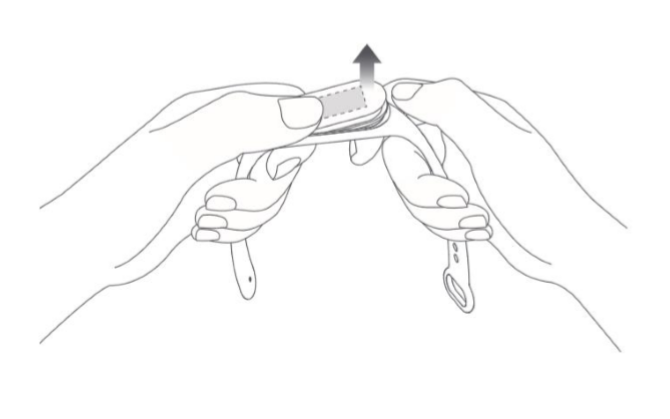
Disassembly:
Remove the band, give a strong pull at both ends of the wrist strap to make a small gap between the tracker unit and the slot of the wrist strap, and then use fingers to remove the unit from the front side of the wrist strap.
What is 50m water resistance (5ATM)?
50m water resistance refers to the waterproof depth of the band under standard conditions. Such
conditions mean that the band has a certain extent of resistance to water pressure under stationary state. The pressure resistance value is not obtained under water, but based on a conversion of atmospheric pressure.
The value of 50m water resistance indicates that the band can withstand the pressure of 50 meters under water under stationary state.Can I wear Mi Band 4 to bathe or swim?
Mi Band 4 has a water resistant rating of 5ATM, and it can be worn in a shower, swimming in the pool, and swimming in shallow waters.
How to charge Mi Band 4?
It is recommended to use the dedicated charger to charge Mi Band 4 (remove the tracker unit,
insert the end with two metal contacts into the dedicated charger, as shown below). After the tracker unit is installed, connect the charging cable to a computer USB port or a mobile phone charger with a voltage of 5V and an output current of over 250mAh. The band itself limits the input current, so don't have to worry about any damage.

How to view the charging progress of Mi Band 4?
When the band is inserted into the charger, the icon that is being charged will be displayed. In this way, the general charging progress can be displayed rather than the specific percentage. After about ten seconds, the screen will be off. If the owner wants to view the charging progress, it needs to tap the touch button with finger, and then the screen will display the charging interface.
What are the battery capacity, charging time and endurance of Mi Band 4?
The battery capacity of Mi Band 4 is 135mAh, and the charging time is about 2 hours. Please tap
the touch button to view the charging progress. The band can last about 15 days, which tested with the following use: with 30 minutes heart rate detection, receive 100 notifications every day, 2 alarms every day, vibrate 5 seconds, tap to view the time 10 times each day, one hour workout each week, open heart rate detection while running, close heart rate alert, sync with the Mi Fit App once every day. In daily use, the battery last time is related with setting, operation and environment, which may be different from test in laboratory.
Can Mi Band 4 be charged with a portable power source?
Mi Band 4 can only be charged with a portable power source that supports low current charging. A portable power source that doesn't support low current charging is mainly designed for mobile
phones, and its charging current is about 1A. When a mobile phone is fully charged, it will enter the trickle charging state and the charging current will become extremely low. Some portable power sources even turn off the charging to save power. The charging current of the band is relatively low, because of which some portable power sources mistakenly assume that the band is fully charged and thus turn off the charging.
Is it required to turn on the Bluetooth all the time when using Mi Band 4?
The step counting, sleep monitoring, heart rate detection, stopwatch, alarm, and idle alert functions do not require turning on the Bluetooth all the time. It allows to wear the band only during workouts, and after that, it needs to connect the band to mobile phone to synchronize and view data.The incoming call, screen unlock, app alerts, find phone, and find band functions require connection between the mobile phone and the band, therefore it needs to turn on the mobile phone Bluetooth and keep the connection between the two devices.
Does the band record data when not connected to the mobile phone?
Mi Band 4 can store data separately, so don't have to carry mobile phone when go out
for running or go to sleep. To synchronize data, it needs to turn on the mobile phone
Bluetooth and connect it to the band.
Mi Band 4 can retain workout data for about 7 days at most. The data that has been synchronized to the Mi Fit App will be automatically uploaded to the cloud for storage. If it is a new mobile phone, please bind previous Mi account with the band and synchronize previous data from the cloud to new mobile phone.
Why aren't the steps increasing after I've started walking with Mi Band 4?
To reduce errors, Mi Band 4 sets an initial value of 10 steps. When the number of steps is greater than 10, the band will start counting and the real-time steps on the app interface will change
accordingly. That is to say, the counting starts from 10 steps.
Does Mi Band 4 record sleep data?
Mi Band 4 can record sleep data rather than afternoon nap data.
Which mobile phone does Mi Band 4 support?
Mi Band 4 supports the devices installed with Android 4.4, iOS 9.0, or above versions that support
Bluetooth 4.0 (iPhone5s or later).
Which app does Mi Band 4 use to connect?
Mi Band 4 uses the Mi Fit app to connect and pair.
How to pair with Mi Band 4?
Open the Mi Fit App - Profile - Add device - Band to keep the mobile phone close to the band for searching and pairing, the mobile phone displays the Tick icon after searching the band, and please tap the Tick icon to confirm pairing.
What is the screen unlock of the band?
The band and mobile phone are paired together one to one. Within a safe distance, the band
acts as identity ID and it can be used to enter the unlock password or pattern and unlock the
mobile phone screen, which greatly enhances the convenience while ensuring security.
Notes: This feature is available on mobile phones that have installed MIUI systems of Android 4.4 and above versions and on mobile phones that support Smart Lock with Android 5.0 systems. Some Chinese mobile phone brands have made major changes to the Android system and this feature may not be available on such brands.
Mi Band 4 custom vibration mode settings
Mi Band 4 allows to edit the vibration mode according to the owner's preferences, and the mobile phone will automatically sense the frequency and intensity of the vibration. Meanwhile, the mobile phone will automatically record vibration rhythm mode. After that, it allows to tap to play. It can be stored directly or re-recorded according to the owner is satisfied or not.
Presently, it can be set in the following options: Incoming call, Event reminder, Alarm, App alerts, Idle alerts, Incoming SMS, Disconnection reminder, Email alerts, Goal notifications.
Does Mi Band 4 support the event reminder?
Yes. In daily life and work, something "trivial" or "important" is often forgotten. At this time, the event reminder function of Mi Fit 4 comes into use. After setting the reminder, the band will
automatically vibrate when the event arrives, and the reminder period can also be set to "Once",
"Every day", "Every week", "Every month", "Every year", "Custom". Currently, the event reminder
supports up to 60 events at most. After successfully set, the event reminder will be stored in the
band, and timely remind the owner even if the Bluetooth or the mobile phone is not connected.
Setting method: Mi Fit App - Profile - Mi Smart Band 4 - Event reminder
Does Mi Band 4 support the alarm?
Yes. When the band is turned on, please choose to set 10 alarms at most.
How to set up the incoming call function?
It can be set by tapping the Mi Fit App - Profile - Mi Smart Band 4 - Incoming call.
How to set up the app notification reminder?
It can be added by following the list in the Mi Fit App - Profile - Mi Smart Band 4 - App alerts -
Manage apps.
Notes: This setting of notification only under "Only receive when the screen is off" on the Android phone rather than the iOS phone.
Does Mi Band 4 support the idle alert?
Yes. When idle for one hour, the band will vibrate to remind the owner. In addition, the idle alert time can also be set and the DND mode during the lunch break.
Does Mi Band 4 support the mobile phone alarm alert?
Yes. After the alarm is turned on, the band will vibrate when the mobile phone alarm sounds, but it is necessary to ensure that the band is connected to the mobile phone.
Does Mi Fit app support the Find band function?
Yes. After tapping Find band (the band is within the Bluetooth connection range), the band will
vibrate to find it.
Does the lift wrist to view info function of Mi Band 4 allow for the effective period?
Yes. To avoid false wake-up during a certain period, the schedule of wrist lifting can be set
according to the actual use.
Does it support to switch between the heart rate detection modes of Mi Band 4?
Yes. Please switch between the following modes: Turn off (active test only), Sleep assistant,
Automatic heart rate detection, Automatic heart rate detection & Sleep assistant. The modes differ in the effect on the band endurance.
Does Mi Band 4 support the find device function?
Yes. When the mobile phone can't be found, slide the band to find the Find device function.
(The find device function is limited to the Bluetooth range). Set the default ringtone or
Does Mi Band 4 harm the human body?
Mi Band 4 applies Bluetooth Low Energy 5.0. Its radiation is much lower than that of a Bluetooth headset, and its signal strength is less than one thousandth of that of a mobile phone. After more
than ten years of studies and surveys, the World Health Organization finds that Bluetooth signals will not do any harm to the human body. Therefore, please rest assured to use this band.
What is the standard configuration for Mi Band 4, and what color is the wrist strap?
The standard Mi Band 4 contains the principal part of the band, wrist strap, charger, and user manual (including the Three Guarantees certificate). The color of the wrist strap is subject to the sold one.
How to operate the screen and buttons of Mi Band 4?
Operation method: slide up and down to switch between functions (Band display, Status, Heart rate, Workout, Weather, Notifications, More), tap the function button to enter the function interface, and slide right to exit the function interface; tap the touch button to return.
Can the band display style of Mi Band 4 be changed?
Yes. In the band display interface of Mi Smart Band 4. Please slide down to enter More - Band
display, and then select favorite band display style, or tap the Mi Fit App - Profile -
Mi Smart Band 4 - Band display setting to download the custom band display.
What is the "workout vice-screen", and how does it work?
After Mi Band 4 is paired with the Mi Fit App, if any of the modes such as Outdoor running,
Treadmill, Cycling, and Walking is enabled under the workout mode, and just lift wrist to
view all the key data on the band (such as workout duration, mileage, pace, heart rate, heart rate
zone, average pace, current time, etc.) during workouts.
Is the wrist strap of Mi Band 4 compatible with that of other bands?
The wrist strap of Mi Band 4 is compatible with that of Mi Band 3, but is incompatible with that of other bands such as Mi Band 2, Mi Band 1S, Mi Band.
How to install and disassemble the wrist strap of Mi Band 4?
Installation:
Insert one end of the tracker unit into the slot on the wrist strap.
Press firmly on the other end to make the entire unit enter the slot and secure it.
Disassembly:
Remove the band, give a strong pull at both ends of the wrist strap to make a small gap between the tracker unit and the slot of the wrist strap, and then use fingers to remove the unit from the front side of the wrist strap.
What is 50m water resistance (5ATM)?
50m water resistance refers to the waterproof depth of the band under standard conditions. Such
conditions mean that the band has a certain extent of resistance to water pressure under stationary state. The pressure resistance value is not obtained under water, but based on a conversion of atmospheric pressure.
The value of 50m water resistance indicates that the band can withstand the pressure of 50 meters under water under stationary state.Can I wear Mi Band 4 to bathe or swim?
Mi Band 4 has a water resistant rating of 5ATM, and it can be worn in a shower, swimming in the pool, and swimming in shallow waters.
How to charge Mi Band 4?
It is recommended to use the dedicated charger to charge Mi Band 4 (remove the tracker unit,
insert the end with two metal contacts into the dedicated charger, as shown below). After the tracker unit is installed, connect the charging cable to a computer USB port or a mobile phone charger with a voltage of 5V and an output current of over 250mAh. The band itself limits the input current, so don't have to worry about any damage.
How to view the charging progress of Mi Band 4?
When the band is inserted into the charger, the icon that is being charged will be displayed. In this way, the general charging progress can be displayed rather than the specific percentage. After about ten seconds, the screen will be off. If the owner wants to view the charging progress, it needs to tap the touch button with finger, and then the screen will display the charging interface.
What are the battery capacity, charging time and endurance of Mi Band 4?
The battery capacity of Mi Band 4 is 135mAh, and the charging time is about 2 hours. Please tap
the touch button to view the charging progress. The band can last about 15 days, which tested with the following use: with 30 minutes heart rate detection, receive 100 notifications every day, 2 alarms every day, vibrate 5 seconds, tap to view the time 10 times each day, one hour workout each week, open heart rate detection while running, close heart rate alert, sync with the Mi Fit App once every day. In daily use, the battery last time is related with setting, operation and environment, which may be different from test in laboratory.
Can Mi Band 4 be charged with a portable power source?
Mi Band 4 can only be charged with a portable power source that supports low current charging. A portable power source that doesn't support low current charging is mainly designed for mobile
phones, and its charging current is about 1A. When a mobile phone is fully charged, it will enter the trickle charging state and the charging current will become extremely low. Some portable power sources even turn off the charging to save power. The charging current of the band is relatively low, because of which some portable power sources mistakenly assume that the band is fully charged and thus turn off the charging.
Is it required to turn on the Bluetooth all the time when using Mi Band 4?
The step counting, sleep monitoring, heart rate detection, stopwatch, alarm, and idle alert functions do not require turning on the Bluetooth all the time. It allows to wear the band only during workouts, and after that, it needs to connect the band to mobile phone to synchronize and view data.The incoming call, screen unlock, app alerts, find phone, and find band functions require connection between the mobile phone and the band, therefore it needs to turn on the mobile phone Bluetooth and keep the connection between the two devices.
Does the band record data when not connected to the mobile phone?
Mi Band 4 can store data separately, so don't have to carry mobile phone when go out
for running or go to sleep. To synchronize data, it needs to turn on the mobile phone
Bluetooth and connect it to the band.
Mi Band 4 can retain workout data for about 7 days at most. The data that has been synchronized to the Mi Fit App will be automatically uploaded to the cloud for storage. If it is a new mobile phone, please bind previous Mi account with the band and synchronize previous data from the cloud to new mobile phone.
Why aren't the steps increasing after I've started walking with Mi Band 4?
To reduce errors, Mi Band 4 sets an initial value of 10 steps. When the number of steps is greater than 10, the band will start counting and the real-time steps on the app interface will change
accordingly. That is to say, the counting starts from 10 steps.
Does Mi Band 4 record sleep data?
Mi Band 4 can record sleep data rather than afternoon nap data.
Which mobile phone does Mi Band 4 support?
Mi Band 4 supports the devices installed with Android 4.4, iOS 9.0, or above versions that support
Bluetooth 4.0 (iPhone5s or later).
Which app does Mi Band 4 use to connect?
Mi Band 4 uses the Mi Fit app to connect and pair.
How to pair with Mi Band 4?
Open the Mi Fit App - Profile - Add device - Band to keep the mobile phone close to the band for searching and pairing, the mobile phone displays the Tick icon after searching the band, and please tap the Tick icon to confirm pairing.
What is the screen unlock of the band?
The band and mobile phone are paired together one to one. Within a safe distance, the band
acts as identity ID and it can be used to enter the unlock password or pattern and unlock the
mobile phone screen, which greatly enhances the convenience while ensuring security.
Notes: This feature is available on mobile phones that have installed MIUI systems of Android 4.4 and above versions and on mobile phones that support Smart Lock with Android 5.0 systems. Some Chinese mobile phone brands have made major changes to the Android system and this feature may not be available on such brands.
Mi Band 4 custom vibration mode settings
Mi Band 4 allows to edit the vibration mode according to the owner's preferences, and the mobile phone will automatically sense the frequency and intensity of the vibration. Meanwhile, the mobile phone will automatically record vibration rhythm mode. After that, it allows to tap to play. It can be stored directly or re-recorded according to the owner is satisfied or not.
Presently, it can be set in the following options: Incoming call, Event reminder, Alarm, App alerts, Idle alerts, Incoming SMS, Disconnection reminder, Email alerts, Goal notifications.
Does Mi Band 4 support the event reminder?
Yes. In daily life and work, something "trivial" or "important" is often forgotten. At this time, the event reminder function of Mi Fit 4 comes into use. After setting the reminder, the band will
automatically vibrate when the event arrives, and the reminder period can also be set to "Once",
"Every day", "Every week", "Every month", "Every year", "Custom". Currently, the event reminder
supports up to 60 events at most. After successfully set, the event reminder will be stored in the
band, and timely remind the owner even if the Bluetooth or the mobile phone is not connected.
Setting method: Mi Fit App - Profile - Mi Smart Band 4 - Event reminder
Does Mi Band 4 support the alarm?
Yes. When the band is turned on, please choose to set 10 alarms at most.
How to set up the incoming call function?
It can be set by tapping the Mi Fit App - Profile - Mi Smart Band 4 - Incoming call.
How to set up the app notification reminder?
It can be added by following the list in the Mi Fit App - Profile - Mi Smart Band 4 - App alerts -
Manage apps.
Notes: This setting of notification only under "Only receive when the screen is off" on the Android phone rather than the iOS phone.
Does Mi Band 4 support the idle alert?
Yes. When idle for one hour, the band will vibrate to remind the owner. In addition, the idle alert time can also be set and the DND mode during the lunch break.
Does Mi Band 4 support the mobile phone alarm alert?
Yes. After the alarm is turned on, the band will vibrate when the mobile phone alarm sounds, but it is necessary to ensure that the band is connected to the mobile phone.
Does Mi Fit app support the Find band function?
Yes. After tapping Find band (the band is within the Bluetooth connection range), the band will
vibrate to find it.
Does the lift wrist to view info function of Mi Band 4 allow for the effective period?
Yes. To avoid false wake-up during a certain period, the schedule of wrist lifting can be set
according to the actual use.
Does it support to switch between the heart rate detection modes of Mi Band 4?
Yes. Please switch between the following modes: Turn off (active test only), Sleep assistant,
Automatic heart rate detection, Automatic heart rate detection & Sleep assistant. The modes differ in the effect on the band endurance.
Does Mi Band 4 support the find device function?
Yes. When the mobile phone can't be found, slide the band to find the Find device function.
(The find device function is limited to the Bluetooth range). Set the default ringtone or
Does it help?
Yes
No