

Mi Desktop Monitor 27 FAQ
| Product model | Mi Desktop Monitor 27 |
|
|
| Specifications | Product model no.:RMMNT27NF |
| Power input:12V, 2A | |
| Rated power*:24W max. | |
| Screen size:27 inches | |
| Display size (diagonal):685.98mm | |
| Dot pitch:0.3114×0.3114mm | |
| Brightness:300cd/m² (TYP) | |
| Contrast:1000:1 (TYP) | |
| Dynamic contrast1000000:1 | |
| Number of colors:16.7 million | |
| Aspect ratio:16:9 | |
| Response time:6ms (GTG) | |
| Maximum resolution:1920×1080 | |
| Recommended resolution:1920×1080 | |
| Maximum refresh rate:75Hz | |
| Recommended refresh rate:60Hz | |
| Dimensions:613.2 (L) × 205.3 (W) × 476.0 (H)mm | |
| Net weight:4.3kg | |
| Operating temperature:0℃—40℃ | |
| Operating humidity:20%—80% RH | |
| *The rated power does not include the power of the adapter. | |
| Number and type of ports | HDMI 1.4 port ×1 VGA port ×1 Audio port ×1 DC IN power port ×1 |
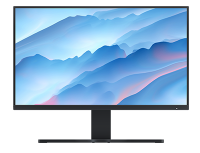
Overview:
1. Q:What interfaces does common monitors have?
A:Common monitors have VGA,DVI,HDMI,DP interface:
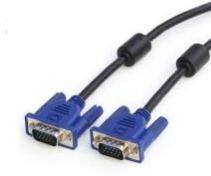
1) VGA:The interface is an analog signal interface for image transmission. It can connect through VGA cable to laptops, desktops and other devices which support VGA output for screen expansion.
2) DVI interface: DVI-I can transmit both digital and analog signals, DVI-D can transmit digital signals, and DVI-A can only transmit analog signals.The most commonly used interface is DVI-I.
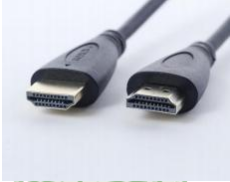
3) HDMI: This interface can support output 1080P images and 7.1 channels at the same time. Only one HDMI cable is needed to transmit high quality video and audio signals, which is the most widely used at present.
① MI TV HDMI interface is the input interface, support through the HDMI cable connection computer, game console, DVD, set-top box, HD player (MI box) output devices.
The HDMI (ARC) interface represents the interface that supports audio return (ARC), which is used to export the sound from the TV to the power amplifier/home theater and other devices when the TV is connected to the external power amplifier/home theater that supports ARC.
② The HDMI interface of MI box belongs to the output interface, which is used to replace AV composite cable to connect HDTV.
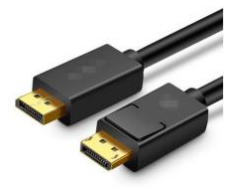
4) DP interface: can transmit video and audio signals, and anti-jamming ability.
2. Q:What are the different between HDMI 1.4 and HDMI 2.0?
A:HDMI 1.4 supports 4K and up to 3840×2160 resolution and 30FPS frame rate.
| Color depth | HDMI 1.4 | HDMI 2.0 |
| 24 | 4096×2160p 24Hz | 3840×2160p 60Hz |
| 30 | 3840×2160p 30Hz | 3840×2160p 60Hz |
| 36 | 3840×2160p 25Hz | 3840×2160p 60Hz |
| 48 | 3840×2160p 24Hz | 3840×2160p 50Hz |
3. Q:What interface does Mi Desktop Monitor 27 have?

A:1. DC IN:Power input
2. HDMI(1.4):Maximum refresh rate 1920×1080/75Hz
3. VGA:Maximum refresh rate 1920×1080/60Hz
4. Audio:Audio output(The audio interface is only suitable for output audio signals)
Frequently ask question:
1. Q: How to do if Mi Desktop Monitor 27 can’t turn on?
A: 1) Directly remove the signal cable of the monitor and keep the monitor power. If the logo appears when the monitor is turned on, it is proved that the display function is normal. If the video line is not in good contact, check the signal cable interface, signal cable and signal source.
2) Replace other HDMI interface.
3) Replace the VGA interface.
Does it help?