

Mi True Wireless Earbuds Basic 2S FAQ
Overview
1.Q:What are the features of Mi True Wireless Earbuds Basic 2S?
A:1.Upgrade connection mode, no limitation on master/slave devices, seamless switching between monaural/binaural modes
2.Featured by DSP digital noise reduction technology, filter out ambient noise, quietly enjoy the clear and transparent sound quality
3.Anti-touch physical buttons, one button to control music and calls, press any headset twice in a row can also wake up the voice assistant, easy and convenient
4.Long battery life, the headset can be used continuously for about 4 hours on a full charge, with the charging case, can be used for about 12 hours.
5.Built-in Bluetooth 5.0 chip, faster speed, more stable connection and lower latency.
2.Q:What is the Bluetooth version of Mi True Wireless Earbuds Basic 2S?
A:Mi True Wireless Earbuds Basic 2S Bluetooth is the latest version 5.0. With the latest technology standards becoming commercially available, more and more smartphones are adopting the Bluetooth 5.0 standard. When the Bluetooth headset is also Bluetooth 5.0.The technology advantage of 5.0 will be maximized. Bring consumers a great experience. Before this true wireless Bluetooth headset call only one side of the sound, Bluetooth 5.0 to achieve stereo sound calls, more immersive feeling. Compared to Bluetooth 4.2, the transmission rate, transmission distance have been improved, but also more power-saving security.
3.Q:How long does the Mi True Wireless Earbuds Basic 2S last?
A:With the headset fully charged and the volume turned up to 50%, you can talk continuously for about 4 hours or listen to songs continuously for about 4 hours. With the charging case, you can talk for about 12 hours.
The above is the laboratory test data, the actual use of the length of time related to the intensity of use.
4.Q:Does the Mi True Wireless Earbuds Basic 2S battery support replacement?
A:The battery does not support replacement.
FAQ
1.Q:How to wear Mi True Wireless Earbuds Basic 2S?
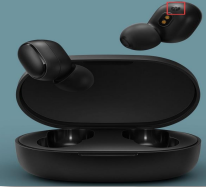
A:First select and assemble the right size earcups, and wear them correctly.
Headphones distinguish between the left and right channel, the position shown below has "L" and "R", respectively, indicating the left channel and the right channel, please wear correctly.
2.Q:How does charge Mi True Wireless Earbuds Basic 2S ?
A:The charging case is inserted into the charging cable and connected to the charger, the charging case itself will start charging, the headphones into the charging case will start charging for the headphones, the headphones and the charging case can be charged at the same time, can also be charged separately.
Charging box is not fully charged charging indicator red light is on for a long time, after fully charged charging indicator is off.
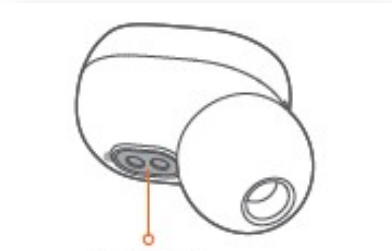
Headset charging, headset indicator red light is on, headset fully charged, headset indicator white light is on for 1 minute and then go out. Before turning on the use, please tear off the left and right headset charging contacts at the isolation film (the arrow points to the following figure), the charging case and headphones fully charged.
3.Q:How does Mi True Wireless Earbuds Basic 2S switch on and off?
A:Headset on/off method is as follows.
Power on: 1, the headset in the charging box, the headset will automatically power on when the headset is removed from the charging box.
2, the headset is not in the charging box and has been turned off, long press the multi-function key for about 1 second to turn on the phone (white light for 1 second).
Power off: 1, the headset into the charging case will automatically shut down.
2、In the power on state, press and hold the multi-function key for 5 seconds to shut down (the red light is on for 2 seconds).
Note: In the case of two headphones in series, manually close one of the headphones through the multi-function key, the other one is closed at the same time.
4.Q:How does Mi True Wireless Earbuds Basic 2S connect to my phone and other devices?
A:Connection steps.
1, firstly turning on the left and right headset at the same time (can be taken out of the charging box automatically turn on, you can also long press the multi-function key about 1 second to turn on), the left and right headset factory has been a series of records, about 2 to 3 seconds after turning on the left and right headset automatically connected successfully, after the successful series of the left headset or right headset indicator white light slowly flashing, the other headset indicator goes out. (The white light of the main headset slowly flashing is entering the pairing state with the phone, headset power below 50%, the headset with high power is the main headset)
2、Search for "Mi True Wireless Earbuds Basic 2S" and complete the connection. Once the connection is complete, the headset will automatically connect back to the last paired device when it is turned on again.
Note: If the connection fails, put the headset back into the charging case and repeat the above operation.
After successful connection, the monaural/binaural can be freely switched. After two headphones are successfully connected, the connection is binaural; put either headphone back into the charging case to automatically turn off the other headphone into monaural mode, and then take it out again to automatically resume binaural mode; both headphones are in the charging case, only take out either one of them, and the removed headphone will automatically turn back on and connect to monaural mode.
5.Q:How to clear the pairing history of Mi True Wireless Earbuds Basic 2S with my device?
A:Take the headset out of the charging case, press and hold the multi-function button of the left and right headset respectively for about 10 seconds until the indicator light The red and white lights will flash 3 times alternately and then turn off to clear the pairing record of the headset and the device.
6.Q:How to reset Mi True Wireless Earbuds Basic 2S?
A:Take the headset out of the charging case, in the headset off state, long press the multi-function button of the left and right headset respectively for about 15 seconds, and release after the second red and white light blinks alternately three times, then the headset reset is completed.
The reset process includes clearing the records of left and right headset serial connection and headset and device pairing.
After resetting the headset, turn on the left and right headset at the same time (within 20 seconds of each other), the headset will automatically complete the series connection, and the white light of the left or right headset will flash slowly after the successful series connection, and the light of the other headset will be off, after the left and right headset have had the series connection record, the headset will be automatically connected again.
7.Q:How to create a tandem record with the left and right headphones of the Mi True Wireless Earbuds Basic 2S?
A:Resetting the headset will clear the records of the left and right headset tandem and the headset and device pairing records.
After resetting the headset, turn on the left and right headset at the same time (within 20 seconds of each other), the headset will automatically complete the series connection, and the white light of the left or right headset will flash slowly after the successful series connection, and the light of the other headset will go off.
8.Q:How can Mi True Wireless Earbuds Basic 2S answer/hang up calls, reject calls, play/pause music, and turn on voice assistant?
A:Answer/hang-up call: When an incoming call comes in, short press any headset multi-function key to answer the call; during the call, short press any headset multi-function key to hang up the call.
Reject call: When an incoming call comes in, press and hold any headset multi-function key for about 1 second to reject the call.
Headset/mobile phone handset switch: when talking, long press any headset multi-function key for about 1 second to switch to headset/mobile phone handset.
Turn on/off the silent mode: when talking, press any headset multi-function key twice in a row to turn on/off the silent mode.
Answer the second call and switch between calls: when there is a new call on the phone, click the multi-function key to keep the previous call and answer the second call; double-click the multi-function key to switch between two calls.
Play/pause music: In standby mode, short press any headphone multi-function key to play/pause music. (Music software must be running in the background.)
Turn on the voice assistant: In standby mode, press any headset multi-function key twice to turn on the voice assistant. (The device must support the voice assistant function and have the Quick Wake setting enabled.)
9.Q:Does Mi True Wireless Earbuds Basic 2S support simultaneous connection of two cell phones and other devices?
A:It does not support connecting two cell phones and other devices at the same time.
10.Q:Does Mi True Wireless Earbuds Basic 2S support left and right headphones each connected to a cell phone and other devices, as two monaural headphones?
A:Does not support the left and right headphones each connected to a cell phone and other devices, does not support the use as two separate headphones.
11.Q:Will Mi True Wireless Earbuds Basic 2S automatically turn off when left unconnected for a long time?
A:If the headset is left unconnected for a long time and not operated, the headset will automatically turn off after 5 minutes.
12.Q:How to answer a second call and switch between calls with Mi True Wireless Earbuds Basic 2S?
A:When the phone calls, short press any headset multi-function key to make a call, if there is a new call, short press the multi-function key to keep the previous call and make the second call, short press the multi-function key twice in a row to switch between the two calls.
13.Q:How to switch between the headset and the handset earpiece with Mi True Wireless Earbuds Basic 2S during a call?
A:During a call, press and hold any headset multi-function key for about 1 second to switch between the headset and the handset handset.
14.Q:How to turn mute on/off with Mi True Wireless Earbuds Basic 2S during a call?
A:During a call, short press any headset multi-function key twice in a row to turn on the mute, and then short press the multi-function key twice in a row to turn off the mute.
15.Q:How to turn on/off gaming mode on Mi True Wireless Earbuds Basic 2S?
A:Mi True Wireless Earbuds Basic 2S does not support gaming mode.
16.Q:Does Mi True Wireless Earbuds Basic 2S support volume adjustment?
A:Mi True Wireless Earbuds Basic 2S does not support adjusting the volume itself, you need to adjust the volume on the bound device.
17.Q:Is it possible to charge Mi True Wireless Earbuds Basic 2S using a mobile power source?
A:Most of the current mobile power supplies have a current protection function, which will turn off the charging when the mobile power detects that the output current is too low. Since the battery capacity of Mi True Wireless Earbuds Basic 2S is small, the current when charging is also small, which is generally lower than the current protection trigger value of the rechargeable battery.
The current protection function of the mobile power will be triggered because the Mi True Wireless Earbuds Basic 2S has a small battery capacity and the charging current is also low, which is generally lower than the current protection trigger value of the charging device. If the mobile power supports low current mode, you can use low current mode to charge the earbuds.
18.Q:Does Mi True Wireless Earbuds Basic 2S broadcast the contact name when the phone calls?
A:When a call comes in, Mi True Wireless Earbuds Basic 2S will only ring and does not support announcing the name and phone number of the incoming contact.
19.Q:Will Mi True Wireless Earbuds Basic 2S fall off easily when I wear it?
A:The Mi True Wireless Earbuds Basic 2S is ergonomically designed with ear caps that fit snugly in the outer ear canal for a secure fit on the ear, and you can choose the right size ear cap for your personal
20.Q:Does Mi True Wireless Earbuds Basic 2S support connection with Xiaomi Band or other Bluetooth bracelets?
A:Does not support connection, because the headset and Bluetooth bracelet belong to the same receiving terminal device, so can not be connected.
21.Q:Two Mi True Wireless Earbuds Basic 2S, lost/damaged left and right earbuds respectively, can the remaining right and left earbuds be reunited?
A:The remaining right and left headsets can be reassembled and used by resetting them and re-establishing the tandem record after the reset.
22.Q:Does the phone support displaying the battery level of Mi True Wireless Earbuds Basic 2S?
A:Apple phone, most Android phones support display headset power, you can check the headset power in the phone notification bar, the display is the main headset power.
23.Q:Does Mi True Wireless Earbuds Basic 2S have a stable connection when talking, listening or gaming?
A:Stable connection. If there is a lot of interference from WiFi, 4G signals, high-powered appliances, etc., or if the phone only supports Bluetooth version 2.0, lagging and intermittency may occur.
24.Q:How long is the sound delay when playing games with Mi True Wireless Earbuds Basic 2S?
A:Depending on the usage environment, network, and codec speed of the phone, there may be varying degrees of delay in transmitting audio data from the phone to the headset.
25.Q:What do the different states of the lights on Mi True Wireless Earbuds Basic 2S mean?
A:Headset on white light for 1 second; headset off red light for 2 seconds; headset and cell phone pairing white light flashes slowly; headset auto-connect white light flashes quickly; headset auto-connect failure white light flashes slowly; clear the pairing record with the phone: off, press and hold the function key for 10 seconds until the red and white lights flash alternately 3 times and then turn off; clear the headset serial pairing record (reset): off, press and hold the function key for 10 seconds until the red and white lights flash alternately 3 times and then turn off.
Press and hold the function key for 10 seconds until the red and white lights blink 3 times and then turn off.
After extinguishing; headset charging red light is always on; headset fully charged white light is always on for 1 minute after extinguishing.
26.Q:How many times can the charging case of Mi True Wireless Earbuds Basic 2S charge the headphones?
1.Q:What are the features of Mi True Wireless Earbuds Basic 2S?
A:1.Upgrade connection mode, no limitation on master/slave devices, seamless switching between monaural/binaural modes
2.Featured by DSP digital noise reduction technology, filter out ambient noise, quietly enjoy the clear and transparent sound quality
3.Anti-touch physical buttons, one button to control music and calls, press any headset twice in a row can also wake up the voice assistant, easy and convenient
4.Long battery life, the headset can be used continuously for about 4 hours on a full charge, with the charging case, can be used for about 12 hours.
5.Built-in Bluetooth 5.0 chip, faster speed, more stable connection and lower latency.
2.Q:What is the Bluetooth version of Mi True Wireless Earbuds Basic 2S?
A:Mi True Wireless Earbuds Basic 2S Bluetooth is the latest version 5.0. With the latest technology standards becoming commercially available, more and more smartphones are adopting the Bluetooth 5.0 standard. When the Bluetooth headset is also Bluetooth 5.0.The technology advantage of 5.0 will be maximized. Bring consumers a great experience. Before this true wireless Bluetooth headset call only one side of the sound, Bluetooth 5.0 to achieve stereo sound calls, more immersive feeling. Compared to Bluetooth 4.2, the transmission rate, transmission distance have been improved, but also more power-saving security.
3.Q:How long does the Mi True Wireless Earbuds Basic 2S last?
A:With the headset fully charged and the volume turned up to 50%, you can talk continuously for about 4 hours or listen to songs continuously for about 4 hours. With the charging case, you can talk for about 12 hours.
The above is the laboratory test data, the actual use of the length of time related to the intensity of use.
4.Q:Does the Mi True Wireless Earbuds Basic 2S battery support replacement?
A:The battery does not support replacement.
FAQ
1.Q:How to wear Mi True Wireless Earbuds Basic 2S?
A:First select and assemble the right size earcups, and wear them correctly.
Headphones distinguish between the left and right channel, the position shown below has "L" and "R", respectively, indicating the left channel and the right channel, please wear correctly.
2.Q:How does charge Mi True Wireless Earbuds Basic 2S ?
A:The charging case is inserted into the charging cable and connected to the charger, the charging case itself will start charging, the headphones into the charging case will start charging for the headphones, the headphones and the charging case can be charged at the same time, can also be charged separately.
Charging box is not fully charged charging indicator red light is on for a long time, after fully charged charging indicator is off.
Headset charging, headset indicator red light is on, headset fully charged, headset indicator white light is on for 1 minute and then go out. Before turning on the use, please tear off the left and right headset charging contacts at the isolation film (the arrow points to the following figure), the charging case and headphones fully charged.
3.Q:How does Mi True Wireless Earbuds Basic 2S switch on and off?
A:Headset on/off method is as follows.
Power on: 1, the headset in the charging box, the headset will automatically power on when the headset is removed from the charging box.
2, the headset is not in the charging box and has been turned off, long press the multi-function key for about 1 second to turn on the phone (white light for 1 second).
Power off: 1, the headset into the charging case will automatically shut down.
2、In the power on state, press and hold the multi-function key for 5 seconds to shut down (the red light is on for 2 seconds).
Note: In the case of two headphones in series, manually close one of the headphones through the multi-function key, the other one is closed at the same time.
4.Q:How does Mi True Wireless Earbuds Basic 2S connect to my phone and other devices?
A:Connection steps.
1, firstly turning on the left and right headset at the same time (can be taken out of the charging box automatically turn on, you can also long press the multi-function key about 1 second to turn on), the left and right headset factory has been a series of records, about 2 to 3 seconds after turning on the left and right headset automatically connected successfully, after the successful series of the left headset or right headset indicator white light slowly flashing, the other headset indicator goes out. (The white light of the main headset slowly flashing is entering the pairing state with the phone, headset power below 50%, the headset with high power is the main headset)
2、Search for "Mi True Wireless Earbuds Basic 2S" and complete the connection. Once the connection is complete, the headset will automatically connect back to the last paired device when it is turned on again.
Note: If the connection fails, put the headset back into the charging case and repeat the above operation.
After successful connection, the monaural/binaural can be freely switched. After two headphones are successfully connected, the connection is binaural; put either headphone back into the charging case to automatically turn off the other headphone into monaural mode, and then take it out again to automatically resume binaural mode; both headphones are in the charging case, only take out either one of them, and the removed headphone will automatically turn back on and connect to monaural mode.
5.Q:How to clear the pairing history of Mi True Wireless Earbuds Basic 2S with my device?
A:Take the headset out of the charging case, press and hold the multi-function button of the left and right headset respectively for about 10 seconds until the indicator light The red and white lights will flash 3 times alternately and then turn off to clear the pairing record of the headset and the device.
6.Q:How to reset Mi True Wireless Earbuds Basic 2S?
A:Take the headset out of the charging case, in the headset off state, long press the multi-function button of the left and right headset respectively for about 15 seconds, and release after the second red and white light blinks alternately three times, then the headset reset is completed.
The reset process includes clearing the records of left and right headset serial connection and headset and device pairing.
After resetting the headset, turn on the left and right headset at the same time (within 20 seconds of each other), the headset will automatically complete the series connection, and the white light of the left or right headset will flash slowly after the successful series connection, and the light of the other headset will be off, after the left and right headset have had the series connection record, the headset will be automatically connected again.
7.Q:How to create a tandem record with the left and right headphones of the Mi True Wireless Earbuds Basic 2S?
A:Resetting the headset will clear the records of the left and right headset tandem and the headset and device pairing records.
After resetting the headset, turn on the left and right headset at the same time (within 20 seconds of each other), the headset will automatically complete the series connection, and the white light of the left or right headset will flash slowly after the successful series connection, and the light of the other headset will go off.
8.Q:How can Mi True Wireless Earbuds Basic 2S answer/hang up calls, reject calls, play/pause music, and turn on voice assistant?
A:Answer/hang-up call: When an incoming call comes in, short press any headset multi-function key to answer the call; during the call, short press any headset multi-function key to hang up the call.
Reject call: When an incoming call comes in, press and hold any headset multi-function key for about 1 second to reject the call.
Headset/mobile phone handset switch: when talking, long press any headset multi-function key for about 1 second to switch to headset/mobile phone handset.
Turn on/off the silent mode: when talking, press any headset multi-function key twice in a row to turn on/off the silent mode.
Answer the second call and switch between calls: when there is a new call on the phone, click the multi-function key to keep the previous call and answer the second call; double-click the multi-function key to switch between two calls.
Play/pause music: In standby mode, short press any headphone multi-function key to play/pause music. (Music software must be running in the background.)
Turn on the voice assistant: In standby mode, press any headset multi-function key twice to turn on the voice assistant. (The device must support the voice assistant function and have the Quick Wake setting enabled.)
9.Q:Does Mi True Wireless Earbuds Basic 2S support simultaneous connection of two cell phones and other devices?
A:It does not support connecting two cell phones and other devices at the same time.
10.Q:Does Mi True Wireless Earbuds Basic 2S support left and right headphones each connected to a cell phone and other devices, as two monaural headphones?
A:Does not support the left and right headphones each connected to a cell phone and other devices, does not support the use as two separate headphones.
11.Q:Will Mi True Wireless Earbuds Basic 2S automatically turn off when left unconnected for a long time?
A:If the headset is left unconnected for a long time and not operated, the headset will automatically turn off after 5 minutes.
12.Q:How to answer a second call and switch between calls with Mi True Wireless Earbuds Basic 2S?
A:When the phone calls, short press any headset multi-function key to make a call, if there is a new call, short press the multi-function key to keep the previous call and make the second call, short press the multi-function key twice in a row to switch between the two calls.
13.Q:How to switch between the headset and the handset earpiece with Mi True Wireless Earbuds Basic 2S during a call?
A:During a call, press and hold any headset multi-function key for about 1 second to switch between the headset and the handset handset.
14.Q:How to turn mute on/off with Mi True Wireless Earbuds Basic 2S during a call?
A:During a call, short press any headset multi-function key twice in a row to turn on the mute, and then short press the multi-function key twice in a row to turn off the mute.
15.Q:How to turn on/off gaming mode on Mi True Wireless Earbuds Basic 2S?
A:Mi True Wireless Earbuds Basic 2S does not support gaming mode.
16.Q:Does Mi True Wireless Earbuds Basic 2S support volume adjustment?
A:Mi True Wireless Earbuds Basic 2S does not support adjusting the volume itself, you need to adjust the volume on the bound device.
17.Q:Is it possible to charge Mi True Wireless Earbuds Basic 2S using a mobile power source?
A:Most of the current mobile power supplies have a current protection function, which will turn off the charging when the mobile power detects that the output current is too low. Since the battery capacity of Mi True Wireless Earbuds Basic 2S is small, the current when charging is also small, which is generally lower than the current protection trigger value of the rechargeable battery.
The current protection function of the mobile power will be triggered because the Mi True Wireless Earbuds Basic 2S has a small battery capacity and the charging current is also low, which is generally lower than the current protection trigger value of the charging device. If the mobile power supports low current mode, you can use low current mode to charge the earbuds.
18.Q:Does Mi True Wireless Earbuds Basic 2S broadcast the contact name when the phone calls?
A:When a call comes in, Mi True Wireless Earbuds Basic 2S will only ring and does not support announcing the name and phone number of the incoming contact.
19.Q:Will Mi True Wireless Earbuds Basic 2S fall off easily when I wear it?
A:The Mi True Wireless Earbuds Basic 2S is ergonomically designed with ear caps that fit snugly in the outer ear canal for a secure fit on the ear, and you can choose the right size ear cap for your personal
20.Q:Does Mi True Wireless Earbuds Basic 2S support connection with Xiaomi Band or other Bluetooth bracelets?
A:Does not support connection, because the headset and Bluetooth bracelet belong to the same receiving terminal device, so can not be connected.
21.Q:Two Mi True Wireless Earbuds Basic 2S, lost/damaged left and right earbuds respectively, can the remaining right and left earbuds be reunited?
A:The remaining right and left headsets can be reassembled and used by resetting them and re-establishing the tandem record after the reset.
22.Q:Does the phone support displaying the battery level of Mi True Wireless Earbuds Basic 2S?
A:Apple phone, most Android phones support display headset power, you can check the headset power in the phone notification bar, the display is the main headset power.
23.Q:Does Mi True Wireless Earbuds Basic 2S have a stable connection when talking, listening or gaming?
A:Stable connection. If there is a lot of interference from WiFi, 4G signals, high-powered appliances, etc., or if the phone only supports Bluetooth version 2.0, lagging and intermittency may occur.
24.Q:How long is the sound delay when playing games with Mi True Wireless Earbuds Basic 2S?
A:Depending on the usage environment, network, and codec speed of the phone, there may be varying degrees of delay in transmitting audio data from the phone to the headset.
25.Q:What do the different states of the lights on Mi True Wireless Earbuds Basic 2S mean?
A:Headset on white light for 1 second; headset off red light for 2 seconds; headset and cell phone pairing white light flashes slowly; headset auto-connect white light flashes quickly; headset auto-connect failure white light flashes slowly; clear the pairing record with the phone: off, press and hold the function key for 10 seconds until the red and white lights flash alternately 3 times and then turn off; clear the headset serial pairing record (reset): off, press and hold the function key for 10 seconds until the red and white lights flash alternately 3 times and then turn off.
Press and hold the function key for 10 seconds until the red and white lights blink 3 times and then turn off.
After extinguishing; headset charging red light is always on; headset fully charged white light is always on for 1 minute after extinguishing.
26.Q:How many times can the charging case of Mi True Wireless Earbuds Basic 2S charge the headphones?
Does it help?
Yes
No