

Mi True Wireless Earphones 2S FAQ
Specification
| Exterior | Mi True Wireless Earphones 2S |
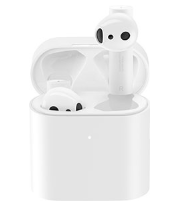 |
|
| Basic Specifications | Weight (Single Ear):4.5g |
| Weight (Total):52g | |
| Impedance:32Ω | |
| Input:5V/1A | |
| Control Type:double-tap | |
| Work Distance:10m | |
| Charging Method:Type-C, Qi wireless charging | |
| Type-C, Qi wireless charging | |
| Charging Time:1h (with Type-C cable) | |
| Battery Life (Single Charge):5h | |
| Battery Life (with Case):24h | |
| Bluetooth Version:5 | |
| Audio Codec:SBC/AAC/LHDC | |
| Package contents | 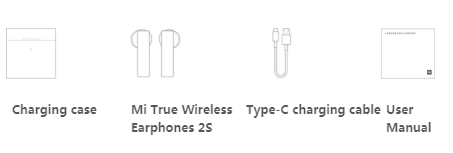 |
Product Introduction
1.Q:What faetures does Mi True Wireless Earphones 2S have?
A:1.Low latency
2.24-hour battery life:Longer single battery life compared
to previous generation
3.Wireless charging
4.Simultaneous transmission between the earphones.(Sync transmission technology is not affected by mobile chips and is compatible with both Android and iOS systems.)
2.Q:What different between Mi True Wireless Earphones 2S and Standard True Wireless Bluetooth Earphones?
A:Left and right both are main earphones.Mi True Wireless Earphones 2S Upgraded Dual-Core Chip featuring new binaural synchronous transmission technology* that delivers sound signals to both left and right earphones simultaneously, effectively reducing sound latency, while minimizing interference, and a more stable connection between left and right earphones.
3.Q:What optimization does Mi True Wireless Earphones 2S have?
A:Full hardware and software optimization,New experience with low latency.
1.LHDC Bluetooth decoding is fully optimized for MIUI systems and hardware has been deeply optimized with a new architecture. When the low-latency setting is turned on, the sound latency is greatly reduced to ensure synchronized sound, fully enhancing the audiovisual gaming experience.(The support for LHDC codec depends on the compatibility with the specific smartphone models.)
2.When the Bluetooth device is LHDC supported, the connection will turn on by default. LHDC provides a high-quality audio experience and high power consumption. Due to Bluetooth hardware limitations, lags may occur. When LHDC is turned on in a 2.4 GHz Wi-Fi network, lags may arise during playing. It is recommended to connect to a 5GHz Wi-Fi network or turn off Wi-Fi for a better LHDC experience. Low latency experience is only supported in some of the games in the Xiaomi app store.
4.Q:How long does Mi True Wireless Earphones 2S’s battery last?
A:1.Wireless charging + 24-hour battery life to keep you company all day.Thanks to the power consumption control of the new generation chip and the increased battery capacity of the case, the battery life lasts for up to 24 hours with the case and 5 hours for single earphone use. The case is compatible with Qi standard wireless charging for easy charge, making sure the earphones stay fully powered.
2.Earphone endurance data: When the earphone is fully charged, and volume is turned to 50% (smartphone), the usable time is up to 5 hours. When the earphones and charging case are fully charged, music can be played continuously for about 24 hours. Specific usable times may vary depending on the conditions of usage and the charging environment factors. Wireless charging requires that the earphone charging position is aligned with the valid position of the wireless charger, otherwise charging functionality or time may be affected.
5.Q:How to operate Mi True Wireless Earphones 2S’s shortcut keys?
A:Double-tap, simplifying the complicated.Easily operated without a phone. Simply tap the earphones to control the music, call, activate voice assistant, etc.
6.Q:What sensor does Mi True Wireless Earphones 2S built-in?
A:1.With intelligent sensing, take out to pause.The built-in infrared sensor can detect whether you're wearing the earphones in real time. It senses when you put them in, and playback will automatically pause when they’re removed. Without missing a single beat, it can effectively improve the actual use time.
2.Earphone wearing status detection does not support movie playing and automatic pause function with the third party player by taking off the earphone.
Frequently ask question
1.Q:How finish series connection of left and right earbuds?
A:The reset process includes clearing the left and right headphone series connection records and the headphone pairing with the device.
How to series connect: After the earphone is reset, the left and right earphones will be switched on at the same time (within 20 seconds), and the earphone will finish series connection automatically. After successful connection, the white indicator light of the left or right earphone will flash slowly, and the indicator light of the other earphone will be turned off. Once the left and right earphones have been connected in series, the earphone will be connected again automatically.
2.Q:Does Mi True Wireless Earphones 2S support to connect to multiple phones at the same time?
A:Not support.
3.Q:Will Mi True Wireless Earphones 2S automatically shut down if it is disconnected for a long time?
A:If you don't operate the earphone, and the earbuds disconnected for a long time,the earphone will automatically shut down after 5 minutes.
4.Q:How to use Mi True Wireless Earphones 2S to answer a second call and switch calls?
A:When the mobile phone calls, press any of the headset multi-function buttons to make a call. If there is a new call during the call, press the multi-function button to keep the previous call and make a second call. Press the multi-function button twice continuously to switch the two calls.
5.Q:How to switch between Earbuds and mobile phone with Mi True Wireless Earphones 2S during a phone call?
A:Long press any multifunction button of earphone for about 1 second to switch between earphone and phone handset in call state.
6.Q:How to turn on/off mute during a phone call with Mi True Wireless Earphones 2S?
A:During a call, press any headset multi-function button twice to turn on mute mode, and then press the multi-function button twice to turn off mute mode.
7.Q:Will Mi True Wireless Earphones 2S announce the contact name when the phone calls?
A:Mi True Wireless Earphones 2S will only ring the bell when calling, and will not broadcast the name and phone number of the caller.
8.Q:Does Mi True Wireless Earphones 2S support to connect to Mi Smart Band or other bluetooth band?
A:Not support, because both the headset and the Bluetooth band belong to the receiving terminal.
9.Q:Does the mobile phone support to display the battery of Mi True Wireless Earphones 2S?
A:Apple phones and most Android phones can display the battery level of the headphone. You can check the battery level of the headphone in the notification bar, which shows the battery level of the main headphone.
10.Q:Is Mi True Wireless Earphones 2S stable when talking, listening to music or playing games?
A:The connection is stable.If the use environment has a large number of WiFi, 4G signals, high-power appliances and other interference, there may be a stuttering, intermittent situation.
11.Q:Why is Mi True Wireless Earphones 2S still connected to the phone when the Earbuds are in the charging case?
A:The power off function cannot be activated when the headphones are put into the charging box without power. Therefore, the headphones are still connected to the mobile phone when the charging box is without power. Please pay attention to the timely charging of the charging box.
12.Q:Why does one side earphone of Mi True Wireless Earphones 2S sound less after a period of use?
A:If one side of the earphone becomes less sound, it is recommended to brush the speaker hole with a brush (as shown in the picture below), and then compare the volume of the earphone to see if it returns to normal。
Troubleshooting
1.Q:Mi True Wireless Earphones 2S can be searched on the device, but what should we do if it cannot be connected?
A:If the device can search Mi True Wireless Earphones 2S but cannot connect, it may be the device's Bluetooth data is abnormal. Try to delete the previous connection record at the device end, restart the device, and then try to connect with the device.
2.Q:How to deal with the prompts of wrong PIN code or paired password when the device is connected to the headset?
A:You can try to enter "0000". If it is still wrong, it may be the abnormal Bluetooth data on the device side. Try to delete the previous connection record on the device side, restart the device, and then try to pair the connection again.
3.Q:What if the sound is intermittent or noisy when using Mi True Wireless Earphones 2S?
A:1. It may be because the battery of the phone or earphone is low, please observe it after full charge;
2. If the distance between the mobile phone and the earphone or between the two earphones is too far or there is an object blocking the signal (such as wall), there may be a problem of intermittent sound or noise. Put the mobile phone and the earphone or the two earphones close to avoid the signal being blocked;
3, there may be signal interference in the use environment, you can try to compare this phenomenon in other use environment;
4. Reset the headset, delete the connection record of the mobile phone, restart the mobile phone and then pair it for use. If there is still discontinuous sound, replace it with other mobile phones for testing.
4.Q:How to use Mi True Wireless Earphones 2S when making phone calls or listening to music?
A:1. First, determine whether the volume of the mobile phone is adjusted too low. If the volume is normal, enter the "Bluetooth Settings" of the mobile phone to check whether the "Mobile Audio" and "Media Audio" of the connected device.
2. Reset the headset, restart the phone and then connect to see if there is sound. If it is still silent, connect to other phones for a test.
5.Q:Why doesn't Mi True Wireless Earphones 2S display the quantity of electricity or the quantity of electricity is inaccurately?
A:Not all mobile phones support the function of displaying battery level in the notification bar. If the mobile phone doesn't support this function, the battery level cannot be displayed.The electric quantity displayed on the notification bar of the mobile phone cannot be very accurate. Please refer to the headphone battery indicator light and headphone prompt tone.
6.Q:Why Mi True Wireless Earphones 2S makes sound when connected to a mobile phone, but not have sound when listening to music?
A:E
Does it help?
Yes
No