

Mi Smart Standing Fan Pro FAQ
Specification:
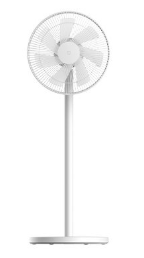
| Product model | Mi Smart Standing Fan Pro |
 |
|
| Specs | Product name:Mi Smart Standing Fan Pro |
| Product type:Standing Fan | |
| Battery capacity:2800 mAh | |
| Product net weight:3.2 kg | |
| Limited charging voltage:14V ⎓ | |
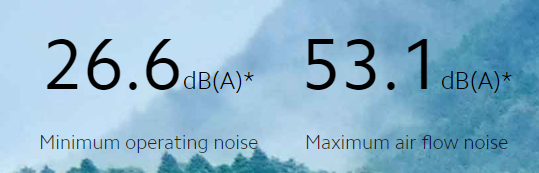
| Noise emission:≤55 dB(A) | |
| Wireless connection:Wi- Fi IEEE 802.11b/g/n 2.4GHz | |
| Accessory type:Power adapter (for charging base) | |
| Input parameter:100-240V~ 50/60Hz | |
| Power cable length:160cm | |
| Model no.:ZLBPSP01XY | |
| Battery type:Lithium-ion Battery | |
| Charging input:12V⎓2A | |
| Rated voltage:12V ⎓ | |
| Rated power:24W | |
| Dimension:950 × 343 × 330 mm | |
| Accessory identifier:BLJ24W120200P-V | |
| Output parameter:12.0V⎓2.0A |
Product Introduction
1.Q: What features does Mi Smart Standing Fan Pro have?
A: 1. Completely Wireless: Can be moved to wherever you need it.
2. Quiet Operation: Quieter than the sound of turning a page.
3. 7 Blades: Smooth and gentle air flow.
4. 140° Ventilation: Cools the whole room.
5. AI Voice Control: Turn on the fan with a voice command.
6. Natural Breeze: The algorithm perfectly simulates a natural breeze.
7. 100 Air Flow Settings: Air flow can be adjusted to suit different needs.
8. DC Motor: Saves energy.
2. Q: How to do if Mi Smart Standing Fan Pro appears power outage?
A: The built-in 33.6Wh lithium-ion battery pack and 12V low voltage design for reliable power supply will keep you cool even in the event of a sudden power outage.
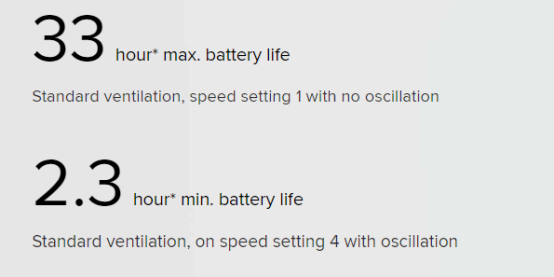
1. Maximum battery life of 33 hours: With a fully charged battery, the fan was able to operate for 33 hours in Standard Ventilation mode at speed setting 1 with no oscillation. Actual results may vary slightly due to differences in the operating environment.
2. Minimum battery life of 2.3 hours: With a fully charged battery, the fan was able to operate for 2.3 hours in Standard Ventilation mode at speed setting 4 with oscillation. Actual results may vary slightly due to differences in the operating environment.
3.Q: Does Mi Smart Standing Fan Pro support overcharge protection?
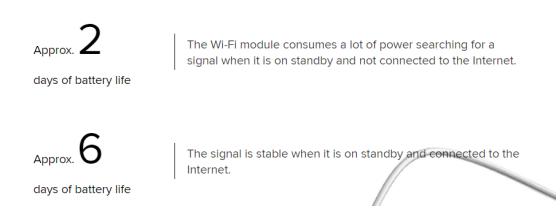
A: Keep track of the battery level Magnetic charging for greater convenience:The magnetic charging base is equipped with overcharge protection. Charging is automatically stopped once the battery is fully charged.
Note:
1. An orange light indicates when the battery level is low; a white light indicates sufficient battery level
2.. To maintain battery performance, it is recommend to keep the battery on charge when not in use.
4.Q: Why is Mi Smart Standing Fan Pro’s air flow patterns irregular?
A: For a more natural breeze, based on natural wind data collected over time, the Mi Smart Standing Fan Pro uses an algorithm to simulate the irregular speed changes of natural wind, cooling you with a relaxing and refreshing breeze.
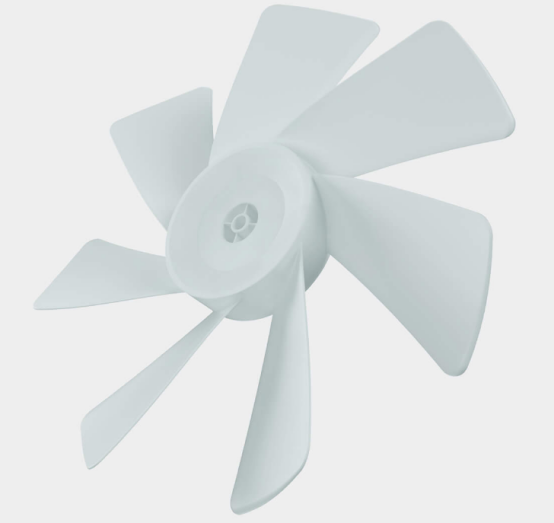
5.Q: What about Mi Smart Standing Fan Pro’s seven blades?
A: The seven wide-area blades have been custom designed for the Mi Smart Standing Fan Pro to cut through the air evenly and densely, perfectly simulating the smooth gentle flow of natural wind and giving you the comfort of a spring breeze.
6.Q: How to control Mi Smart Standing Fan Pro and how many control methods?
A: Four different control methods:
1. In addition to the traditional control buttons on top of the unit;
2. The fan supports voice control through Alexa and Google Assistant;
3. Remote control via the Mi Home/Xiaomi Home app;
4. And can be linked to Mi IoT, so you can create a cool comfortable environment on the hottest summer days.


Note:
1. Switch between natural breeze, standard ventilation and different speed settings in the Mi Home/Xiaomi Home app to adjust the air flow to meet your needs.
2. Links with other smart devices: This product can be connected with other Mi smart devices via Wi-Fi using the smart module in the Mi Home/Xiaomi Home app. See the app for actual performance. Connecting devices must be purchased separately. When connecting to non-WiFi-enabled devices, such as the Mi Temperature and Humidity Monitor, a hub is required. Direct connection is possible with WiFi-enabled devices such as the Mi Air Purifier and Mi Air Conditioner that are equipped with temperature and humidity sensors. This makes it possible to control the fan by setting temperature and humidity conditions.
3. The purpose of the image is to illustrate smart control functions, and is not an accurate depiction of the fan.
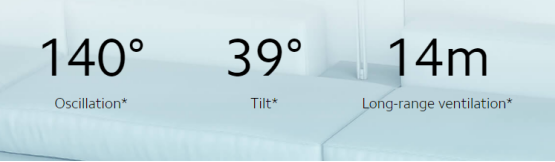
7.Q: How much wide-angle can Mi Smart Standing Fan Pro be adjusted?
A: Adjustable wide-angle 140° ventilation. Circulating cool air throughout the room. Oscillation angles of 30°, 60°, 90°, 120° and 140° can be selected in the Mi Home/Xiaomi Home app; tilt angles (23° upwards and 16° downwards) must be set manually.
Mi Home App related
1.Q: How to set Mi Smart Standing Fan Pro power on /off timer?
A: Mi Smart Standing Fan Pro supports WiFi function, after connecting to MiHomeApp, can control power on/off or timer function. Go to the Mi Home/Xiaomi Home app fan plug-in > More > Settings> Power on/off timer. Timers can be set for up to 7×24 hours.
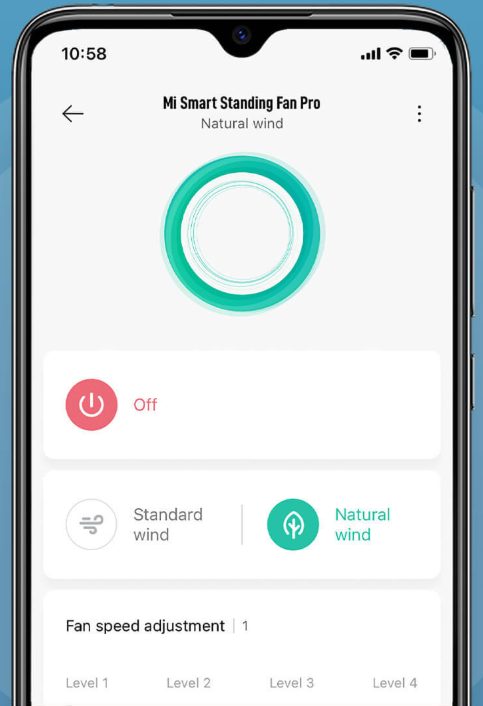
2.Q: How to switch mode of Mi Smart Standing Fan Pro?
A: Go to the Mi Home/Xiaomi Home app fan plug-in > More > Settings > Smart Scenes to switch between two modes, "Natural Wind" and "Standard Wind", and to set your own custom scenes.
Frequently asked questions and Troubleshooting
1.Q: What if the device is always offline, or WIFI cannot be connected?
A: 1. Confirm whether Mi Smart Standing Fan Pro is powered on and running normally.
2. Confirm whether WIFI is normal.
3. Check whether the fan is offline for more than half an hour. If the fan is offline for more than half an hour, please reset the Wi-Fi. Check whether the router frequency band is 2.4G, if not, adjust the router frequency band to 2.4G.
4. Please unplug the power cord and turn it on again 10 seconds later (the power needs to be discharged for a period of time). Try to reset the WiFi of Mi Smart Standing Fan Pro and reconnect.
5. Reset the fan Wi-Fi and reconnect the APP. If the connection fails, please change the network environment such as the hot spot of the phone and try again.
2.Q: Why can't Mi Home App find the device?
A: Select "Trust this APP" in the "Mobile Settings" - "App Management" - "Mi Home App". Pull down the screen of the phone to turn on the function of "Location Information". It is suggested to exit the Mi account and select the corresponding region when you log in again.
3.Q: What are the requirements of the fan connection network for the router?
A: The fan is compatible with most routers on the market; The router supports WPA and WPA2 encryption, but doesn't support WEP. DHCP must be enabled on the router, and static IP is not supported. Web authentication and enterprise oriented 802.1x network authentication are not supported.
4.Q: What about the fan blade swing?
A: 1. Check whether the fan blade knob is tightened;
2. Check whether the fan blade is deformed;
3. Remove the fan blade and rotate it 180 degrees. After installing it, try whether the lower fan blade will swing;
4. After-sale test, whether it is a performance fault.
5.Q: What if Mi Smart Standing Fan Pro doesn't turn on?
A: Press the switch button to switch machine/mode, when there is no response or alarm sound:
1. Check whether the power socket is powered;
2. Check whether the bolt of the base is loose;
3. Check whether the connection between the pillar and the base is in correct alignment;
4. After-sale test.
6.Q: Why there is no response when turning on the fan shaking head function?
A: Reenergize the fan and start the shaking function (press the button or the APP to open) to check whether the device is normal. If the physical button of the child lock is opened, it will be invalid. Please open the shaking or close the child lock in the APP. If the fan doesn't shake head, it is suggested to after-sale testing.
Does it help?
Yes
No