

Mi Smart Plug(WiFi)FAQ
1.Q: Standard accessories of Mi Smart Plug(WiFi)?
A: Appearance and packing list of Mi Smart Plug(WiFi) are as follows:
Product packing box*1, plug*1, user manual*1 (with warranty certificate)
2.Q: Parameters of Mi Smart Plug(WiFi)?
A:
| Hardware | Material | Fire Resistant PC (Fire Resistant Level V0, Flame-retardant 750°) |
| Dimensions | 90 × 52 × 73 | |
| Weight (Net) | 115 g | |
| Operation Temperature | 0 °C ~ 35 ° | |
| Rated Power | 3680 W (Max.), 50 Hz, μ | |
| Input Voltage/ Current | 220 – 240 V ~, 16 A, | |
| App& Network | WiFi Agreement& MHz | WiFi IEEE 802.11 b/g/n 2.4GHz |
| Timed Power-on/off | Support | |
| Countdown Timer | Support | |
| Support Platform | Android 4.0 above, iOS 9.0 above | |
| Management App | Xiaomi App | |
| Button& Indicator | Physical Button | Single Click (Power on/off plug 220V), Long Press (Reset WiFi) |
| Indicator | A LED light: solid yellow (starting now), flashing yellow (awaiting connection), solid blue (network connected), flashing blue (network failure or firmware upgrade), LED light out (plug off 220V or indicator off) |
3.Q: Appearance and functions of Mi Smart Plug(WiFi)
A:
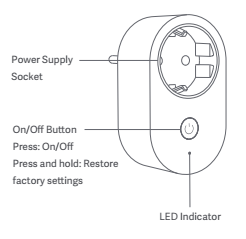
4.Q: How to connect Mi Smart Plug(WiFi)?
A: Use Mi home APP:
Install Mi home APP on the mobile phone and the phone will automatically scan for plugs that are started but not configured. Select Mi Smart Plug(WiFi) and WiFi.
After successful connection, add it to Mi home APP, then the user can manage and use Mi Smart Plug(WiFi).
5.Q: Use Instructions of Mi Smart Plug(WiFi)
A: Use instructions of Mi Smart Plug(WiFi) are as follows:
Main functions of Mi Smart Plug(WiFi) are remote control, timed power-on/off and countdown timer. APP can control the plug.
Tap the three dots on the upper right corner, and the user can upgrade the firmware.
6.Q: What appliances can use Mi Smart Plug(WiFi)?
A: The maximum load rating of Mi Smart Plug(WiFi) is3680 W, the maximum load voltage is AC 220 – 240V~ and the maximum current is 16 A. As long as an electric appliance has its load, voltage and current below the maximum ratings of the smart plug, it can be used.
7.Q: Does Mi Smart Plug(WiFi) have power failure memory?
A: After power failure and power call, Mi Smart Plug(WiFi) will not remember the state before power failure by default. Instead, smart control is adopted.
8.Q: How to restore the factory settings of Mi Smart Plug(WiFi)?
A: Press the power button on the top of the plug and hold for 5 seconds until the indicator turns yellow, it is reset successfully.
9.Q: Can the switch of Mi Smart Plug(WiFi) control a 220V socket?
A: Power button of Mi Smart Plug(WiFi) can control sockets of 220–240 V. Hit the power button and it can be controled.
10.Q: Can it be in use without Xiaomi router?
A: Mi Smart Plug(WiFi) has no restraints on brands of routers, as long as the router supports WiFi IEEE802.11b/g/n and wpa/wpa2.
11.Q: Does Mi Smart Plug(WiFi) have anti-surge function?
A: Mi Smart Plug(WiFi) has anti-surge function and it can resist a maximum surge voltage of 2KV.
Electric surge: Transient overvoltage, also known as transient pulse voltage, transient overcurrent, spike or electric surge, is a transient current and voltage fluctuation in the circuit and a violent pulse which usually lasts about one out of 1,000,000 seconds.
Does it help?
Yes
No