

MI Portable Photo Printer FAQ
Overview
1.Q:What’s ZINK?
A:Zink is zero ink, which means printing without ink.The heart of the technology is not the printer, but the paper.Zero ink printing paper is a composite structure, the overcoat is high gloss coating, the middle three layers are yellow, cyan and magenta (printing three primary colors) of the crystal image layers.
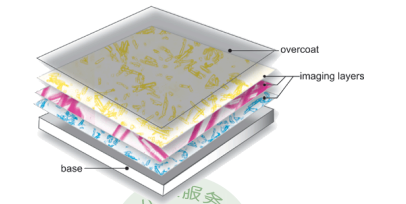
Colour generation is achieved through pulse patterns that control temperature and time from the device's print head, and the crystals become stable structures when subjected to high temperature baking, displaying specific colors, and turning into vibrant photographs and images.Zero-ink paper looks like ordinary white photo paper, until the heat activates the application layer to produce color.
2.Q:What’s DPI?
A:DPI is Dots Per Inch, a unit of measurement used in dot matrix digital images. It refers to the number of points, Per Inch, that can be sampled, displayed, or output.DPI is a unit of measurement for the resolution of printers, mice and other devices. It is one of the main parameters to measure the printing accuracy of printers. The higher the value of DPI, the higher the printing accuracy of printers.MI Portable Photo Printer's printing resolution is 313×400dpi.
Product Introduction and Use
1.Q:What are the features of Mi Portable Photo Printer?
A:MI Portable Photo Printer adopts Zink inkless printing technology, 3 inch gum back, easy to use.The shell is made of ABS fireproof material.Cooperating with Mi Home APP, it can print 15-second AR photos and leave audio photos.
2.Q:How to turn on/off Mi Portable Photo Printer?
A:Long press the power key for 2 seconds to start MI Portable Photo Printer.The printer status indicator is always on in white. The printer bluetooth automatically enters the waiting state for connection. The bluetooth indicator is always on in orange.Long press the power button for 2 seconds to turn off the printer.
3.Q:How does Mi Portable Photo Printer reset factory setting?
A:Press the power button 6 times in a row.
4.Q:How do I put the paper in?
A:Mi Portable Photo Printer can load up to 10 sheets of Photo paper +1 orange calibration card.
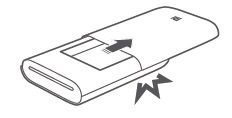
1, Open the printer carton cover and push the carton cover hard, when you hear the "click" sound, the carton cover is in place.
2.Put in the paper
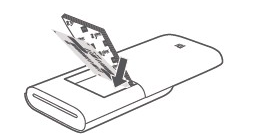
Unpack the package and put the whole package into the printer. Make sure the orange calibration card is placed at the bottom with the bar code of the calibration card facing down and the smooth surface of the paper facing up.
Note: The orange calibration card must be placed at the bottom.
3.Close the cover of the printer carton
5.Q:What’s the indicator status of Mi Portable Photo Printer?
| Electric quantity indicator | |
| White indicator flashes | Battery is low |
| White indicator normally on | In the charging |
| Put out state | Power is normal |
| Bluetooth indicator light | |
| Orange indicator normally on | Waiting for pairing |
| Blue indicator normally on | Pairing success |
| Status indicator | |
| Put out state | Turn it off |
| White indicator is normally on | Standby |
| White indicator is flashing | Printing, firmware upgrade |
| Orange indicator is flashing | Printer failure |
6.Q:Will MI Portable Photo Printer shut down automatically?
A:In order to save the power of the Printer, MI Portable Photo Printer will automatically shut down after 10 minutes.
7.Q:Does MI Portable Photo Printer get hot when working?
A:Yes. The print head needs to be heated, and the photo imaging processing is carried out through the heated print head. The heat will be conducted through the machine shell, and the heating of the printer shell is a normal working phenomenon.
8.Q:Can MI Portable Photo Printer use unofficial Photo paper?
A:MI Portable Photo Printer cannot use unofficial Photo paper.Unofficial paper can cause damage to the machine and print quality cannot be guaranteed.
9.Q:What’s AR photo?
Does it help?
Yes
No