

Mi LED Desk Lamp FAQ
1.Q:What is the requirement for connecting Mi LED Desk Lamp?
A:For connecting with Mi LED Desk Lamp, the phone need to be Android 4.0 and above or iOS 7.0 and above. At the meanwhile , the router needs to support 2.4GHz WiFi and the way of encryption is WPA/WPA2-PSK.
2.Q:What is the size of Mi LED Desk Lamp?
A:The size of the lamp is shown as below:
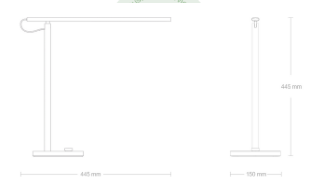
The weight is around 800g,the length of power line is 1.8m.
3.Q:What are the accessories in the package?
A:The lamp*1、Instruction*1、Adapter*1.
4.Q:Is the color of lamplight changeable?
A:No, but you can adjust the brightness and color temperature. User can control
the light via rotary knob and Mi Home APP.
5.Q:What is the power rate of Mi LED Desk Lamp?
A:The rated power is 6W and the standby power is 1.3W. The voltage is between
100-240V ~ 50/60Hz 0.2A.
6.Q:How is the lifetime of Mi LED Desk Lamp?
A:The useful life of the lamp is around 25000 hours.
7.Q:What kinds of modes does Mi LED Desk Lamp support?
A:There are Pomodoro Mode、Reading Mode 、Kids Mode and PC Mode.
8.Q:Does Mi LED Desk Lamp support to connect to multiple phones?
A:Mi LED Desk Lamp can be connected to two and above phones for its share
feature. Theoretically, there is no limit. But user can only control single lamp once.
9.Q:What is the effective connection distance between Mi LED Desk Lamp and phone?
A:For the initialization, keep the distance within 2 meters with the phone. After the
initialization success, provided that the lamp and phone are in the same network,
there is no distance restriction between the devices.
10.Q:How to reset the Mi LED Desk Lamp?
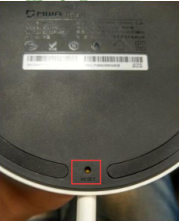
A:Long press the reset key at the bottom of the lamp for approximately 5seconds
until it flashs for 5 seconds.
11.Q:Does the Mi LED Desk Lamp support firmware update?
A:Yes. User are recommended to update to the latest firmware in “Check for updates” in settings.
12.Q:Does the Mi LED Desk Lamp support “Sleep Timer”?
A:Yes, it supports. User can set the sleep timer within the range of 1-60minutes in settings.
13.Q:Does the Mi LED Desk Lamp support scheduled power on/off?
A:Yes, it supports. User can go to the “Schedules”to set it up.
14. Q:What is Kids Mode and how to set it up?
A:Once the Kids Mode is enabled, the color temperature will be adjusted within a range of 2700K~4000K, and it cannot be adjusted beyond 4000K by APP or the knob. The Kids Mode can reduce the proportion of blue light, which will protect children’s eyesight.
15. Q:How to connect Mi LED Desk Lamp?
A:1. Plug in the lamp;
2. Log in Mi account in Mi Home APP;
3. Find the Mi LED Desk Lamp in the APP, then do as the instruction.
16.Q:How to do if it fails to search the Mi LED Desk Lamp?
A:For this condition, reset the lamp first. Besides, the lamp working fine requires
the following conditions:
1. Check the network, the phone and the lamp should connect to same WiFi network;
2. The lamp only support 2.4GHz WiFi, the way of encryption is WPA/WPA2;
3. The SSID of the WiFi cannot contain any Chinese character ;
4. The phone should be Android4.0 or above, iOS 7 or above with Wi-Fi feature;
5. If the router’s security level is high, it may possibly block the lamp connection.
Please set the level as low and reconnect the device.
17.Q:Why the initial connection is time delay?
A:: The connection of the lamp requires the phone, lamp, router and cloud server to interact with each other. The possible reasons for the connection timeout are the following:
1. The network of the device connected to has some problem;
2. The phone may do not compatible with the lamp;
3. The router is not connected to the lamp;
4. Cloud server is not exchanging data;
5. Password input is wrong.
18. Q:Does it support with the knob on the lamp?
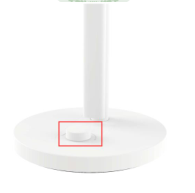
A:The only knob on the lamp can realize the following function:
1.Click the knob to switch on/off the lamp;
2.Turn the knob to adjust the brightness;
3.Turn the knob while pressing to adjust the color temperature;
4.Double click to enable Pomodoro mode.
19. Q:What is “Pomodoro mode”?
A: The Pomodoro mode is enabled; the lamp will notice the user through different
patterns of light-breathing at different phase. By using this mode, user can
concentrate during working phase and have a rest when break phase is coming.
The default setting of “Pomodoro mode”is “work for 45 mins and break for 10
mins”.So when work time is over 45 mins, a gentle breath is started to let you
know it’s time to take a break. The gentle break will last for 10 mins, after that the
light will breathe twice to notice that next round of work begins. Certainly, user can
configure his own “Pomodoro mode”.
Does it help?
Yes
No