

Xiaomi Smart Scent Diffuser FAQ
Overview
1. Q: What is the Xiaomi Smart Scent Diffuser?
A: The Xiaomi Smart Scent Diffuser is a home fragrance diffuser designed for various settings such as bedrooms, entryways, study rooms, living rooms, and bathrooms. It integrates a sensing radar and ambient light function, and connects with the Mi Home/Xiaomi Home APP. You can control fragrance intensity and diffusion time, adjust the ambiance lighting seamlessly, and enjoy a more intelligent fragrance experience. It also supports scene modes and human body sensing to create an interactive smart home experience through the Internet of Things (IoT). This product provides the freedom to control fragrance diffusion while interacting with other Xiaomi smart devices, blending technology and nature harmoniously.The selling points of the product are as follows:
1. The product features a minimalist and comfortable design with a sleek, compact body. Its classic and refined gray color fits effortlessly into any environment, making it suitable for both office and home use, enhancing the space's atmosphere;
2. It diffuses fragrance intermittently, with fine mist spreading quickly throughout the room. You can adjust the fragrance intensity with three levels, from light to strong, for an enjoyable sensory experience;
3. The product collaborates with a world-renowned fragrance company with 130 years of history, offering custom perfume-grade fragrances for a luxurious, natural fragrance experience at home;
4. It uses natural plant-based essential oils that offer a fresh, pure fragrance, filling the air with natural energy with every breath.
2. Q: What colors does the Xiaomi Smart Scent Diffuser have?
A: The Xiaomi Smart Scent Diffuser is available in gray.3. Q: What are the package contents of the Xiaomi Smart Scent Diffuser?
A: The package contents of the product include a Xiaomi Smart Scent Diffuser, a Type-C charging cable, and a User manual.4. Q: How to check the SN of the Xiaomi Smart Scent Diffuser?
A: The SN of the Xiaomi Smart Scent Diffuser can be found in two locations: the back of the product packaging (bottom-right corner) and the bottom of the Xiaomi Smart Scent Diffuser.Use Related
1. Q: How many fragrance types are available for the Xiaomi Smart Scent Diffuser?
A: For fragrance refills, there are three options available: cypress green tea, twilight earth, and summer rose lychee.2. Q: How to install the Xiaomi Smart Scent Diffuser?
A: To install the Xiaomi Smart Scent Diffuser, please refer to the following steps:1. Remove the scent liquid and unscrew the lid counterclockwise;
2. Rotate the scent diffuser clockwise to secure it with the scent liquid bottle.
Note:
Fully charge the scent diffuser before using it for the first time. Remove the silicone plug from the charging port in the scent diffuser body, plug the charging cable into the charging port and connect it to a power outlet to start charging. Place back the silicone plug once fully charged.
3. Q: What are the accessories functions of the Xiaomi Smart Scent Diffuser?
A: The top of the Xiaomi Smart Scent Diffuser features the Power Button, Ambiance Light On/Off Button, Diffusion Outlet, Indicators (I, II, III), and Ambiance Light. The side of the device has the Charging Port and Reset Button. The Sensor Area is located above the Xiaomi logo.You can refer to the image below:
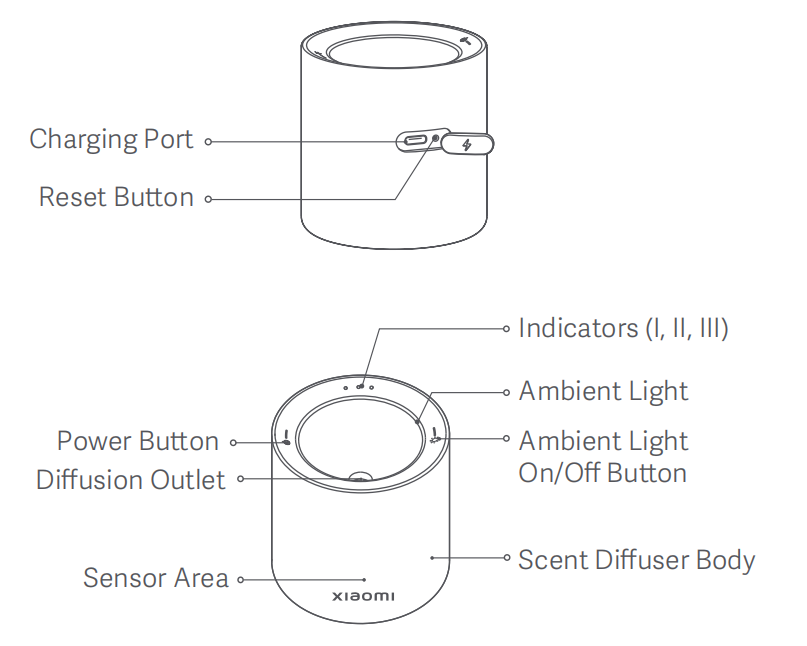
The detailed introductions are as follows:
1. Power button: Press the power button to turn on and press and hold the power button for 2 seconds to turn off. After turning it on, press the power button to cycle through level 1, level 2, level 3, and off;
2. Ambient light: Press the ambient light on/off button to turn the ambient light on/off;
3. Diffusion outlet: The location where the fragrance is emitted when the scent diffuser is in operation;
4. Indicators: The indicators I, II, III correspond to different levels of operation, showing which level the device is currently working at;
5. Charging port: Type-C charging port;
6. Reset button: The button used to reset the device and reconnect it to the network.
4. Q: What are the indicator status descriptions on the Xiaomi Smart Scent Diffuser?
A: The indicator status descriptions on the Xiaomi Smart Scent Diffuser are as follows:1. When the scent diffuser is powered on, the indicator for level 1 keeps on;
2. When the scent diffuser is powered off, indicators turn off;
3. When the scent diffuser switches between levels, the indicator for the selected level keeps on;
4. When the scent diffuser is at a low battery level, the indicator stays orange;
5. When the scent diffuser is in a depleted battery state, the indicator blinks in orange;
6. When the scent diffuser is awaiting network configuration, the ambient light blinks in orange;
7. When the scent diffuser is configuring the network, the ambient light blinks in blue;
8. When the scent diffuser has successfully configured the network, the ambient light stays blue for 3 seconds and then turns off;
9. When charging, if the battery level is lower than 33%, one indicator blinks. If the battery level is between 33% and 66%, two indicators blink. If the battery level is between 66% and 99%, three indicators blink. If the battery level is 100%, three indicators will keep in white for 20 seconds and then go off.
5. Q: How to use the Xiaomi Smart Scent Diffuser?
A: To use the Xiaomi Smart Scent Diffuser, please refer to the following instructions:1. Turing on/off and switching levels: Press the power button to turn on and press and hold the power button for 2 seconds to turn off. After turning it on, press the power button to cycle through level 1, level 2, level 3, and off;
2. Level introduction: The scent diffuser has three levels, level 1, level 2, and level 3, with diffusion intervals of 20 minutes, 15 minutes, and 10 minutes respectively, and a single diffusion duration of 2 seconds. The indicator on the scent diffuser body shows I, II, and III for levels 1 to 3 respectively;
3. Turning the ambient light on/off: Press the ambient light on/off button to turn the ambient light on/off;
4. Resetting the scent diffuser: Press and hold the reset button with a pin for more than 7 seconds. When the ambient light blinks in orange, the scent diffuser has been reset successfully.
Note:
Fully charge the scent diffuser before using it for the first time. Remove the silicone plug from the charging port in the scent diffuser body, plug the charging cable into the charging port and connect it to a power outlet to start charging. Place back the silicone plug once fully charged.
6. Q: Does the Xiaomi Smart Scent Diffuser support connecting to the Mi Home/Xiaomi Home APP?
A: The Xiaomi Smart Scent Diffuser supports connecting to the Mi Home/Xiaomi Home APP.To connect to the Mi Home/Xiaomi Home APP, please refer to the following steps:
1. Scan the QR code to download and install the APP. You will be directed to step 2 if the APP is installed already;
2. Plug in the original Type-C charging cable, use a pin to press the reset button for 7 seconds or more and the ambient light will blink in orange;
3. After turning on Bluetooth on your phone, open the Mi Home/Xiaomi Home APP, tap [+] at the upper right corner, select [Add device] and search for the Xiaomi Smart Scent Diffuser. Once found, tap the product. When the Bluetooth connection is successful, the orange light will turn blue, and the APP will display device added successfully. Follow the prompts to set the room and name, and you can control and use the device via your phone;
4. After successful device addition, you can set the scent interval, fragrance duration, and adjust the brightness and color of the ambient light in this APP.
7. Q: How to reset the Xiaomi Smart Scent Diffuser?
A: Press and hold the reset button with a pin for more than 7 seconds. When the ambient light blinks in orange, the scent diffuser has been reset successfully.Note:
If this is not the first time connecting, press the reset button once and then press and hold it for 7 seconds to reconnect.
8. Q: What is the fragrance diffusion principle of the Xiaomi Smart Scent Diffuser?
A: The Xiaomi Smart Scent Diffuser works by using a cotton stick to absorb the scent liquid and transfer it to the atomization plate's bottom. After the atomization plate activates, it atomizes the scent liquid, which is then spread into the air.9. Q: Is the scent when people approach feature for the Xiaomi Smart Scent Diffuser enabled or disabled by default?
A: The scent when people approach feature is disabled by default at the factory. To use this function, you need to enable it in the Mi Home/Xiaomi Home APP.Note:
The sensor's range is 120° in front of the scent diffuser and within 2 meters.
10. Q: Is the ambient light feature for the Xiaomi Smart Scent Diffuser enabled or disabled by default?
A: The ambient light feature is disabled by default at the factory. To use this feature, you need to enable it in the Mi Home/Xiaomi Home APP.APP Related
1. Q: What are the functions of the Xiaomi Smart Scent Diffuser on the Mi Home/Xiaomi Home APP?
A: The functions of the Xiaomi Smart Scent Diffuser on the Mi Home/Xiaomi Home APP are as follows:1. You can check the battery level of the Xiaomi Smart Scent Diffuser on the Mi Home/Xiaomi Home APP. If the device is plugged in with a charging cable, it will display charging;
2. You can control the device's power on or off;
3. You can set the fragrance interval. In level 1, the fragrance output is for 2 seconds every 20 minutes. In level 2, the fragrance output is for 2 seconds every 15 minutes. In level 3, the fragrance output is for 2 seconds every 10 minutes;
4. You can set the fragrance output duration. The number 2 represents a fragrance duration of 2 seconds. The number 3 represents a fragrance duration of 3 seconds. The number 4 represents a fragrance duration of 4 seconds, and so on;
5. You can also set the quick fragrance output.
2. Q: How to power on or off the Xiaomi Smart Scent Diffuser on the Mi Home/Xiaomi Home APP?
A: Go to the Mi Home/Xiaomi Home APP, select the Xiaomi Smart Scent Diffuser and then you can power on or off the device on this page.3. Q: How to adjust the ambient light brightness of the Xiaomi Smart Scent Diffuser on the Mi Home/Xiaomi Home APP?
A: Go to the Mi Home/Xiaomi Home APP and select the Xiaomi Smart Scent Diffuser. After powering on the device, please turn on the ambient light on this page and then you can swipe left or right to adjust the ambient light brightness.4. Q: How to adjust the ambient light color of the Xiaomi Smart Scent Diffuser on the Mi Home/Xiaomi Home APP?
A: Go to the Mi Home/Xiaomi Home APP and select the Xiaomi Smart Scent Diffuser. After powering on the device, please turn on the ambient light on this page and then you can view the ambient light color configuration. Swipe your finger to select a color and confirm, and the color of the ambient light will be successfully configured.5. Q: How to enable the scent when people approach feature of the Xiaomi Smart Scent Diffuser?
A: Add the Xiaomi Smart Scent Diffuser and connect successfully. Go to the Mi Home/Xiaomi Home APP and select the device. Tap the three-dot icon at the upper right corner of this page and select the scent when people approach feature to enable it.6. Q: How to enable the ambient sensing light function of the Xiaomi Smart Scent Diffuser?
A: Add the Xiaomi Smart Scent Diffuser and connect successfully. Go to the Mi Home/Xiaomi Home APP and select the device. Tap the three-dot icon at the upper right corner of this page and select the ambient sensing light function to enable it.FAQs
1. Q: What is the power supply method of the Xiaomi Smart Scent Diffuser?
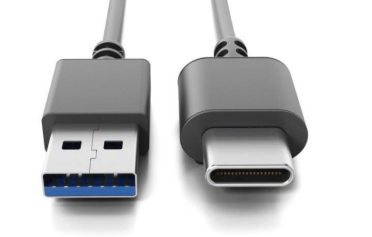
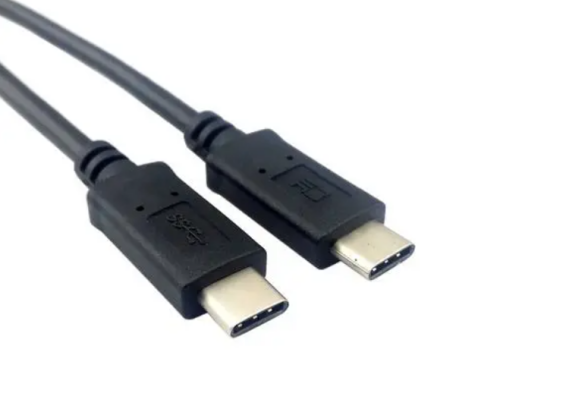
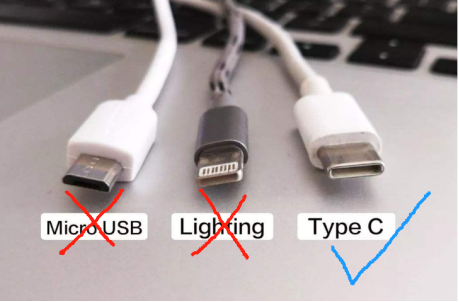
A: The Xiaomi Smart Scent Diffuser uses a rechargeable lithium-ion battery, with a Type-C charging port, and supports a 5V 0.5A adapter.The charging cable uses a Type-C connector and offers the following options:
1. USB input on one end and Type-C output on the other;
2. Type-C connectors on both ends;
3. Cables without a Type-C output are not compatible.
2. Q: How to power on or off the Xiaomi Smart Scent Diffuser?
A: Press the power button to turn on and press and hold the power button for 2 seconds to turn off. After turning it on, press the power button to cycle through level 1, level 2, level 3, and off.To turn on or off the ambient light, you can press the ambient light on/off button.
3. Q: How to clean and maintain the Xiaomi Smart Scent Diffuser?
A: To clean and maintain the Xiaomi Smart Scent Diffuser, please refer to the following steps:1. Before cleaning or maintenance, turn off the scent diffuser;
2. Gently wipe the surface of the device with a damp cloth, or use a cotton swab to gently clean the dust;
3. Restart the device to resume normal use.
Note:
Do not lay the device flat or tilt it when it contains scent liquid, as this can cause leakage.
4. Q: Does the Xiaomi Smart Scent Diffuser support inverted installation?
A: The Xiaomi Smart Scent Diffuser does not support inverted installation. Please avoid laying the device flat or tilting it, as this can cause scent liquid to leak.5. Q: Can the scent liquid of the Xiaomi Smart Scent Diffuser be replaced?
A: The scent liquid can be replaced. However, self-refilling is not supported. It is recommended to use the compatible scent liquid sold through official Xiaomi channels. Using non-official scent liquids can lead to device malfunctions, which are not covered under warranty.6. Q: Why does the ambient light color of the Xiaomi Smart Scent Diffuser vary?
A: The ambient light effects of the Xiaomi Smart Scent Diffuser can vary slightly with different colors. This is a normal phenomenon.7. Q: What is the shelf life of the scent liquid for the Xiaomi Smart Scent Diffuser?
A: The shelf life of the scent liquid is three years. You can check the expiry date on the bottle and at the bottom of the scent liquid’s packaging box.8. Q: What are the precautions when using the Xiaomi Smart Scent Diffuser?
A: The precautions when using the Xiaomi Smart Scent Diffuser are as follows:1. When the Xiaomi Smart Scent Diffuser is in operation, avoid splashing water or other liquids onto it, and do not approach the diffusion outlet directly. Avoid direct inhalation or ingestion of the scent liquid;
2. If any allergic reactions occur, stop using the product immediately and seek medical advice if necessary;
3. Keep the scent diffuser and scent liquid out of reach of children. If the scent liquid gets into the eyes, rinse immediately with water;
4. If you are sensitive to fragrances, please use with caution;
5. The scent liquid is designed only for air freshening purposes and should not be used for other applications;
6. The scent liquid is not for ingestion and should not be applied directly to the skin. If accidentally ingested, seek medical attention promptly.
Troubleshooting
1. Q: Why can’t the Xiaomi Smart Scent Diffuser connect to the network?
A: Press and hold the reset button with a pin for more than 7 seconds. After resetting, try reconnecting to the network.2. Q: Why can’t the Xiaomi Smart Scent Diffuser power on?
A: To resolve this issue, please refer to the following methods:1. Press the power button to turn on and press and hold the power button for 2 seconds to turn off. After turning it on, press the power button to cycle through level 1, level 2, level 3, and off;
2. If the battery is depleted, remove the silicone plug from the charging port in the scent diffuser body, plug the charging cable into the charging port and connect it to a power outlet to start charging. Place back the silicone plug once fully charged;
3. If the device’s surface is dirty, clean it and try turning it on again.
3. Q: Why is the indicator of the Xiaomi Smart Scent Diffuser blinking in orange?
A: When the indicator on the Xiaomi Smart Scent Diffuser blinks in orange, the device's battery is low and needs to be charged.4. Q: Why isn’t the Xiaomi Smart Scent Diffuser releasing scent?
A: To resolve this issue, please refer to the following methods:1. The scent liquid can be empty. Replace the scent liquid;
2. If the battery is depleted, remove the silicone plug from the charging port in the scent diffuser body, plug the charging cable into the charging port and connect it to a power outlet to start charging. Place back the silicone plug once fully charged;
3. Ensure the liquid bottle is correctly installed by removing and reinstalling it, then tightening it;
4. Check if there is dust on the atomizer surface. If so, gently clean it with a cotton swab, then reinstall the liquid bottle and restart the device.
5. Q: Why isn’t the ambient light of the Xiaomi Smart Scent Diffuser turning on?
A: To resolve this issue, please refer to the following methods:1. The ambient light can not be correctly activated. You can press the ambient light on/off button to turn the ambient light on;
2. If the battery is depleted, remove the silicone plug from the charging port in the scent diffuser body, plug the charging cable into the charging port and connect it to a power outlet to start charging. Place back the silicone plug once fully charged.
Does it help?
Yes
No