

How to turn on/off dial pad tones on the Xiaomi 14T?
Turning on or off dial pad tones on the Xiaomi 14T allows for personalized control over sound feedback when dialing numbers. Activating tones can provide audible confirmation of presses, enhancing your using experience, while turning them off can create a quieter environment, preventing compromising your surroundings or attracting unwanted attention.
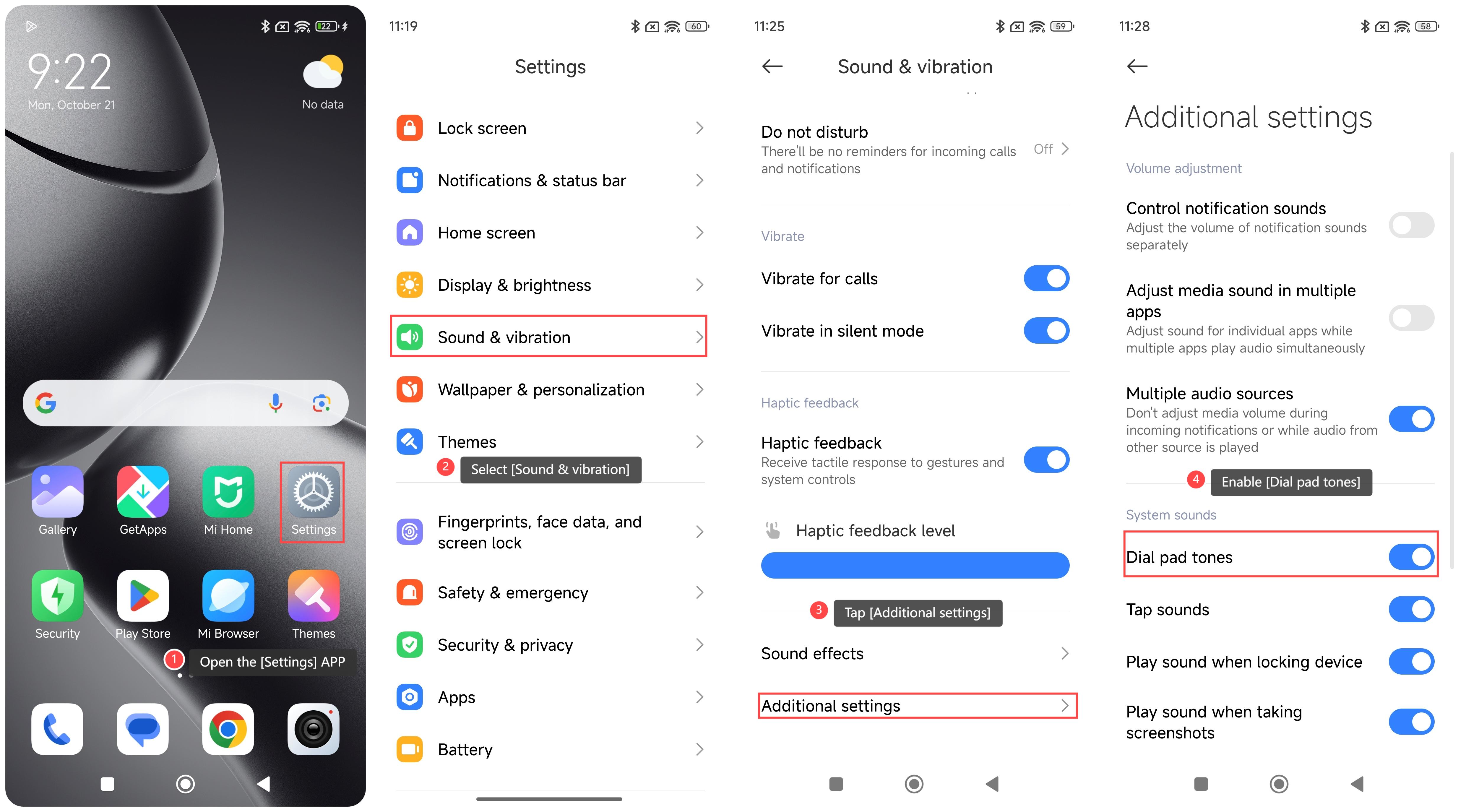
To turn on/off dial pad tones on the phone, please refer to the following steps:
1. Open the [Settings] APP on your phone;
2. Select [Sound & vibration];
3. Tap [Additional settings];
4. Enable [Dial pad tones]. Once enabled, your phone will make sounds when dialing.
Note:
It's advisable to keep dial pad tones disabled in quiet environments, such as meetings or libraries, to avoid causing distractions.
To turn on/off dial pad tones on the phone, please refer to the following steps:
1. Open the [Settings] APP on your phone;
2. Select [Sound & vibration];
3. Tap [Additional settings];
4. Enable [Dial pad tones]. Once enabled, your phone will make sounds when dialing.
Note:
It's advisable to keep dial pad tones disabled in quiet environments, such as meetings or libraries, to avoid causing distractions.
Does it help?
Yes
No