

POCO F1 FAQ
Overview
1. Q: What are the features of POCO F1 ?
A: POCO F1 is a flagship phone that integrates exquisite body technology, powerful computing performance, and excellent camera quality.
The body of phone adopts four-curved glass + water drop arc design, which feels round and thin; 6.21-inch 18.7:9 wide color gamut screen, 86.68% ultra-high screen-to-body ratio, making POCO F1 only the size of a traditional 5.5-inch mobile phone; using Qualcomm The annual flagship Snapdragon 845 processor, 10nm process technology, the single-core main frequency reaches an astonishing 2.8GHz, and the running score can reach as high as 30w; the artificial intelligence-powered AI scene camera, AI studio light effect, and Sony IMX363 with 1.4μm super large pixels The high-end camera and Dual PD dual-core ultra-fast focusing technology can easily take large-scale effects and studio-level photos; in addition , the blessing of technologies such as infrared AI face unlock , dual-frequency dual-channel positioning system, and full-featured NFC represent the eight-year product of Xiaomi mobile phones Precipitation and exploration of the road to innovation.
2. Q: POCO F1 basic hardware parameter information?
A: POCO F1 hardware parameter information is as follows:
Appearance process
1. Q: What are the characteristics of POCO F1 's body of phone design, and what materials are used?
A: The body of POCO F1 uses four-curved glass, which shines like gems when light and shadow flow; the body uses 7-series aluminum middle frame, which ensures the strength close to that of stainless steel, and at the same time has the lightness of aluminum. Arc closing design + perfect R-angle arc, creating a round, light and comfortable feel.
Note 1: The lens protection glass is made of sapphire glass.
Note 2: The rear cover glass is made of Corning Gorilla 5.
2. Q: Why does POCO F1 use a special-shaped screen solution?
A:
In order to meet users' needs for a wider screen field of view and further expand the space of the display area, we use the same special-shaped full-screen solution as iPhoneX. While further increasing the screen- to-body ratio, it can also control the size of the body very well. In addition, the option of "hide screen notch" is also provided in Settings. After hiding the notch area, the display ratio will return to 18:9. At the same time, the notch area will display power, signal, time and other information with a pure black background, which is integrated with the frame .
Setting path : Settings>>full screen>>hide screen bangs
3. Q: Why is there no notch area in the screenshot of POCO F1 ?
A : In order to ensure image consistency and aesthetics, the system will automatically complete the notch area and the rounded corners of the screen after taking a screenshot. At present, all mobile phones with special-shaped full screens in the industry use the same automatic completion design.
4. Q: What's in the notch area of POCO F1 ?
A: POCO F1 integrates the front camera, distance/light sensor, earpiece, infrared lighting element, and infrared camera in the notch area.
5. Q: The rear camera of POCO F1 adopts the same arrangement as iPhone X, what are the benefits?
A: The POCO F1 rear camera adopts a wide angle + telephoto dual-camera solution. For better structural design and appearance, POCO F1 adopts a vertical appearance design, and the flash is placed between the two cameras.
6. Q: Does POCO F1 have touch buttons?
A: POCO F1 does not have touch buttons, and uses a virtual button solution; it also supports full-screen gesture operations, Setting path : Settings >> System navigation >> Buttons/Gestures
7. Q: What color is the LED breathing light of POCO F1 , can it be changed in the settings?
A: In order to ensure a more concise design and user experience, the LED breathing light of POCO F1 is only white and has no other colors. In the settings, you can choose to turn on or off the "breathing light is always on when charging" and "breathing light flashes when receiving notifications".
Setting path : Settings >> Additional settings >> Breathing light .
8. Q: What specification headphone jack does POCO F1 use? What headset devices can I use?
A: POCO F1 uses the Type-C interface, which makes the body structure more effectively optimized, the appearance is more concise and unified, and supports the mainstream Type-C earphones on the market; in addition, a Type-C will be included when purchasing the product TO The AUDIO adapter cable can use 3.5mm headphone equipment through the adapter cable.
Note: via Type-C To After the Audio is converted to a 3.5mm headphone jack, it can be compatible with mainstream American or national standard headphones on the market; if you use Apple or Apple standard 3.5mm headphones, there may be an incompatibility phenomenon that the wire control cannot be used normally, but the headphones can be used normally.
9. Q: What are the features of the fingerprint sensor of POCO F1 ?
A: POCO F1 uses a push-type fingerprint sensor module, which can be used to unlock the phone screen, view private files, enter private photo albums, etc. It is convenient and easy to use, and can save up to 5 fingerprint information .
10. Q: Does POCO F1 fingerprint unlock need to wake up the screen?
A: The fingerprint sensor module of POCO F1 is on the back of the body of phone. When the screen is off, press the fingerprint to wake up the screen and directly unlock and enter the system.
11. Q: What are the features of POCO F1 's AI face unlock ?
A: POCO F1 's AI face unlock uses AI artificial intelligence to use face detection, pose estimation, quality assessment, feature extraction, face comparison and other technologies, and cooperates with infrared cameras to detect living bodies and improve facial recognition accuracy in dark light environments. Perform high-precision intelligent matching, realize fast and safe AI face unlock , greatly improve the security of AI face unlock , and can fully prevent photo attacks and video attacks.
12. Q: Does POCO F1 's AI face unlock need to wake up the screen?
A: The AI face unlock of POCO F1 needs to be used after waking up the screen. It can be used together with the lift-to-wake function to achieve a smooth experience of unlocking the phone when it is lifted : Settings >> Display- Raise to wake .
13. Q: Does POCO F1 support self-replacement of the back cover?
A: The back cover and battery of POCO F1 do not support self-removal and replacement.
14. Q: Does POCO F1 support water resistant?
A: POCO F1 does not support water resistant.
Camera related
1. Q: How does the POCO F1 rear camera take pictures?
A: The POCO F1 rear camera uses a super-sensing AI dual-camera. The main camera uses Sony IMX363 high-end photosensitive elements, Dual PD dual-core focusing and 1.4μm super large pixels. Not only fast focusing speed in dark light environments, but also large pixels can get more The amount of incoming light; professional Portrait mode with AI dynamic spot, dream blur, and hardware-level multi-frame noise reduction and four-axis optical image stabilization, whether it is shooting objects or portraits, can be easily achieved through POCO F1 ; more AI Smart scene camera, supports up to 206 kinds of scene intelligent recognition and real-time optimization, taking pictures of beautiful scenery and people is more beautiful, so that each photo can be taken with a large style.
2. Q: What is the selfie effect of the front camera of POCO F1 ?
A: The POCO F1's front-facing 20-megapixel camera uses Samsung's high-end sensor, which automatically synthesizes 1.8μm super-large pixels with four-in-one pixels in dark light. With automatic HDR, the skin is still bright when taking selfies in dark light and backlight; built-in AI Portrait mode, which recognizes appearance through artificial intelligence With the features of hair accessories, it can accurately cut out images, distinguish portraits, and achieve more natural background blur. It also adds AI smart scene function to the front camera, which can intelligently identify 12 selfie scenes to separate and beautify people and scenes, and easily take pictures of "healing system". "Selfie.
Note 1: The 12 types of selfie scenes include blue sky, sunrise, sunset, seaside, cherry blossoms, rape blossoms, lavender, green plants, night scenes, maple leaves, autumn colors, and snow scenes.
3. Q: What is an AI smart scene, and which scenes are supported?
A: Through artificial intelligence depth algorithm and learning, the camera can support a variety of application scenarios in real time. According to the different shooting content, the camera parameters are automatically adjusted by artificial intelligence and matched with the optimization scheme, so that the picture has layers, the main body highlights details, and the color tone is more vivid. nice. In the future, it will continue to optimize and support more scenarios.
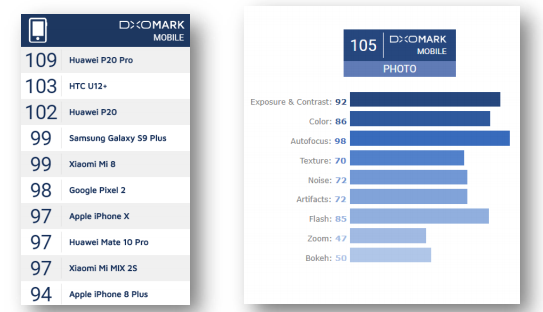
4. Q: Why do some users claim that the score they see on the DxOMARK official website is not 105?
A: The score on the home page of the DxOMARK website is the comprehensive camera score of 99 (pictured on the left). The comprehensive score refers to the score of the comprehensive evaluation of multiple standards such as taking pictures and videos of mobile phone cameras, not the score of taking photos. After clicking on the details of POCO F1 , you can see the specific photo score, which is 105 points (right picture).
Hardware related
1. Q: What processor does POCO F1 use, and what is its performance?
A: POCO F1 uses Qualcomm's new generation of Snapdragon 845 processor equipped with an artificial intelligence engine to dynamically allocate AI computing tasks; compared with the previous generation, the AI performance is improved by 3 times, the highest frequency can reach 2.8GHz, and the 10nm process technology.The chip size is smaller, but also integrates more functions. Kryo architecture, LPDDR4x memory, UFS high-speed flash memory, and a new generation of Adreno630 graphics processor make POCO F1 faster than imagined.
2. Q: What screen ratio does POCO F1 use?
A: In order to obtain a wider screen view and make the proportion of the whole machine more coordinated, POCO F1 adopts a special-shaped screen with a ratio of 18.7:9 (resolution 2248*1080), and the screen ratio is as high as 86.68%. Special-shaped screens are the current industry development trend, and most apps on the market are adapting as soon as possible. For applications that can automatically identify the screen size and resolution information of the mobile phone, it will be able to take advantage of the 18.7:9 screen to display more content; for applications that do not support the full screen ratio, MIUI will automatically adjust the screen display range. A small number of software or videos may not be able to be full-screen. The software interface that cannot be full-screen will leave black at both ends of the phone (in landscape, the two ends of the landscape), but it does not affect the look and feel.
Note: If the app that the user currently uses frequently has abnormal display or screen ratio imbalance, etc., it is recommended that the user select the corresponding application name in Home screen>>Tools>>Services and feedback, module selection More>>Third-party applications>>Select the corresponding application name , Module Selection Screen >> Miscellaneous, and record the detail,and we will contact the App developer as soon as possible for an adaptation update.
3. Q: What is an AMOLED screen? What are the characteristics?
A: AMOLED is Active Matrix/Organic light Emitting Diode, that is, "active matrix organic light-emitting diode panel". Known as the next-generation display technology, AMOLED is capable of stunningly high contrast and high resolution, and is currently the premier display in the industry. In addition, because AMOLED does not have a backlight component, but each pixel emits light by itself, so the display becomes thinner, so as to further control the thickness of the body, creating a thin and round body feel.
Note 1: If you watch the AMOLED display from an oblique angle, you may occasionally notice a slight change in the color of the screen image, which is a characteristic of AMOLED and is a normal phenomenon.
Note 2: When the screen is displayed at a low brightness, you may see water ripples that are difficult to detect with the naked eye when viewing the screen with the camera of other mobile phones. This is the characteristic of AMOLED. It is a normal phenomenon that the screen brightness will be controlled by controlling the screen pulse power supply in low and medium brightness.
4. Q: Will the AMOLED screen used in POCO F1 suffer from screen burn-in and afterimages?
A: During long-term use, due to the display characteristics of AMOLED, slight visual changes may appear, including "image persistence" or "aging", which is a normal phenomenon. This phenomenon refers to the display showing a faint residual image even after switching to a new image on the screen; it may also occur in more extreme cases, such as when the same high-contrast image is displayed continuously for a long time Phenomenon. This is a screen effect, not really damaged or aged.
Note: In order to reduce the "image persistence" or "aging" effect of OLED, we have added a number of optimization measures to the settings of POCO F1 , including screen brightness adjustment optimization, screen-off display optimization, AI power saving optimization, etc. You can also further reduce "image persistence" or "burn-in" effects by reducing the screen lock time, occasionally adjusting the desktop icon layout, and automatically switching wallpapers.
5. Q: Does POCO F1 support HDR display?
A: The POCO F1 screen supports HDR display, which will provide a more vivid and better picture display effect when playing HDR resources.
Note: POCO F1 supports HDR display of HDR10 resources. At present, many mainstream video and media resources have video resources using this standard.
6. Q: What is the maximum screen brightness of POCO F1 ?
A: In order to protect daily eye health, POCO F1 manually adjusts the brightness up to 430nit (standard value); when the phone is viewed under strong light, it will automatically detect the ambient brightness and adjust it up to 600nit.
7. Q: Does the POCO F1 screen support Sunlight display, Night mode , Reading Mode , Color temperature adjustment?
A: The POCO F1 screen supports sunlight screen, Night mode , Reading Mode and Color temperature adjustment .
8. Q: Does POCO F1 support AOD?
A: POCO F1 supports off-screen display : Settings >> Display >>AOD , after enabling it, when the phone is locked, the current time, date and other information will be displayed on the screen for easy viewing.
Note: In order to further optimize to reduce the possible "image persistence" or "burn-in" effect, the picture with the screen off will move up and down slightly every minute, and the brightness will also change with the ambient light intensity.
9. Q: Does POCO F1 support dual card dual standby?
A: POCO F1 supports Dual SIM Dual Standby (single pass), the dual card does not distinguish between the primary and secondary cards.
10. Q: Which network standards and frequency bands does POCO F1 support?
A: The specific support of POCO F1 data network is as follows:
11. Q: Which 4G+ network does POCO F1 support?
A: POCO F1 supports 4G+ networks with in-band carrier aggregation and inter-band carrier aggregation.
12. Q: Does POCO F1 support carrier aggregation and high-order modulation technology?
A: POCO F1 supports two technologies: carrier aggregation and high-order modulation; carrier aggregation technology can effectively improve network utilization and increase the bandwidth of network data transmission; high-order modulation technology can effectively increase data bit width and increase the unit of data transmission capacity.
13. Q: Does POCO F1 support VoLTE?
A: POCO F1 supports VoLTE (high-definition voice and video calls);
The call quality is better; the SIM card operator and mobile phone support are required, and the area has VoLTE network signal coverage.
14. Q: What kind of SIM card can POCO F1 use? Does it support external SD card?
A: POCO F1 supports nano+nano , but does not support external SD card expansion.
Note: It is not recommended to cut the card by yourself , which may cause damage to the card holder, unrecognized card or inability to remove the SIM card, etc.
15. Q: What is the battery capacity of POCO F1 and how is it used?
A: The battery capacity of POCO F1 is 3300mAh(min)/3400mAh(typ); laboratory test results: it can watch videos continuously for 18 hours when fully charged, and can stand by for 10 days when fully charged.
*The actual situation may vary with usage scenarios and software versions.
16. Q: What kind of data interface does POCO F1 use?
A: POCO F1 adopts Type-C interface, and the data transmission standard is USB2.0.
17. Q: Does POCO F1 support fast charging, and what standard is the adapter?
A: The POCO F1 mobile phone is compatible with Quickcharge4.0 fast charging technology and USB Power Delivery (USBPD) fast charging protocol; the standard power adapter supports QuickCharge3.0, and the standard adapter output standards are 5V3A, 9V2A, 12V1.5A.
18. Q: Does POCO F1 support OTG function?
A: POCO F1 supports OTG function, you need to purchase OTG cable with Type-C interface for use; if you use Micro OTG line of the USB interface, and then match the Micro If the USB to Type-C adapter is connected to the mobile phone, it will not be recognized.
19. Q: Does POCO F1 support NFC (Near Field Communication) function?
A: POCO F1 supports card reading, writing and card simulation mode of NFC function. Through NFC function, bus and subway can be swiped. After Mi Pay is activated, the mobile phone can also simulate bank card use.
20. Q: Does POCO F1 support 5GHz band WiFi?
A: POCO F1 supports 2.4GHz (802.11b/g/n) and 5GHz (802.11a/n/ac) WiFi, and the theoretical maximum transmission rate is 866Mbps (requires router support).
21. Q: What is MU-MIMO, does POCO F1 support MU - MIMO?
A: MU-MIMO (Multi-User Multiple-Input Multiple-Output) means multiple users with multiple inputs and multiple outputs. This is the most advanced WiFi protocol at present. From the perspective of mobile phones/tablets and other devices, supporting MU-MIMO technology will improve bandwidth utilization and solve the problem of multiple devices in the same The problem of the transmission rate drop caused by the network environment. POCO F1 supports this technology.
*This function requires router support
22. Q: What is the Bluetooth version of POCO F1 ? Does it support Bluetooth HID?
A: The Bluetooth version used by POCO F1 is 5.0; it supports Bluetooth HID, and can connect external devices such as Bluetooth mouse and Bluetooth keyboard.
23. Q: Does POCO F1 support FM (radio) function?
A: POCO F1 does not support FM (radio) function.
24. Q: Which sensors does POCO F1 support?
A: The sensors supported by POCO F1 are: gyroscope (angular velocity sensor), gravity sensor (acceleration sensor), electronic compass (magnetic field sensor), light sensor, distance sensor, Hall sensor (to realize smart clamshell), air pressure sensor .
25. Q: Does POCO F1 support infrared remote control?
A: POCO F1 does not support infrared remote control.
26. Q: What satellite positioning system does POCO F1 support?
A: POCO F1 supports the US GPS positioning system, the Russian Glonass positioning system, the EU Galileo positioning system, the Chinese Compass positioning system (Beidou satellite navigation system), and the Japanese QZSS positioning system. Faster and more accurate.
27. Q: What accessories does POCO F1 come standard with?
A: POCO F1 standard accessories include: mobile phone host, TPU translucent protective case, power adapter, USB Type-C data cable, Type-C To Audio adapter cable, SIM Eject Tool , Quick Start Guide , Warranty Card
System related
1. Q: Which version of MIUI is the built-in system of POCO F1 , and which version of Android is customized based on it?
A: The first batch of POCO F1 is equipped with MIUI9 stable version system, which is deeply customized based on Android8.1.
2. Q: Does POCO F1 have voice assistant?
A:POCO F1 has Google voice assistant.
3.Q:Does POCO F1 support split screen mode?
A:POCO F1 supports split screen mode.
4.Q:Does POCO F1 support full-screen gestures?
A: POCO F1 supports full-screen gestures, which you can select directly at the first boot or in the full-screen options set by the system after entering the system.
5.Q: Does POCO F1 support one-handed mode?
A: POCO F1 supports one hand mode, open method: Settings >> Additional settings >> One-handed mode, you can choose to use different sizes.
6.Q: Does POCO F1 support double click to wake up?
A: POCO F1 supports double click on the screen to wake up (the system is turned off by default), which needs to be turned on manually.
Open Double tap screen to wake setting path: system settings >> Lock screen >> Double tap screen to wake.
7.Q:How does POCO F1 perform hardware detection?
A: There are two ways of hardware detection for POCO F1:
Method 1: enter "*#*#64663#*#*" in the dial interface, or enter "*#*#6484#*#*".
Mode 2: in the Setting>>About phone>>All specs, click "kernel version" four times.
8.Q:Does POCO F1 have Bootloader lock?
A: In order to improve the security of user data, ensure the reliability of phone search function, and prevent scalpers from batch swiping third-party ROM, which may lead to user information leakage or other system problems, POCO F1 has added Bootloader lock.
9.Q:Does POCO F1 support the Recovery mode to empty data?
A: POCO F1 supports the Recovery mode to clear all data.Enter the Recovery mode: in the shutdown state, hold down the volume + power button, and release the power button until entering the Recovery mode after Mi Logo appears on the screen.
1. Q: What are the features of POCO F1 ?
A: POCO F1 is a flagship phone that integrates exquisite body technology, powerful computing performance, and excellent camera quality.
The body of phone adopts four-curved glass + water drop arc design, which feels round and thin; 6.21-inch 18.7:9 wide color gamut screen, 86.68% ultra-high screen-to-body ratio, making POCO F1 only the size of a traditional 5.5-inch mobile phone; using Qualcomm The annual flagship Snapdragon 845 processor, 10nm process technology, the single-core main frequency reaches an astonishing 2.8GHz, and the running score can reach as high as 30w; the artificial intelligence-powered AI scene camera, AI studio light effect, and Sony IMX363 with 1.4μm super large pixels The high-end camera and Dual PD dual-core ultra-fast focusing technology can easily take large-scale effects and studio-level photos; in addition , the blessing of technologies such as infrared AI face unlock , dual-frequency dual-channel positioning system, and full-featured NFC represent the eight-year product of Xiaomi mobile phones Precipitation and exploration of the road to innovation.
2. Q: POCO F1 basic hardware parameter information?
A: POCO F1 hardware parameter information is as follows:
| model | POCO F1 |
| size | 154.9mm*74.8mm*7.6mm |
| weight | About 175g |
| SoC model | Qualcomm® Snapdragon™ 845 |
| Number of CPU cores | 8 cores |
| CPU frequency | Up to 2.8GHz |
| core architecture | Qualcomm® Kryo™ 385 |
| graphics processor | Qualcomm® Adreno™ 630 |
| RAM | 6GB-LPDDR4X |
| ROM | 64GB/128GB/256GB-UFS |
| Screen | 6.21 inches (18.7:9) |
| screen type | 2.5D+AMOLED |
| resolution | 2248*1080 |
| Dual SIM 4G | support |
| 4G+ | Three carrier aggregation (Cat 12) |
| VoLTE | support |
| fingerprint sensor | support |
| camera | Rear 12 million pixels + 12 million pixels , front 20 million pixels |
| Battery | POCO F1 : 3300/3400mAh (min/typ) lithium-ion polymer battery |
| The first batch of factory systems | MIUI 9 (based on Android 8.1) |
Appearance process
1. Q: What are the characteristics of POCO F1 's body of phone design, and what materials are used?
A: The body of POCO F1 uses four-curved glass, which shines like gems when light and shadow flow; the body uses 7-series aluminum middle frame, which ensures the strength close to that of stainless steel, and at the same time has the lightness of aluminum. Arc closing design + perfect R-angle arc, creating a round, light and comfortable feel.
Note 1: The lens protection glass is made of sapphire glass.
Note 2: The rear cover glass is made of Corning Gorilla 5.
2. Q: Why does POCO F1 use a special-shaped screen solution?
A:
In order to meet users' needs for a wider screen field of view and further expand the space of the display area, we use the same special-shaped full-screen solution as iPhoneX. While further increasing the screen- to-body ratio, it can also control the size of the body very well. In addition, the option of "hide screen notch" is also provided in Settings. After hiding the notch area, the display ratio will return to 18:9. At the same time, the notch area will display power, signal, time and other information with a pure black background, which is integrated with the frame .
Setting path : Settings>>full screen>>hide screen bangs
3. Q: Why is there no notch area in the screenshot of POCO F1 ?
A : In order to ensure image consistency and aesthetics, the system will automatically complete the notch area and the rounded corners of the screen after taking a screenshot. At present, all mobile phones with special-shaped full screens in the industry use the same automatic completion design.
4. Q: What's in the notch area of POCO F1 ?
A: POCO F1 integrates the front camera, distance/light sensor, earpiece, infrared lighting element, and infrared camera in the notch area.
5. Q: The rear camera of POCO F1 adopts the same arrangement as iPhone X, what are the benefits?
A: The POCO F1 rear camera adopts a wide angle + telephoto dual-camera solution. For better structural design and appearance, POCO F1 adopts a vertical appearance design, and the flash is placed between the two cameras.
6. Q: Does POCO F1 have touch buttons?
A: POCO F1 does not have touch buttons, and uses a virtual button solution; it also supports full-screen gesture operations, Setting path : Settings >> System navigation >> Buttons/Gestures
7. Q: What color is the LED breathing light of POCO F1 , can it be changed in the settings?
A: In order to ensure a more concise design and user experience, the LED breathing light of POCO F1 is only white and has no other colors. In the settings, you can choose to turn on or off the "breathing light is always on when charging" and "breathing light flashes when receiving notifications".
Setting path : Settings >> Additional settings >> Breathing light .
8. Q: What specification headphone jack does POCO F1 use? What headset devices can I use?
A: POCO F1 uses the Type-C interface, which makes the body structure more effectively optimized, the appearance is more concise and unified, and supports the mainstream Type-C earphones on the market; in addition, a Type-C will be included when purchasing the product TO The AUDIO adapter cable can use 3.5mm headphone equipment through the adapter cable.
Note: via Type-C To After the Audio is converted to a 3.5mm headphone jack, it can be compatible with mainstream American or national standard headphones on the market; if you use Apple or Apple standard 3.5mm headphones, there may be an incompatibility phenomenon that the wire control cannot be used normally, but the headphones can be used normally.
9. Q: What are the features of the fingerprint sensor of POCO F1 ?
A: POCO F1 uses a push-type fingerprint sensor module, which can be used to unlock the phone screen, view private files, enter private photo albums, etc. It is convenient and easy to use, and can save up to 5 fingerprint information .
10. Q: Does POCO F1 fingerprint unlock need to wake up the screen?
A: The fingerprint sensor module of POCO F1 is on the back of the body of phone. When the screen is off, press the fingerprint to wake up the screen and directly unlock and enter the system.
11. Q: What are the features of POCO F1 's AI face unlock ?
A: POCO F1 's AI face unlock uses AI artificial intelligence to use face detection, pose estimation, quality assessment, feature extraction, face comparison and other technologies, and cooperates with infrared cameras to detect living bodies and improve facial recognition accuracy in dark light environments. Perform high-precision intelligent matching, realize fast and safe AI face unlock , greatly improve the security of AI face unlock , and can fully prevent photo attacks and video attacks.
12. Q: Does POCO F1 's AI face unlock need to wake up the screen?
A: The AI face unlock of POCO F1 needs to be used after waking up the screen. It can be used together with the lift-to-wake function to achieve a smooth experience of unlocking the phone when it is lifted : Settings >> Display- Raise to wake .
13. Q: Does POCO F1 support self-replacement of the back cover?
A: The back cover and battery of POCO F1 do not support self-removal and replacement.
14. Q: Does POCO F1 support water resistant?
A: POCO F1 does not support water resistant.
Camera related
1. Q: How does the POCO F1 rear camera take pictures?
A: The POCO F1 rear camera uses a super-sensing AI dual-camera. The main camera uses Sony IMX363 high-end photosensitive elements, Dual PD dual-core focusing and 1.4μm super large pixels. Not only fast focusing speed in dark light environments, but also large pixels can get more The amount of incoming light; professional Portrait mode with AI dynamic spot, dream blur, and hardware-level multi-frame noise reduction and four-axis optical image stabilization, whether it is shooting objects or portraits, can be easily achieved through POCO F1 ; more AI Smart scene camera, supports up to 206 kinds of scene intelligent recognition and real-time optimization, taking pictures of beautiful scenery and people is more beautiful, so that each photo can be taken with a large style.
2. Q: What is the selfie effect of the front camera of POCO F1 ?
A: The POCO F1's front-facing 20-megapixel camera uses Samsung's high-end sensor, which automatically synthesizes 1.8μm super-large pixels with four-in-one pixels in dark light. With automatic HDR, the skin is still bright when taking selfies in dark light and backlight; built-in AI Portrait mode, which recognizes appearance through artificial intelligence With the features of hair accessories, it can accurately cut out images, distinguish portraits, and achieve more natural background blur. It also adds AI smart scene function to the front camera, which can intelligently identify 12 selfie scenes to separate and beautify people and scenes, and easily take pictures of "healing system". "Selfie.
Note 1: The 12 types of selfie scenes include blue sky, sunrise, sunset, seaside, cherry blossoms, rape blossoms, lavender, green plants, night scenes, maple leaves, autumn colors, and snow scenes.
3. Q: What is an AI smart scene, and which scenes are supported?
A: Through artificial intelligence depth algorithm and learning, the camera can support a variety of application scenarios in real time. According to the different shooting content, the camera parameters are automatically adjusted by artificial intelligence and matched with the optimization scheme, so that the picture has layers, the main body highlights details, and the color tone is more vivid. nice. In the future, it will continue to optimize and support more scenarios.
4. Q: Why do some users claim that the score they see on the DxOMARK official website is not 105?
A: The score on the home page of the DxOMARK website is the comprehensive camera score of 99 (pictured on the left). The comprehensive score refers to the score of the comprehensive evaluation of multiple standards such as taking pictures and videos of mobile phone cameras, not the score of taking photos. After clicking on the details of POCO F1 , you can see the specific photo score, which is 105 points (right picture).
Hardware related
1. Q: What processor does POCO F1 use, and what is its performance?
A: POCO F1 uses Qualcomm's new generation of Snapdragon 845 processor equipped with an artificial intelligence engine to dynamically allocate AI computing tasks; compared with the previous generation, the AI performance is improved by 3 times, the highest frequency can reach 2.8GHz, and the 10nm process technology.The chip size is smaller, but also integrates more functions. Kryo architecture, LPDDR4x memory, UFS high-speed flash memory, and a new generation of Adreno630 graphics processor make POCO F1 faster than imagined.
2. Q: What screen ratio does POCO F1 use?
A: In order to obtain a wider screen view and make the proportion of the whole machine more coordinated, POCO F1 adopts a special-shaped screen with a ratio of 18.7:9 (resolution 2248*1080), and the screen ratio is as high as 86.68%. Special-shaped screens are the current industry development trend, and most apps on the market are adapting as soon as possible. For applications that can automatically identify the screen size and resolution information of the mobile phone, it will be able to take advantage of the 18.7:9 screen to display more content; for applications that do not support the full screen ratio, MIUI will automatically adjust the screen display range. A small number of software or videos may not be able to be full-screen. The software interface that cannot be full-screen will leave black at both ends of the phone (in landscape, the two ends of the landscape), but it does not affect the look and feel.
Note: If the app that the user currently uses frequently has abnormal display or screen ratio imbalance, etc., it is recommended that the user select the corresponding application name in Home screen>>Tools>>Services and feedback, module selection More>>Third-party applications>>Select the corresponding application name , Module Selection Screen >> Miscellaneous, and record the detail,and we will contact the App developer as soon as possible for an adaptation update.
3. Q: What is an AMOLED screen? What are the characteristics?
A: AMOLED is Active Matrix/Organic light Emitting Diode, that is, "active matrix organic light-emitting diode panel". Known as the next-generation display technology, AMOLED is capable of stunningly high contrast and high resolution, and is currently the premier display in the industry. In addition, because AMOLED does not have a backlight component, but each pixel emits light by itself, so the display becomes thinner, so as to further control the thickness of the body, creating a thin and round body feel.
Note 1: If you watch the AMOLED display from an oblique angle, you may occasionally notice a slight change in the color of the screen image, which is a characteristic of AMOLED and is a normal phenomenon.
Note 2: When the screen is displayed at a low brightness, you may see water ripples that are difficult to detect with the naked eye when viewing the screen with the camera of other mobile phones. This is the characteristic of AMOLED. It is a normal phenomenon that the screen brightness will be controlled by controlling the screen pulse power supply in low and medium brightness.
4. Q: Will the AMOLED screen used in POCO F1 suffer from screen burn-in and afterimages?
A: During long-term use, due to the display characteristics of AMOLED, slight visual changes may appear, including "image persistence" or "aging", which is a normal phenomenon. This phenomenon refers to the display showing a faint residual image even after switching to a new image on the screen; it may also occur in more extreme cases, such as when the same high-contrast image is displayed continuously for a long time Phenomenon. This is a screen effect, not really damaged or aged.
Note: In order to reduce the "image persistence" or "aging" effect of OLED, we have added a number of optimization measures to the settings of POCO F1 , including screen brightness adjustment optimization, screen-off display optimization, AI power saving optimization, etc. You can also further reduce "image persistence" or "burn-in" effects by reducing the screen lock time, occasionally adjusting the desktop icon layout, and automatically switching wallpapers.
5. Q: Does POCO F1 support HDR display?
A: The POCO F1 screen supports HDR display, which will provide a more vivid and better picture display effect when playing HDR resources.
Note: POCO F1 supports HDR display of HDR10 resources. At present, many mainstream video and media resources have video resources using this standard.
6. Q: What is the maximum screen brightness of POCO F1 ?
A: In order to protect daily eye health, POCO F1 manually adjusts the brightness up to 430nit (standard value); when the phone is viewed under strong light, it will automatically detect the ambient brightness and adjust it up to 600nit.
7. Q: Does the POCO F1 screen support Sunlight display, Night mode , Reading Mode , Color temperature adjustment?
A: The POCO F1 screen supports sunlight screen, Night mode , Reading Mode and Color temperature adjustment .
8. Q: Does POCO F1 support AOD?
A: POCO F1 supports off-screen display : Settings >> Display >>AOD , after enabling it, when the phone is locked, the current time, date and other information will be displayed on the screen for easy viewing.
Note: In order to further optimize to reduce the possible "image persistence" or "burn-in" effect, the picture with the screen off will move up and down slightly every minute, and the brightness will also change with the ambient light intensity.
9. Q: Does POCO F1 support dual card dual standby?
A: POCO F1 supports Dual SIM Dual Standby (single pass), the dual card does not distinguish between the primary and secondary cards.
10. Q: Which network standards and frequency bands does POCO F1 support?
A: The specific support of POCO F1 data network is as follows:
| network | network type | Network bands |
| 4G | FDD-LTE | B1/B2/B3/B4/B5/B7/B8/B12/B17/B20 |
| TDD-LTE | B34/B38/B39/B40/B41(2535-2655MHz) | |
| 3G | WCDMA | B1/B2/B4/B5/B8 |
| TD-SCDMA | B34/B39 | |
| CDMAEVDO | BC0 | |
| 2G | GSM | B2/B3/B5/B8 |
| CDMA | BC0 |
A: POCO F1 supports 4G+ networks with in-band carrier aggregation and inter-band carrier aggregation.
12. Q: Does POCO F1 support carrier aggregation and high-order modulation technology?
A: POCO F1 supports two technologies: carrier aggregation and high-order modulation; carrier aggregation technology can effectively improve network utilization and increase the bandwidth of network data transmission; high-order modulation technology can effectively increase data bit width and increase the unit of data transmission capacity.
13. Q: Does POCO F1 support VoLTE?
A: POCO F1 supports VoLTE (high-definition voice and video calls);
The call quality is better; the SIM card operator and mobile phone support are required, and the area has VoLTE network signal coverage.
14. Q: What kind of SIM card can POCO F1 use? Does it support external SD card?
A: POCO F1 supports nano+nano , but does not support external SD card expansion.
Note: It is not recommended to cut the card by yourself , which may cause damage to the card holder, unrecognized card or inability to remove the SIM card, etc.
15. Q: What is the battery capacity of POCO F1 and how is it used?
A: The battery capacity of POCO F1 is 3300mAh(min)/3400mAh(typ); laboratory test results: it can watch videos continuously for 18 hours when fully charged, and can stand by for 10 days when fully charged.
*The actual situation may vary with usage scenarios and software versions.
16. Q: What kind of data interface does POCO F1 use?
A: POCO F1 adopts Type-C interface, and the data transmission standard is USB2.0.
17. Q: Does POCO F1 support fast charging, and what standard is the adapter?
A: The POCO F1 mobile phone is compatible with Quickcharge4.0 fast charging technology and USB Power Delivery (USBPD) fast charging protocol; the standard power adapter supports QuickCharge3.0, and the standard adapter output standards are 5V3A, 9V2A, 12V1.5A.
18. Q: Does POCO F1 support OTG function?
A: POCO F1 supports OTG function, you need to purchase OTG cable with Type-C interface for use; if you use Micro OTG line of the USB interface, and then match the Micro If the USB to Type-C adapter is connected to the mobile phone, it will not be recognized.
19. Q: Does POCO F1 support NFC (Near Field Communication) function?
A: POCO F1 supports card reading, writing and card simulation mode of NFC function. Through NFC function, bus and subway can be swiped. After Mi Pay is activated, the mobile phone can also simulate bank card use.
20. Q: Does POCO F1 support 5GHz band WiFi?
A: POCO F1 supports 2.4GHz (802.11b/g/n) and 5GHz (802.11a/n/ac) WiFi, and the theoretical maximum transmission rate is 866Mbps (requires router support).
21. Q: What is MU-MIMO, does POCO F1 support MU - MIMO?
A: MU-MIMO (Multi-User Multiple-Input Multiple-Output) means multiple users with multiple inputs and multiple outputs. This is the most advanced WiFi protocol at present. From the perspective of mobile phones/tablets and other devices, supporting MU-MIMO technology will improve bandwidth utilization and solve the problem of multiple devices in the same The problem of the transmission rate drop caused by the network environment. POCO F1 supports this technology.
*This function requires router support
22. Q: What is the Bluetooth version of POCO F1 ? Does it support Bluetooth HID?
A: The Bluetooth version used by POCO F1 is 5.0; it supports Bluetooth HID, and can connect external devices such as Bluetooth mouse and Bluetooth keyboard.
23. Q: Does POCO F1 support FM (radio) function?
A: POCO F1 does not support FM (radio) function.
24. Q: Which sensors does POCO F1 support?
A: The sensors supported by POCO F1 are: gyroscope (angular velocity sensor), gravity sensor (acceleration sensor), electronic compass (magnetic field sensor), light sensor, distance sensor, Hall sensor (to realize smart clamshell), air pressure sensor .
25. Q: Does POCO F1 support infrared remote control?
A: POCO F1 does not support infrared remote control.
26. Q: What satellite positioning system does POCO F1 support?
A: POCO F1 supports the US GPS positioning system, the Russian Glonass positioning system, the EU Galileo positioning system, the Chinese Compass positioning system (Beidou satellite navigation system), and the Japanese QZSS positioning system. Faster and more accurate.
27. Q: What accessories does POCO F1 come standard with?
A: POCO F1 standard accessories include: mobile phone host, TPU translucent protective case, power adapter, USB Type-C data cable, Type-C To Audio adapter cable, SIM Eject Tool , Quick Start Guide , Warranty Card
System related
1. Q: Which version of MIUI is the built-in system of POCO F1 , and which version of Android is customized based on it?
A: The first batch of POCO F1 is equipped with MIUI9 stable version system, which is deeply customized based on Android8.1.
2. Q: Does POCO F1 have voice assistant?
A:POCO F1 has Google voice assistant.
3.Q:Does POCO F1 support split screen mode?
A:POCO F1 supports split screen mode.
4.Q:Does POCO F1 support full-screen gestures?
A: POCO F1 supports full-screen gestures, which you can select directly at the first boot or in the full-screen options set by the system after entering the system.
5.Q: Does POCO F1 support one-handed mode?
A: POCO F1 supports one hand mode, open method: Settings >> Additional settings >> One-handed mode, you can choose to use different sizes.
6.Q: Does POCO F1 support double click to wake up?
A: POCO F1 supports double click on the screen to wake up (the system is turned off by default), which needs to be turned on manually.
Open Double tap screen to wake setting path: system settings >> Lock screen >> Double tap screen to wake.
7.Q:How does POCO F1 perform hardware detection?
A: There are two ways of hardware detection for POCO F1:
Method 1: enter "*#*#64663#*#*" in the dial interface, or enter "*#*#6484#*#*".
Mode 2: in the Setting>>About phone>>All specs, click "kernel version" four times.
8.Q:Does POCO F1 have Bootloader lock?
A: In order to improve the security of user data, ensure the reliability of phone search function, and prevent scalpers from batch swiping third-party ROM, which may lead to user information leakage or other system problems, POCO F1 has added Bootloader lock.
9.Q:Does POCO F1 support the Recovery mode to empty data?
A: POCO F1 supports the Recovery mode to clear all data.Enter the Recovery mode: in the shutdown state, hold down the volume + power button, and release the power button until entering the Recovery mode after Mi Logo appears on the screen.
Does it help?
Yes
No