

Xiaomi Robot Vacuum X10+ FAQ
1.Q: What is the Xiaomi Robot Vacuum X10+?
A:The Xiaomi Robot Vacuum X10+ is the most versatile version of the current Xiaomi Robot Vacuum. It is a smart planning robot with 3D obstacle recognition. The fully automatic smart all-in-one station supports all-in-one multi-dimensional functions such as auto dust collection, pad washing, hot dry and refill. Dust collection frequency and mop cleaning modes can also be set for completely hands-free use.
2. Q:What are the features of Xiaomi Robot Vacuum X10+?
A: All-in-one cleaning, drying, emptying, and water-refilling station
S-Cross AI™ advanced 3D obstacle avoidance system
Dual rotating mop pads with carpet-detection and auto-lifting
Advanced LDS laser navigation
4,000 Pa fan blower, powerful suction*
3. Q:What is LDS/Laser Navigation Technology?
A:LDS laser navigation technology measures the relative position of the boundary and the machine body by emitting an invisible laser and receiving reflected light.
This is used to determine the position of the machine in the map while creating a complete boundary map.
Xiaomi Robot Vacuum X10+ is equipped with a professional LIDAR sensor with 2080 points/second fast scanning distance of up to 8
With a scanning distance of up to 8 meters and a scanning accuracy of 10 mm, it enables fast and accurate map building and navigation.
4. Q:What are the advantages of LDS laser navigation over VSLAM/visual navigation?
A:Xiaomi Robot Vacuum X10+ adopts laser navigation technology, using laser sensor, the body height is 9.7 cm, the positioning accuracy is more accurate, and the map building is faster than VSLAM/visual navigation, and the map function operation is richer and more stable.
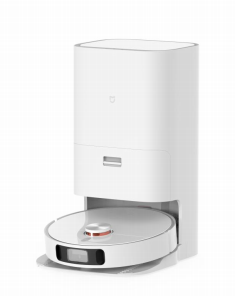
5. Q:Xiaomi Robot Vacuum X10+ appearance introduction
A:The appearance is as follows.
6. Q:What is the all-new S-Cross AI™ Advanced 3D obstacle recognition and avoidance sensor system?
A:Based on laser navigation, AI+3D stereo obstacle avoidance. Support scene recognition, object recognition, millimeter-level perception accuracy, and easy obstacle avoidance.
Dual-line laser navigation enables rapid mapping without fear of light and environmental interference, and accurate planning of cleaning paths. One-click generation of 3D maps in the Mi Home app.
The Advanced AI camera uses an AI graphics algorithm to identify various obstacles on the floor and in rooms around the home. Flexible planning of avoidance paths and cleaning sequences, for smart home cleaning without manual intervention.
Identify common household obstacles, including socks, power cords, fans, and more. Precise obstacle avoidance and reduce machine jamming.
Product introduction and use
1.Q:What is All-in-one station base?
A:All-in-one station base is developed from the traditional charging base, which not only supports charging but also integrates more and more complex functions, such as supporting cleaning mop, collecting sewage, collecting waste from the dust box of the host, drying mop and other functions, thus making the cleaning function of the sweeper more and more powerful.
2. Q:How does the boot button of Xiaomi Robot Vacuum X10+ work?
A:Power on button
Power on/off: Press and hold for 3 seconds to turn on or off the machine
Cleaning: After power on, short press to start cleaning
Status Indicator
White light: working/working/charging completed
White flashing: charging back / repositioning / firmware upgrade / device to be connected / Wi-Fi connection
White breathing: charging
Orange blinking: abnormal status
Orange constant light: low battery / Wi-Fi disconnected
Tip: the host can not be turned off during charging; press any key to pause while cleaning and back charging.
3. Q:How to use the recharge button of Xiaomi Robot Vacuum X10+?
A:Recharge: short press to recharge
Child lock: Long press for 3 seconds to turn on or off the child lock
Tip: Press any key to pause when cleaning, recharging or partial cleaning.
4. Q:How to use the base button of Xiaomi Robot Vacuum X10+?
A:Exit key: short press, the host exits the All-in-one station base
Sweep and drag key: short press, the host starts global cleaning
Drying key: short press, the base executes or terminates mop drying
Tip: Only when the host is connected to All-in-one station base, the base key will take effect; when the host is not connected to All-in-one station base, the key is invalid; when the host is cleaning the mop or suspending the state of cleaning the mop on the base station, it cannot be operated.
5.Q:How does the Xiaomi Robot Vacuum X10+ All-in-one station base work?
A:
1、For a better mobile client experience, please place the base within the Wi-Fi coverage area.
2、Place the All-in-one station base against the wall on the horizontal ground, make sure there is more than 0.5m space on both sides of the base, connect the plug to the power socket, the All-in-one station base indicator light will be on, indicating that the power is plugged in.
3、Before using, turn on the host and place it on All-in-one station base, the host will dock automatically. When you hear the host broadcast start charging, the host docking success.
4, the first time the first use is recommended to be fully charged, the base indicator light is always on for 10 minutes and then go out
Tip: When the host is connected to the All-in-one station base, it will not shut down. The water tank in the base station is not enough water, the sewage tank is full of water, the dust bag in the dust collection bin is full will be prompted.
6. Q:How to use the Do Not Disturb mode on Xiaomi Robot Vacuum X10+?
A:Do-not-disturb mode is enabled by factory default and the time period is 22:00-08:00. You can use the mobile phone client to turn off Do Not Disturb mode or modify the Do Not Disturb time period. In the APP set in the Do Not Disturb time period, the host will not automatically renew the sweep, active broadcast voice and automatic dust collection. The indicator light is off.
7. Q:How to save the complete map?
A: Before use, please open the door of the area to be cleaned to ensure the integrity of the map.
Xiaomi Robot Vacuum X10+ supports quick map building. When you use it for the first time, you can use the quick map building function according to the newbie guide after the Mi Home app is connected to the network. When you use the Quick Build, the host will explore the home environment and only build a map without cleaning. The entire building process takes about 5-15 minutes. After the build is complete, the host returns to the All-in-one station base to generate the completed partition map.
If you click the Start button on the Robot Vacuum or the base, or click Start on the Mi Home app and select Global Cleaning, the Robot Vacuum will start the cleaning task from the base and return to the base on its own, which will also generate a complete partition map.
If you manually recharge or manually move back to the dock in the middle, it will only generate a temporary map. Temporary map, no automatic partitioning, no
It is not possible to use the functions of zone cleaning, partition adjustment/renaming, etc.
8. Q:How does the Xiaomi Robot Vacuum X10+ sweep the entire house?
A: Cleaning method when there is no map
For the first sweeping, the Robot Vacuum will follow a 4.5*4.5m area and then use a bow sweep until all areas are covered.
All areas will be covered.
Cleaning method when there is a map
After starting, the Robot Vacuum will clean the room in the order of room cleaning, first extended edge cleaning, then bow cleaning, and finish the room cleaning. Sweeping and mopping
The cleaning order of the room is different from the sweeping mode to avoid the secondary pollution caused by the Robot Vacuum passing through the cleaned room. The cleaning sequence of the room is different from the sweeping mode.
9. Q:Can the Xiaomi Robot Vacuum X10+ be charged all the time?
A:The Xiaomi Robot Vacuum X10+ supports overcharge protection and will automatically adjust to low current charging when the power is full.
10. Q:Does the Xiaomi Robot Vacuum X10+ have motor overload protection?
A:All motors have overload protection, including the main brush motor, side brush motor, main wheel motor and mop motor.
The protection will be activated automatically when foreign objects are introduced or blockage is serious enough to cause overload.
11.Q:How does the Xiaomi Robot Vacuum X10+ return to charging?
A:After cleaning, the host will automatically return to All-in-one station base for charging.
In the pause state, short press the back-charge button of the host to start back charging.
You can also put the Robot Vacuum back to the base manually, and the Robot Vacuum will automatically dock when the mop component is facing the cleaning tray position of All-in-one station base.
When the host is charging, the voice "Start Charging" will be broadcasted and the power button will be blinking, indicating that the host is successfully connected to the All-in-one station base.
Tip: If the host does not find the All-in-one station base will automatically return to the cleaning starting position, please manually put the host back to the All-in-one station base charging.
12. Q:How does the Xiaomi Robot Vacuum X10+ automatically clean the wipes? Why does it need to be cleaned frequently?
A:Before each sweeping or mopping task starts, the host will clean and wet the wipes and refill the water tank of the host.
Midway back to wash: In the whole mopping task, the host will automatically return to All-in-one station base to wash back to maintain a relatively clean state and better mopping effect. After each wash, it returns to the previous position to continue the unfinished work. The frequency of cleaning can be set in Mi Home APP.
End task and start self-cleaning: After the Robot Vacuum finishes mopping and recharges, the All-in-one station base will start cleaning and drying the mop thoroughly.
13.Q:When will the Xiaomi Robot Vacuum X10+ do automatic water refill?
A:When the Robot Vacuum is cleaning the mop in the dock, the dock will refill the Robot Vacuum water tank at the same time. Keep the Robot Vacuum mopping outside to keep the The mop is always wet.
14. Q:Can the Xiaomi Robot Vacuum X10+ wipe be raised? How high is it raised? When is it raised?
A:The Robot Vacuum's pad can be raised by 7mm, at which time the wipe is about 5mm above the floor. The wipe will be raised when navigating to the mopping position and getting out of trouble to avoid secondary pollution. Carpet adaptive mode is enabled by factory default, when the host When the carpet on the machine detects the carpet material, the mopping cloth will be automatically lifted. Due to the limited lifting height, the rag may still rub the carpet lightly. If you want to avoid the carpet, you can choose to avoid the carpet in selecting "Avoid Carpets” mode via the Mi Home/Xiaomi Home app.
15. Q:When does the Xiaomi Robot Vacuum X10+ dry the mop?
A:After The Robot Vacuum completes its mopping task, the base will automatically start drying. The drying time is about 2 hours. The drying task can be manually terminated or started via the drying button on the dock or the Mi Home app.
16.Q:When will the Xiaomi Robot Vacuum X10+ collect dust?
A:When the Robot Vacuum returns to the dock after the Robot Vacuum has finished sweeping, the dock will automatically start dust collection for both the Robot Vacuum and the dock. The dust collection time is about 10 seconds, and will be extended to about 20 seconds. You can turn off the automatic dust collection in the Mi Home app or modify the dust collection frequency according to your needs.
17.Q:Does Xiaomi Robot Vacuum X10+ have obstacle avoidance function?
A: Does Xiaomi Robot Vacuum X10+ have obstacle avoidance function?
A: Xiaomi Robot Vacuum X10+ is equipped with the S-Cross AI super-sensitive paper stereo recognition obstacle avoidance system. The front of the Robot Vacuum is equipped with obstacle avoidance sensors - line laser sensors and AI vision recognition sensors, which can sense various obstacles on the ground, measure the distance between them, and plan ahead to slow down to avoid them. It can sense multiple obstacles on the ground, measure the distance between them, and autonomously plan to slow down in advance to avoid collision. The AI vision recognition sensor can also recognize six types of objects: woven objects, power cords, poop, shoes, bases, and scales, and intelligently determine the deceleration and detour distances based on the type of obstacle.
18.Q:Why does the Xiaomi Robot Vacuum X10+ still collide with the obstacle avoidance sensor it has?
A:1. Please check if the AI sensor cleaning switch is turned on in the Mi Home app, after it is turned on, the Robot Vacuum can optimize the cleaning strategy when avoiding obstacles, the path is APP-upper right corner settings-function settings-AI sensor cleaning
2. Please use a soft dry cloth to wipe the lens of AI vision recognition sensor and line laser sensor to make sure there is no fingerprint or dust.
3. Some dark colored, highly reflective surfaces (such as metal), transparent objects (glass walls), small table and chair legs and some Some shorter obstacles, or obstacles appearing in the detection blind zone, may occasionally fail to detect a collision
4. AI vision sensor does not have night vision, when the ambient light is low, the recognition of six types of objects, such as woven objects, power cords, poop, shoes, bases, and weight scales, can not be detected. The recognition ability of these six types of objects will be reduced
5. When the machine encounters a flexible obstacle such as curtains or a false door of a room, it will slow down and lightly touch the collision, or completely No contact touch, if there is a slight touch belongs to the normal phenomenon
6. If the home environment is more complex, there are a lot of ground obstacles trapped the Robot Vacuum, may produce a collision when getting out of trouble.
19.Q:Does the AI vision recognition sensor of Xiaomi Robot Vacuum X10+ violate personal privacy?
A:The pictures collected during the process of obstacle avoidance in AI recognition are processed in real time and not saved, so it will not violate your personal privacy.
Please feel free to use it.
20.Q:How to add cleaner to Xiaomi Robot Vacuum X10+?
A: When using, fill the water tank with water to the highest water level, then add 25ml of designated Daily Elements brand cleaner (there is a scale on the cleaner bottle cap), shake gently and evenly before using. The ratio of water to cleaner is about 1:100, please do not shake vigorously after adding the cleaner; do not add any other items except the official designated cleaner to avoid damaging the machine.
21.Q:How to maintain the main brush for Xiaomi Robot Vacuum X10+?
A: 1. Turn the Robot Vacuum bottom side up and press the snap to remove the main brush cover.
2. Remove the main brush upward and clean the main brush bearing.
3. Remove the end caps of the main brush to clean the tangled hairs.
4.Use the main brush cleaning tool to cut off the tangled hairs on the main brush.
5. Install the main brush and tighten the main brush cover retaining clips.
Tip: It is recommended to clean every 2 weeks and replace the main brush every 6-12 months to ensure the cleaning effect.
22.Q:How to maintain Dustbin and filter for Xiaomi Robot Vacuum X10+?
A:
- Lift the Robot Vacuum cover, press and hold the Dustbin release button up to remove the Dustbin and dump the garbage.
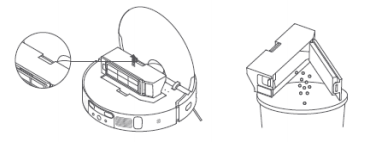
Tip: To avoid filter clogging, tap Dustbin when dumping garbage.
- Please remove the filter as shown, rinse it repeatedly and tap the filter frame gently to tap out the dirt until it is clean.
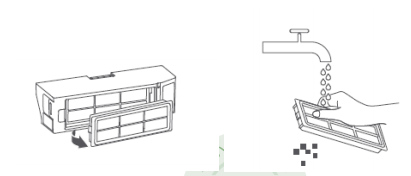
Tip: Please do not use brushes, fingers, etc. to clean the filter.
It is recommended to clean the screen once every two weeks.
23. Q:How to maintain the gimbal of Xiaomi Robot Vacuum X10+?
A:1. Turn the machine over , and pull out the gimbal wheel upwards.
2. Clean the hair and dirt from the wheel body and axle.
3. Reinstall the wheel body and press it tightly.
Tip: You can use tap water to rinse it, dry it and put it back on.
24.Q:How to maintain the side brush of Xiaomi Robot Vacuum X10+?
A:1. Turn the machine over, pull out the side brush upward and clean it.
2. Install the side brush back.
Tip: It is recommended to clean once a month and replace the side brush every 3-6 months to ensure the cleaning effect.
25.Q:How to maintain the wipe on Xiaomi Robot Vacuum X10+?
A: Remove the mop cloth from the mop tray for replacement. 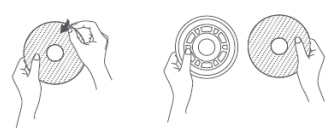
Tip: It is recommended to change the mopping cloth 1-3 months to ensure the cleaning effect.
26.Q:How to wipe and maintain the sensor and charging pole piece of the Robot Vacuum X10+?
A:Use a soft dry cloth to wipe and clean the sensors of the Robot Vacuum.
27.Q:How to wipe the cleaning tray of Xiaomi Robot Vacuum X10+ for daily maintenance?
A:1. Take out the cleaning tray, rinse it well, and wipe the dirt.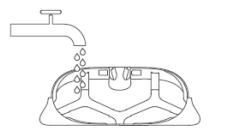
2.Wipe the bottom of All-in-one station base with a soft dry cloth and wipe it clean before putting it back into the cleaning tray. 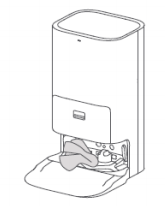
28.Q:How to maintain and wipe the Xiaomi Robot Vacuum X10+ base on a daily basis?
A:Use a soft dry cloth to wipe and clean the charging shrapnel, dust collection port and signal transmitting area of the All-in-one station base. 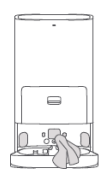
Do not wash the All-in-one station base with water.
Do not tilt the All-in-one station base during daily use and cleaning. if water accumulates in the cleaning tray, wipe it off with a rag.
29.Q:How to clean the fresh water tank of Xiaomi Robot Vacuum X10+?
A:1. Open the top cover of the clean water tank, clean it well with water and put it back to the base. 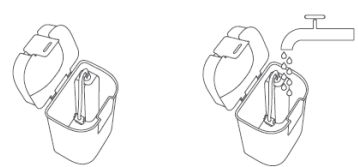
Tip: The float in the fresh water tank is a moving part, do not use too much force when cleaning to avoid affecting the function.
30.Q:How to clean the sewage tank of Xiaomi Robot Vacuum X10+?
A:1. Remove the sewage tank, open the top cover of the tank and dump the sewage. 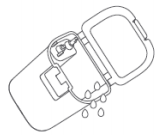
2.Wash well with water and put back to All-in-one station base.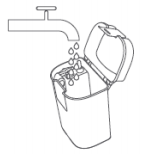
Tips.:
1.Do not turn the sewage tank upside down when there is water in the tank.
2.The float ball in the sewage tank is a moving part, do not use too much force when cleaning to avoid affecting the function of the float ball.
31.Q:How to maintain the battery of Xiaomi Robot Vacuum X10+?
A:Xiaomi Robot Vacuum X10+ has a built-in high performance lithium-ion rechargeable battery pack. To maintain the battery performance, please keep the Robot Vacuum charged for daily use.
Tip: If you do not use it for a long time, please turn it off and store it, and charge it at least once every three months to avoid battery damage due to over discharge.
32.Q: Does Xiaomi Robot Vacuum X10+ support child lock?
A:It supports the child lock function, which can be turned on or off in three ways.
1、 Press and hold the Robot Vacuum back to charge button for 3 seconds
2. When the Robot Vacuum is connected to the dock, press and hold the out button and the drying button of the dock at the same time for 3 seconds
3. Mi Home app's child lock switch: upper right corner more settings - function settings - auxiliary functions - child lock
Tip: If the child lock is on, the Robot Vacuum and any keys on the All-in-one station base cannot be operated.
33. Q: How to cancel the automatic drying mop of Xiaomi Robot Vacuum X10+?
A: At present, there is no switch for drying mop, in order to avoid the mop not drying to breed bacteria or odor, the default is to dry automatically after sweeping and mopping.
In order to avoid bacteria and odor, the default is to dry the mop automatically after sweeping.
34.Q: Why doesn't Xiaomi Robot Vacuum X10+ select the mode for appointment execution?
A: The mode of appointment execution in firmware version 1068 and below depends on the mode and cleaning method set in the APP home page at the time of appointment execution.
The mode of appointment execution depends on the mode and cleaning method set in the APP home page at the time of appointment execution. At present, it is not possible to set the mode at the time of reservation. This part will be optimized in future firmware versions.
Please keep upgrading to the latest firmware to ensure that you can experience the optimization at the first time.
35.Q:Xiaomi Robot Vacuum X10+ drying effect is not good, not completely dry?
A:At present, the drying time is 2 hours, the drying will start automatically after the cleaning is finished, it is recommended not to do other operations during the drying process to interrupt the drying work of the Robot Vacuum.
If you accidentally interrupt the drying process, you can click on the APP to dry the mop immediately or click on the drying button of the base station to start drying again. If it is still wet after complete drying and the firmware version is 1068 or below, the subsequent firmware version will optimize the function of this part, please keep upgrading to the latest firmware to ensure that you can experience the optimization at the first time.
36.Q:How to solve the problem of not being able to clean a few centimeters from the wall?
A:At present, the Robot Vacuum is close to the wall when cleaning along the edge, but the mopping tray cannot be attached to the edge, so the mopping traces look The subsequent firmware version will optimize this problem. Even if the wall is not mopped, the side brush is still able to Even if the wall is not mopped, the side brush can still clean the dust and garbage from the wall to the Robot Vacuum main brush port to ensure the cleaning effect of the wall.
37. Q:What does the AI in Xiaomi Robot Vacuum X10+ do?
A:It can recognize some obstacles and plan the avoidance path flexibly according to the type of obstacles. The following are recognized: power cord, socks The Robot Vacuum also supports the recognition of some furniture and automatically determines the room properties based on the furniture recognized.
38.Q:Why doesn't the map of Xiaomi Robot Vacuum X10+ show obstacles or furniture?
A:The Robot Vacuum will plan the avoidance path flexibly according to the obstacle type, but will not show the obstacle type on the 2D or 3D map. the Robot Vacuum will determine the room properties by recognizing some furniture, and will show the room type on the 2D map, but not on the 3D map.
Mi Home app related
1. Q:How to connect Xiaomi Robot Vacuum X10+ to Mi Home app?
A:This product is already connected to Mi Home and can be controlled and interconnected with other products via Mi Home app.
Scan the QR code to download and install the Mi Home app, and users who have already installed the Mi Home app will directly enter the device connection page. Or search for "Mi Home" in the app store, download and install the Mi Home app, open the Mi Home app home page, click "+" in the upper right corner of the page, and add devices according to the APP prompt.
Note: Due to the upgrade and update of Mi Home app, the actual operation may be slightly different from the above description, please follow the current APP Please follow the instructions in the current app.
2. Q:How to reset the WiFi of Xiaomi Robot Vacuum X10+?
A:When the router configuration is modified, forgotten password or other reasons cause the phone can not connect to the Robot Vacuum, please open the top cover to reveal the Wi-Fi indicator, and press and hold the partial cleaning button and the recharge button at the same time (7 seconds) until the voice prompt "Waiting for network configuration", wait for the Wi-Fi indicator to start blinking again. Wait for the Wi-Fi indicator to start blinking again to indicate a successful reset.
Open the Mi Home app home page, click "+" at the top right corner of the page, and add devices according to the APP prompt.
3. Q:How to upgrade the firmware of Xiaomi Robot Vacuum X10+?
A:The Robot Vacuum firmware can be upgraded using the Mi Home app. Before upgrading, please make sure the Robot Vacuum is on All-in-one station base and the power level is above 15%.
Please make sure the Robot Vacuum is on the All-in-one station base and the power is more than 15% before upgrading. The buttons are flashing during the firmware upgrade.
Path: In the APP - Top right corner Settings - General Settings - Firmware Upgrade
It is recommended to upgrade the firmware to the latest version.
4. Q: How to restore the factory settings of Xiaomi Robot Vacuum X10+?
A:If the system does not work properly after reboot, please use the tool to press and hold the reset button until the voice prompts "Start to restore factory settings".
The Robot Vacuum will be restored to the factory state.
5. Q:How to restart the Robot Vacuum X10+?
A:When the button does not respond or cannot be turned off, press and hold the button for 15 seconds to force it to turn off, and then press again for 3 seconds to turn on.
6. Q:Can the Xiaomi Robot Vacuum X10+ support quick map building?
A : Yes, after using Mi Home app, you can follow the guide to build a quick map. When the quick map is created, the home environment will be explored and only the map will be created without cleaning. The entire build process takes about 5-15 minutes. Once the map is completed, the Robot Vacuum returns to the All-in-one station base and generates a completed zoning map. The Robot Vacuum returns to the All-in-one station base to generate the completed zoning map.
7. Q:How many maps does the Xiaomi Robot Vacuum X10+ support to save?
A:Currently, 3 maps can be saved. When using X10+ for the first time, you can create a map quickly or globally clean the map.
When you need more maps, you can create and manage new maps in Mi Home app - Settings - Map Manage- Map List.
8. Q:What is the Do Not Disturb time period?
A:During the Do Not Disturb time period, the Robot Vacuum will not respond to dust collection, intermittent cleaning, scheduled cleaning and active voice announcement. Do Not Disturb mode is enabled by factory default and the default time period is from 22:00 p.m. to 8:00 a.m. Do Not Disturb can be turned off via Mi Home app.
9. Q:What is the full cleaning function?
A:If you select global cleaning when the map is not saved, the Robot Vacuum will clean a square area of 4.5m×4.5m area by area; after the map is saved in the APP, select global cleaning, the Robot Vacuum will automatically plan the path to clean room by room, and return to the charging stand after cleaning.
10. Q:What is the memory map function?
A: The first cleaning needs the Robot Vacuum to start from the dock, and automatically return to the dock after finishing the cleaning, the map of your home can be saved only after completing the complete cleaning, the map will not be saved if the cleaning process is artificially terminated or moved back to the charging dock, etc. After the map is successfully drawn, you can divide, merge areas or customize the room name in the APP.
11. Q:What is the zoning cleaning function?
A:You can set up the zone cleaning function in Mi Home app, and the Robot Vacuum will clean according to the planned area.
Tip:
During cleaning, the Robot Vacuum may go out of the zoning area, please pay attention to clean the obstacles around the zoning area, this zoning does not serve as a safe separation.
12.Q: What is the appointment cleaning function?
A:Using Mi Home app, you can set the appointment cleaning time, repeat mode and cleaning range, and the main unit will automatically start cleaning at the specified time and return to the all-in-one base at the end of cleaning.
In the APP, you can set the settings in the upper-right corner of Settings-Function Settings-Appointment Cleaning.
Tip: If Do Not Disturb mode is turned on, the appointment cleaning will not be executed during the Do Not Disturb time period.
13. Q:What is the virtual wall/no-zone function?
A:Using the Mi Home app, you can set a virtual wall/no-go zone to prohibit the Robot Vacuum from entering areas that do not need to be cleaned.
Tips:
1.Before using this function, you need to save the map in the APP.
2.Moving the Robot Vacuum or significant changes in your home environment may cause the original map to become invalid and the virtual wall/no-go area to be lost.
Virtual Wall, add a virtual wall so that the sweeper can't pass through.
Path: In APP - Top right corner Settings - Map Manage - Virtual Wall / Forbidden Zone
Add: In the restricted area/virtual wall setting page - click on the virtual wall/prohibited area - move the virtual wall line/prohibited area to the appropriate area (you can enlarge or reduce the length of the virtual wall/prohibited area) - click on the check mark in the upper right corner to save
Delete - in the restricted area / virtual wall settings page - click the virtual wall / prohibited area to be deleted - click the upper right corner of the virtual wall / prohibited area (X sign) to delete - click the check mark in the upper right corner to save.
Sweeping and mopping prohibited area, add sweeping and mopping prohibited area, sweeping and mopping machine do not enter the area.
Mopping prohibited area, add mopping prohibited area, the sweeper does not enter the area when mopping.
14. Q:Does the Xiaomi Robot Vacuum X10+ support carpet recognition function?
A:The Xiaomi Robot Vacuum X10+ has an ultrasonic sensor and supports carpet recognition and factory default carpet adaptive cleaning mode, i.e. the carpet on the Robot Vacuum only sweeps, suction power is enhanced and the mopping cloth is lifted. Due to the limited height of the rag lift, the rag lift is 7mm.
The rag lift height is limited to 7mm, so your carpet may still be lightly scuffed by the rag. If you want the Robot Vacuum to stay above the carpet when installing the mop, you can choose to avoid the carpet in the Mi Home app - top right corner settings - function settings - carpet cleaning method.
Tip: Shaggy carpet with thickness of 2cm or more may be recognized as an obstacle by the line laser and avoided.
If the carpet recognition area is inaccurate or misidentified, you can turn off the carpet recognition switch and select dodge in Mi Home app-upper right corner Settings- Map Management-Virtual Wall/Prohibited Area to manually add a mopping prohibited area to avoid the Robot Vacuum from entering the area inside the prohibited area.
15.Q:How to reset the map of Xiaomi Robot Vacuum X10+?
A:Click Reset Map in Settings, click OK and the map will be reset and disappear, you need to rebuild the map.
Reset map: In APP - Map Manage - Map List - Select the map you need to reset - Top right corner trash icon - Make sure
16.Q:How to create multiple maps with Xiaomi Robot Vacuum X10+?
A:Move the Robot Vacuum and the dock to a new environment, plug in the dock, and connect the Robot Vacuum to the dock. Open Mi Home app - Top right corner - Settings - Map Management - Click Create Map in the map list, it is recommended to create the 2nd or 3rd map using the Quick Map Build function. After the map is saved successfully, if you need to clean a floor, move the Robot Vacuum to the floor near the starting location of the map, and manually select the corresponding map in the APP-Map list to start cleaning.
If you don't want to move the base to a new environment, you can just move the Robot Vacuum to the new environment by opening the Mi Home app - Settings - Map Management - Map List and click Create Map. Once the map is created, if you need to clean a floor, move the Robot Vacuum to that floor and manually select the corresponding map in the App-Map list to start cleaning. Since there is no docking station, the Robot Vacuum will start sweeping/mopping/sweeping tasks directly, without returning to the rag or collecting dust. If you need wet mopping, we recommend you to wet the wipe manually.
17.Q:Does Xiaomi Robot Vacuum X10+ support setting suction power and mopping humidity?
A:You can set the suction power and mopping humidity level in APP. There are four levels of suction power: quiet, standard, strong and super; mopping
There are three levels of humidity: low, medium and high.
18.Q:How to set the custom mode of Xiaomi Robot Vacuum X10+?
A:When you finish saving or have a partition map, you can personalize each partition, different rooms can be set with different cleaning mode, the Robot Vacuum suction power, mopping humidity, cleaning times. You can also manually adjust the cleaning order of each room in the cleaning order finishing.
19.Q:How is the 3D map of Xiaomi Robot Vacuum X10+ generated?
A:Xiaomi Robot Vacuum X10+ can automatically generate 3D maps after saving or existing partition maps. Click the icon on the top right corner of the map area on the home page of Mi Home APP to enter the 3D map page, and you can view the 3D map effect.
20.Q:Can Xiaomi Robot Vacuum X10+ set or adjust the backwash frequency?
A :You can modify it in APP-upper right corner setting-base setting-wash mop setting. Deep cleaning with most frequent backwash.
Suitable for dirty floor cleaning and cleaner mopping; daily cleaning, suitable for daily environment and balanced washback frequency; water-saving cleaning, suitable for cleaner environment and single washback frequency.
For clean environment, the single cleaning area is the largest, low washback frequency, the most water-saving.
FAQs and Troubleshooting
1. Q:What if the Xiaomi Robot Vacuum X10+ cannot connect to the network?
A:1, confirm that the WiFi password entered when connecting is correct, WiFi user name can not be with Chinese characters or password settings contain ¥% such special characters, if you reset to English or with numbers, letters format account and password and then try again.
2, check whether the router is connected to the external network is normal, you can try to open the web browsing through the cell phone or the computer connected to WiFi to see if it is smooth.
3,Check whether the distance between the router and the Robot Vacuum is too far (beyond 5 meters or there is a wall in between), you can try to move the Robot Vacuum to 1-2 meters away from the router and try to reconnect.
4, connect the cell phone WiFi hotspot to try.
5, check whether the router is connected to more smart devices that cause network slowdown or router unresponsive, you can try after restarting the router.
6, currently does not support the company EAP802.1x authentication network, 5G signal network or public WiFi network that requires web authentication network, such as CMCC, ChinaUnicom, etc., you need to try to connect after switching the network again.
7, after the network is turned off, if the device has not been connected for more than 1 hour, the WiFi module will turn off the network link function, and at the same time WiFi indicator will become flashing, and the connection can be restored only after restarting the device.
8, check whether the phone has restricted the App permissions, such as networking, positioning, etc., please allow the permission and try again.
9, connection failure may also be related to the phone model, try to use other different models of cell phones to try to link.
10, If you can't connect to the network, try to reset the Robot Vacuum and connect again.
2. Q:What if the charging of Xiaomi Robot Vacuum X10+ is abnormal?
A:Please check if the All-in-one station base and the Robot Vacuum charging pad are dusty, dusty will cause charging abnormalities, please wipe them off and use them.
If the All-in-one station base is not powered on, please make sure that both ends of the All-in-one station base power cable are plugged in.
3. Q:What if there is a high water level alarm in the cleaning tray of Xiaomi Robot Vacuum X10+?
A:1, please take out the cleaning tray, rinse it well and wipe it with a dry rag.
2, confirm whether the bottom of the cleaning tray is clogged with dirt, wipe the inside of All-in-one station base with a dry rag.
3, the cleaning tray back to the base.
4, confirm whether the sewage tank / sewage tank seal is broken, whether the float in the sewage tank into the water, if broken or into the water, please contact the aftermarket; if all normal, light pressure on the sewage tank to ensure that the installation in place.
5, the correct addition and use of cleaning fluid: only support the daily elements of the specified cleaning fluid, add a ratio of 1:100, a bucket of water tank MAX line) water recommended to add about 25ml cleaning fluid, water first, then liquid, avoid violent shaking. Do not overfill or use Do not overfill or use other cleaners and disinfectants. If foam is generated, please let it stand until the foam is eliminated before use.
6, if the fault can not be eliminated, please contact the after-sales service.
4.Q:What are the precautions before cleaning the Xiaomi Robot Vacuum X10+?
A:Please try to make the Robot Vacuum fully charged and start cleaning from the All-in-one station base.
Before cleaning, please tidy up your home furniture and put away fragile items and debris on the floor in advance.
5. Q:What new firmware version should be upgraded?
A : The new firmware version contains optimization content, please try to find new firmware version and upgrade in time to ensure the best
Please try to upgrade as soon as you find the new firmware version to ensure the best cleaning experience.
6. Q:What happens when the Robot Vacuum X10+ cleans one room before it finishes cleaning another room?
A:The Robot Vacuum will clean according to the room after the first map is created. If this happens, please check the partition situation and adjust the room partition on the APP if there is a partition error.
7. Q:Is there a repeated back and forth in the cleaning path of Xiaomi Robot Vacuum X10+?
A: The Robot Vacuum will clean according to the planned path, and will navigate to the uncleaned area when cleaning, so there will be some repeated back and forth visually, but actually it is not repeated cleaning.
8.Q:Does the X10+ have the phenomenon that some narrow areas are inaccessible when cleaning?
A:The minimum distance between the Robot Vacuum and the area is about 37cm, and areas smaller than this distance may not be accessible.
9. Q:Will the efficiency of the Xiaomi Robot Vacuum X10+ decrease in complex environments?
A:In order to ensure the cleaning coverage, the Robot Vacuum will clean all corners. In a complex environment, it will increase the turning and movement along the edge, and the cleaning efficiency may be reduced.
10. Q:Is the Xiaomi Robot Vacuum X10+ louder when cleaning?
A:
1、You need to confirm whether the roller brush is entangled with foreign objects and makes a strange noise, you need to clean the roller brush in time, otherwise it will cause damage to the roller brush.
2、In order to ensure the cleaning effect, the Robot Vacuum adopts a fan with more suction power, which is more powerful and slightly louder. When cleaning, you can use the quiet gear with less sound to work.
11.Q:How to solve the noise of Xiaomi Robot Vacuum X10+ when cleaning?
A:When the Robot Vacuum works on smooth tile floors and wood floors, there may be a slight sound when the bottom squeegee bar rubs against the floor.
When the Robot Vacuum passes through the joints of tiles and floors, it will touch and clean the joints, which may produce a slight "click-click-click" sound.
These sounds do not affect the normal use of the Robot Vacuum.
12. Q:What happens when the Robot Vacuum X10+ gets stuck while sweeping?
A:The Robot Vacuum may get stuck on slippers, plastic bags and other debris in your home when cleaning.
Please try to clean up the clutter in your home before cleaning to avoid the Robot Vacuum from getting stuck while cleaning.
13. Q:What if the upper surface of the Robot Vacuum X10+ gets stuck while cleaning?
A : The Robot Vacuum may get stuck on the upper surface of the body when cleaning the bottom of the furniture which is close to the height of the body. Please set a virtual wall to prevent the Robot Vacuum from re-entering.
14.Q:How to deal with the side brushes and main brush tangled when cleaning Xiaomi Robot Vacuum X10+?
A:When the Robot Vacuum is cleaning, the side brushes and roller brushes may get entangled with the power cord and charging cable in your home. Please try to put the Robot Vacuum in the nearby cleaned area and continue cleaning after dealing with the entanglement problem.
Please try to clean up the clutter in your home before cleaning to avoid the Robot Vacuum from getting tangled while cleaning.
15. Q:What if the All-in-one station base power cord gets tangled when cleaning the Xiaomi Robot Vacuum X10+?
A:Please tidy up the excess All-in-one station base power cord before cleaning and do not put it on the floor.
16. Q:What is the reason why the Robot Vacuum X10+ will go to the cleaned area and repeat cleaning after moving?
A:The Robot Vacuum will perform repositioning after moving, if the repositioning is successful, it will continue to clean, if the repositioning fails, it will start cleaning again.
17.Q:What is the reason for the repositioning failure of Xiaomi Robot Vacuum X10+?
A:The Robot Vacuum moving to an area that has not been previously cleaned will cause the repositioning to fail. Please try to ensure that you move to an area that has been previously cleaned.
Someone is standing next to the Robot Vacuum when the Robot Vacuum is being re-positioned. Please make sure not to stand next to the Robot Vacuum as much as possible.
18. Q:Why does the mop tray fall off during the operation of the Robot Vacuum?
A:When the Robot Vacuum goes over the carpet, threshold, small steps, the rag tray may be stuck off, you can set the mopping exclusion zone to avoid the sweeper to enter with a mop. Please tidy up the ground power cord etc. before cleaning to prevent tangling and causing the rag tray to fall off.
19. Q:Why can't Xiaomi Robot Vacuum X10+ skip some rooms in custom mode?
A:The custom mode is customized for all rooms, not all customized rooms need to be cleaned. Regardless of customization mode and
Normal mode, you can use the selected area cleaning mode. Click on the room or rooms that need to be cleaned on the APP map.
Then click Start, the Robot Vacuum will clean only the selected room.
20.Q:Why does the mop fall off?
A:Please make sure the mop is well attached to the mop tray before working, if the mop cannot be attached well or is uneven after repeated use, please replace it with a new one in time.
Please replace the mop with a new one.
21. Q:What is the reason for the collision with obstacles when cleaning the Xiaomi Robot Vacuum X10+?
A:The Robot Vacuum has LDS laser sensor, line laser sensor and AI vision recognition sensor, which can detect obstacles and slow down the collision in advance. However, for some darker color, reflective, smaller table and chair legs and some shorter obstacles, they may not be detected and not slowed down in advance, which is normal.
22.Q:What is the reason for the distance from the wall when cleaning along the edge of the Xiaomi Robot Vacuum X10+?
A:The Robot Vacuum has its own sensor along the wall, when cleaning along the edge, it will keep a certain distance from the wall, which is a normal phenomenon.
23.Q:What if Xiaomi Robot Vacuum X10+ cannot be turned on?
A:Battery power is low, please charge it by All-in-one station base before use. The ambient temperature is too low (below 0℃) or too high (above 40℃), please use it in 0-40℃ environment.
24.Q:What is the reason for the fast power consumption when cleaning the Xiaomi Robot Vacuum X10+?
A:After the Robot Vacuum is charged and left for a long time, the power may drop quickly when it starts to clean for a few minutes, which is normal.
The Robot Vacuum will consume more power when you use the powerful gear and super power gear to clean.
25.Q:Does the Xiaomi Robot Vacuum X10+ consume power when it is always at the All-in-one station base?
A : When the Robot Vacuum is always in All-in-one station base, the power is supplied to the Robot Vacuum from the base. The power consumption is extremely low in the hibernation state, and the battery goes into hibernation at this time to maintain the best performance.
26.Q:What could be the reason for the Xiaomi Robot Vacuum X10+ recharge failure?
A:There are too many obstacles near All-in-one station base, please put All-in-one station base in the open area and make sure there are no obstacles within 0.5m on both sides and 1.5m in front of All-in-one station base.
If the Robot Vacuum does not start from the All-in-one station base before cleaning, and if the Robot Vacuum does not find the All-in-one station base during cleaning, please make the Robot Vacuum start from the All-in-one station base as much as possible.
If the Robot Vacuum has been moved during the cleaning process, the Robot Vacuum will fail to reposition when you continue cleaning and start a new task.
If there is water on the All-in-one station base or the ground in front of you is wet, the wheels may slip, please dry them and try again.
27. Q:What if it is difficult to open the Dustbin of Xiaomi Robot Vacuum X10+?
A : Please pay attention to the logo at the Dustbin opening place and open the Dustbin correctly, do not open the Dustbin by removing the Dustbin cartridge. 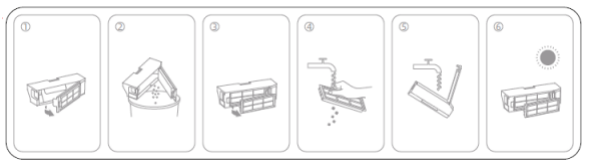
28.Q: What can be done if stubborn stains cannot be removed when mopping the floor with Xiaomi Robot Vacuum X10+?
A: Some stubborn stains cannot be removed when mopping, so manual assistance is needed to clean up.
29.Q: What if the floor of Xiaomi Robot Vacuum X10+ gets dirtier and dirtier?
A: If the floor is too dirty, please clean the wipe regularly when mopping.
30.Q: How long does it take to dry the mopping cloth of Xiaomi Robot Vacuum X10+?
A: The Robot Vacuum takes about 2 hours to dry automatically in the base after cleaning.
31. Q: What about the yellowing of the All-in-one station base water sensor of the Xiaomi Robot Vacuum X10+?
A: The yellowing of the All-in-one station base water sensor is normal and does not affect normal use. You can wipe it with a damp cloth and use it.
32.Q:Why doesn't the Xiaomi Robot Vacuum X10+ take effect with timed cleaning?
A :
1、May be the power is not enough, the remaining power is more than 15% to start the timer cleaning.
2、May be the do-not-disturb mode is set, the timer cleaning does not take effect during the do-not-disturb time period.
33.Q:What is the reason that the Xiaomi Robot Vacuum X10+ is not renewed when the power is low in the middle of cleaning?
A : Please make sure the Robot Vacuum is not in Do-not-disturb mode, it will not renew during the Do-not-disturb time period; it will not renew if you recharge manually or put the Robot Vacuum back to All-in-one station base.
34.Q:What is the reason for Xiaomi Robot Vacuum X10+ to find that the cleaning ability is reduced or there is dust leakage?
A : 1、Dustbin is full, Dustbin filter is blocked, please clean Dustbin and filter.
2、The main brush is entangled with foreign objects, please clean the main brush.
3、Is the Robot Vacuum dust collection port blocked by foreign objects, please clean the dust collection port.
35.Q:Can the Xiaomi Robot Vacuum X10+the Robot Vacuum operate in low light conditions?
A : Yes, the LDS laser sensor is not affected by light. However, the AI vision recognition sensor will not work in low light environments.
However, the AI vision recognition sensor may reduce the recognition and obstacle avoidance of power lines, shoes, and other obstacle areas in low-light environments.
36.Q:Can Xiaomi Robot Vacuum X10+ turn on or off drying manually?
A :If you think the drying sound is noisy, you can click the drying button on the base to stop drying.
37. Q:What could be the reason for the Xiaomi Robot Vacuum X10+ firmware upgrade failure? A : The firmware upgrade requires the Robot Vacuum to be in All-in-one station base with more than 15% power at the same time to upgrade.
Check your home network situation.
38.Q:What if the data cannot be loaded when using the App on Xiaomi Robot Vacuum X10+?
A : Please check if your home network is normal.
Exit the app and try again.
39.Q:What if Xiaomi Robot Vacuum X10+ reports being trapped?
A:When the Robot Vacuum encounters some narrow scenes, it may be trapped between objects. If the sweeper is smaller than 37cm, it is difficult to get out of the trap, so you need to help the Robot Vacuum to continue to finish cleaning.
40.Q:What about the carpet on the Xiaomi Robot Vacuum X10+?
A:1. The Robot Vacuum is shipped with carpet recognition switch on by default, it will automatically recognize the carpet material, the Robot Vacuum will get on the carpet, lift the mopping cloth and increase the suction power, which is normal.
2. If you want the Robot Vacuum to avoid carpeting, you can choose to avoid carpeting in the Mi Home app-upper right corner settings-carpet cleaning mode.
3. If the carpet recognition is not accurate, you can turn off the carpet recognition and manually set the mopping exclusion zone in the map settings, then the mopping process
Then you will bypass the no-go zone and not on the carpet.
41. Q:What could be the reason for the odor of the rag and Dustbin?
A : The odor of rag may be caused by dirty floor, the Robot Vacuum inhale liquid when cleaning, if you don't clean Dustbin in time, it may produce odor, please clean Dustbin and rag in time after work is finished.
42.Q:What if the map of Xiaomi Robot Vacuum X10+ is skewed?
A:
1、Mirror reflection and other conditions will cause the map to be built messy, it is recommended to block the bottom 15 cm.
2. If the map is overlapped or rotated after a period of time, you can restore it to the historical map in the map management, and it will be rebuilt in the next cleaning process.
The map will be rebuilt in the next cleaning process.
3、Regularly check the side of the navigation scanning component for dirt, wipe with a clean rag or paper towel.
4、Restart or reset the Robot Vacuum
43.Q: What if Xiaomi Robot Vacuum X10+the Robot Vacuum travel path is abnormal?
A:
1、We suggest you to check whether the drive wheel is wrapped with foreign objects.
2、Check whether the LDS of the Robot Vacuum is rotating normally, please try to lightly radar the upper cover of the sensor to check whether the rebound is normal.
3. Please check if there is any foreign object or hair on the rotating part of the LDS, which may cause poor rotation or stopping, if so, please try to remove it.
4、Please check if there is any uneven or raised stickers or larger objects on the surface of the Robot Vacuum.
5、Please try to tap on the impact plate to make sure it is in a rebound state.
6、Please wipe the line laser sensor and AI sensor.
7、Please try to restart the Robot Vacuum and try again.
44.Q: Xiaomi Robot Vacuum X10+the Robot Vacuum reports an abnormal bumping plate?
A:
1、Please try to tap the crash plate to make sure it is in a reboundable state.
2. Please try to restart the Robot Vacuum and try again.
45.Q:Xiaomi Robot Vacuum X10+the Robot Vacuum reports side brush exception?
A:
1、Please try to remove the side brush and make sure there is no foreign object or hair entangled in the side brush and its components.
2. Please try to restart the Robot Vacuum and try again.
46.Q:How to deal with the error of water tank when cleaning mop on Xiaomi Robot Vacuum X10+?
A:May be the water tank is not installed or the water tank is not enough
1. Take out the water tank, check whether the float and float magnet at the bottom of the water tank are in place, if they are lost, please contact after-sales service
2. water tank water is not enough to complete the work will prompt anomalies, add a sufficient amount of water and click the base sweep drag button or App start
button to continue
3. Please reposition the fresh water tank in place and gently press
4. If there is water in the tank and still report trouble, please unplug the All-in-one station base, wait for 1 minute, then plug it in again and try again.
5. If the problem still exists, please contact after-sales service.
47. Q:What if the Xiaomi Robot Vacuum X10+ has an abnormal sewage tank when cleaning mop?
A:1. If the sewage tank is full, please dump the sewage first
2. Place the tank in place and tap the tank
3. Click the APP Start button to continue the cleaning task
48.Q:What can be done when Xiaomi Robot Vacuum X10+ can't pump water to the sewage tank or broadcast abnormal water level of the cleaning tray when cleaning mop?
A:
1. Please take out the sewage tank, check whether the sewage tank seal is deformed and cocked or not in place, if so, the seal can be plugged again and used again.
If you can re-use the seal after good; if the sewage tank is broken, please contact customer service
2. After confirming that the sewage tank is not abnormal, please snap the top cover of the sewage tank, put it back on and press it gently to ensure that the sewage tank is installed
the end
3. Please take out the cleaning tray from the base, check whether the bottom is clogged with dirt, if clogged, please clean it before use
4. Wipe the residual water inside the All-in-one station base with a dry wipe and put the cleaning tray back in place.
5. Click the sweep button, try to clean the mop, if the fault can not be eliminated, please contact the after-sales service
49.Q:Does Xiaomi Robot Vacuum X10+ the Robot Vacuum support multiple connections?
A:The Robot Vacuum does not support multiple connections, but you can share the Robot Vacuum with others, you can do so in APP-Settings-General Settings-Device Sharing. (suction power and humidity)
50.Q:Xiaomi Robot Vacuum X10+ App shows the Robot Vacuum offline?
A:
1. the Robot Vacuum is offline, the app cannot connect to the Robot Vacuum
2. The change of the Robot Vacuum online and offline status is related to the strength of the network signal at the location of the Robot Vacuum.
If the Robot Vacuum is located in a location with a weak or unstable network signal, the Robot Vacuum will appear offline.
3.Home WiFi no network
Solution.
1. Check if the Robot Vacuum is off, if it is, please press and hold the Robot Vacuum power switch to turn it on.
2. If the Robot Vacuum is offline during normal operation, it will not affect the Robot Vacuum to continue to complete cleaning.
3. You can add or reset the network for the Robot Vacuum, choose a router network close to the Robot Vacuum to pair the Robot Vacuum with a network.
4. Check if the home WiFi is working properly
51.Q:How to solve the problem of Xiaomi Robot Vacuum X10+ making strange noises during work
A:
1. Main brush is tangled by hair/foreign object
2. Side brush is tangled with hair/foreign matter
3. Inhaling large particles of garbage (such as soybean/mung bean, rice grain, etc.)
Solution.
1. Please check whether the main brush / side brush is entangled foreign matter and clean up
2. If there is still a foreign noise after cleaning, please remove the main brush / side brush, clean the internal winding hair / foreign matter and then put it back. 52.Q:Does the Robot Vacuum make a strange noise when the X10+ is being recharged?
A:When the Robot Vacuum is recharging, the Robot Vacuum pump will turn on early, which is normal.
53.Q:Xiaomi Robot Vacuum X10+ is still wet after the mop is finished drying.
A:1. The Robot Vacuum will only clean and dry when it returns to the base station after finishing the cleaning task. If it is in the cleaning pause state, it will not perform the drying task.
2、Drying task takes 2 hours, please wait patiently for the task to be completed.
3、If the cloth is still slightly wet after automatic drying, you can start manual drying on the base again to extend the drying time.
54.Q:How to solve the Robot Vacuum shutdown/base shutdown
A:The Robot Vacuum will return to the dock to charge on its own after finishing cleaning work. after a period of time the Robot Vacuum will enter low power mode and the dock will automatically turn off the indicator light; only when the dock is powered off will the dock shut down, if you want to turn off the dock, please unplug the dock power cord. The Robot Vacuum will not be able to charge continuously after the base station is powered off, and a longer time may cause the Robot Vacuum to run out of power and shut down. The next time you use the Robot Vacuum, please power up the base station and charge the Robot Vacuum first.
55. Q:Why does the Xiaomi Robot Vacuum X10+the Robot Vacuum turn off automatically?
A: 1. the Robot Vacuum will automatically shut down when the power level is below 10%.
2. the Robot Vacuum will automatically shut down when it has been in standby for more than 12 hours without operation, and it is not charged in the base station.
Solution.
1. Put the Robot Vacuum into the base station to charge.
2. If the Robot Vacuum turns off automatically in the base station, please check whether the base station is not connected to the power supply or the Robot Vacuum is not fully in contact with the base station.
The Robot Vacuum is not in contact with the base station.
56.Q:Does the Xiaomi Robot Vacuum X10+ dock create odor?
A:
1. It is recommended to dump and rinse the waste water tank promptly after each use.
2. Clean the cleaning tray regularly. It is recommended to clean the cleaning tray once every 2~3 times you use the mopping function.
57.Q:How to solve the odor in the sewage tank of Xiaomi Robot Vacuum X10+?
A:If the floor is dirty, it is recommended to dump and rinse the sewage tank after each use.
58.Q:If the floor is dirty, it is recommended to dump and rinse the sewage tank after each use.
A:If you are in a relatively humid area or season, the wipe tray may not be completely dry.
It is recommended to wash and dry it manually regularly to avoid odor from long term wetness; please wipe the base and clean the cleaning tray regularly.
59. Q:What if the dust collection of Xiaomi Robot Vacuum X10+ is not successful?
A:1、Make sure that the dust cover of the dust bin is covered and the dust bag is installed when the All-in-one station base is powered on and dust collection is performed.
2、Please check if the dust bag is full, if it is, try to replace it.
3、Check the Robot Vacuum and All-in-one station base dust collection port, Dustbin dust collection outlet is not blocked, please take care of it after use.
4, please check the app upper right corner settings - base settings - automatic dust collection is closed, if closed, please open and try
5、Check the dirty window at the charging pole piece, it may not be able to transmit the signal, please try again after cleaning with dry paper towel.
6、If the amount of dust and dirt at home is large, it is recommended to set the dust collection frequency for each dust collection
60.Q:Why is the docking on the base twice when the Xiaomi Robot Vacuum X10+ is recharging?
A:The Robot Vacuum needs to ensure that the charging pole piece, docking port and automatic water refill port are in place when recharging, which requires a high degree of precision. Please make sure the base is placed on a horizontal ground, no water residue on the base and near the base to avoid slippage.
61.Q:Why does the Xiaomi Robot Vacuum X10+ dock twice on the base before starting the cleaning task?
A:Before the Robot Vacuum starts the cleaning task, it will check whether the charging pole piece, the docking port and the automatic water refill port are properly docked to ensure that the Robot Vacuum can be refilled normally, if there is any deviation in the docking, the Robot Vacuum will back off the base and dock twice, this is normal.
62.Q:Why does the base make a slight sound every morning and evening?
A:The base has the function of self-test, every morning and evening the base device will start once to maintain the best working condition, will make a slight
The sound is normal, please feel free to use.
63.Q:How to solve the problem of incomplete map for quick map building?
A:When building a map quickly, you need to open all the doors of the room, do not cover or open half, and do not stand too close to the Robot Vacuum or follow the host. If the map is incomplete, you can delete it from the map list and rebuild it. If you don't want to rebuild the map, you can also do a global cleanup on the original map, and the map will be updated automatically to fill in the missing areas and partition.
64.Q:How to solve the mopping after the water marks and water marks?
A:After the completion of mopping, the ground water evaporates, leaving some water marks is normal, the obvious degree of water marks and floor material, light
Line have a lot to do with. Recommended sweeper can be set to clean regularly, and timely replacement of rags, the ground is getting cleaner and cleaner, water stains will be less and less obvious ha. Recommended with the use of special cleaning fluid, and in accordance with the ratio of use (1 full tank of water with 25ml cleaning fluid), can make the ground
(cleaning solution), you can make the ground tile floor cleaner and brighter.
65. Q:how long can a tank of water be used with a full tank of water?
A: It can support the actual mopping area of about 230 square meters at one time. In actual use, a small house with a floor area of less than 90 square meters can use about 3 times.
In actual use, it can be used for about 3 cycles for small households and 2 cycles for medium and large households with a floor area of 90-240 square meters.
66.Q:What if the mopping cloth falls from the raised position during single sweeping of the Xiaomi Robot Vacuum X10+ and does not lift up automatically?
A:The Robot Vacuum in single sweep mode, the mop is automatically raised to the high position, the Robot Vacuum in the cleaning process, the mop tray and the wall and furniture produce a slight cut, will cause the mop tray fall, subsequent firmware versions will optimize this part of the function, please keep upgrading to the latest firmware to ensure that the first time you can experience the optimization.
67. Q:How to solve the high water level in the cleaning tray of Xiaomi Robot Vacuum X10+?
A: 1. Please take out the sewage tank, check whether the sewage tank seal is deformed and cocked or not plugged in place, if there is, you can plug the seal again and then use it again.
If there is a good seal, then use it again; if the sewage tank is damaged, please contact customer service
2. After confirming that the sewage tank is not abnormal, please snap the top cover of the sewage tank, put it back on and press it gently to ensure that the sewage tank is installed the end
3. Please take out the cleaning tray from the base, check whether the bottom is clogged with dirt, if clogged, please clean it before use
4. Wipe the residual water inside the All-in-one station base with a dry wipe and put the cleaning tray back in place.
5. Click the sweep button and try to clean the mop, if the problem cannot be solved, please contact the after-sales service.
68. Q:Is it normal for the Xiaomi Robot Vacuum X10+the Robot Vacuum to move to the second floor or other environment and not be able to mop the floor?
A: It's normal, currently the Robot Vacuum with firmware 1068 and below needs to be moved together with the base station to mop the floor in a new environment, and create a new map in the APP map management, then apply the new map and use it. The firmware will be updated in the future so that the Robot Vacuum can be moved alone to complete the mopping task, please look forward to it.
69. Q:How to solve the fast water consumption of the water tank of Xiaomi Robot Vacuum X10+?
A:If you think the water tank capacity is still not enough, you can fill the water tank above the MAX line. At the same time, the subsequent firmware version will optimize the water logic, and the fresh water tank will have a longer life.
Please keep upgrading to the latest firmware to ensure that you can experience the optimization at the first time.
Does it help?