

To make a voice/video call on the watch: Swipe to the Phone screen (left swipe on the dial screen (clock screen)) in the feature list, enter and select the corresponding contact and tap on the voice/video call to make the call.
To answer a voice/video call on your watch: when you receive an incoming call, tap the corresponding button on the screen to answer or hang up the voice /video call
 .
.
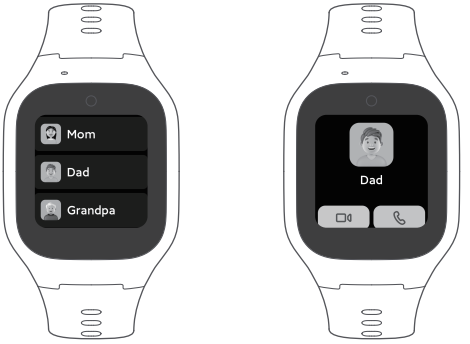
Make a voice/video call from the phone: Xiaomi Kids app→Messages→Select Phone/Video call; the watch will receive a call request and the child can choose to answer or decline the call.
Phone to answer a voice/video call: When you receive an incoming call, tap the corresponding button on the screen to answer or hang up the voice/video call.
Notes:
1. When the watch is connected to WiFi, the video call function gives priority to the WiFi network; when it is not connected to WiFi, the video call function uses the data traffic from the SIM card inside the watch.
2. To protect your child's eyes, the maximum duration of video calls is 10 minutes each time.
To answer a voice/video call on your watch: when you receive an incoming call, tap the corresponding button on the screen to answer or hang up the voice
/video call.Make a voice/video call from the phone: Xiaomi Kids app→Messages→Select Phone/Video call; the watch will receive a call request and the child can choose to answer or decline the call.
Phone to answer a voice/video call: When you receive an incoming call, tap the corresponding button on the screen to answer or hang up the voice/video call.
Notes:
1. When the watch is connected to WiFi, the video call function gives priority to the WiFi network; when it is not connected to WiFi, the video call function uses the data traffic from the SIM card inside the watch.
2. To protect your child's eyes, the maximum duration of video calls is 10 minutes each time.