

You can take a picture for a document such as paper, PowerPoint, and black-
board in Documents mode. It can modify lens distortion and adjust perspective and support you to take a straight photo. Documents mode also enables you to add watermarks to protect your documents from unauthorized copying.
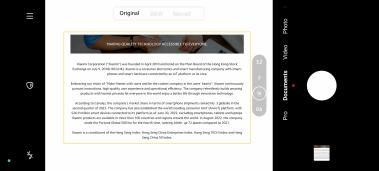
When you tap Documents for the first time, the option is not present. You can tap Documents again after downloading.
1. Open Camera.
2. Select Documents mode.
3. Point camera at the subject and wait for the camera to identify the docu- ment area in the yellow frame.
4. Tap o to take a photo.
Tip
• You can tap to edit the text of the protective watermark.
board in Documents mode. It can modify lens distortion and adjust perspective and support you to take a straight photo. Documents mode also enables you to add watermarks to protect your documents from unauthorized copying.
When you tap Documents for the first time, the option is not present. You can tap Documents again after downloading.
1. Open
Camera.2. Select Documents mode.
3. Point camera at the subject and wait for the camera to identify the docu- ment area in the yellow frame.
4. Tap o to take a photo.
Tip
• You can tap
to edit the text of the protective watermark.• You can go to
 Gallery to view and adjust the document area.