

To rename the device on the Redmi 10 5G, please refer to the following steps:
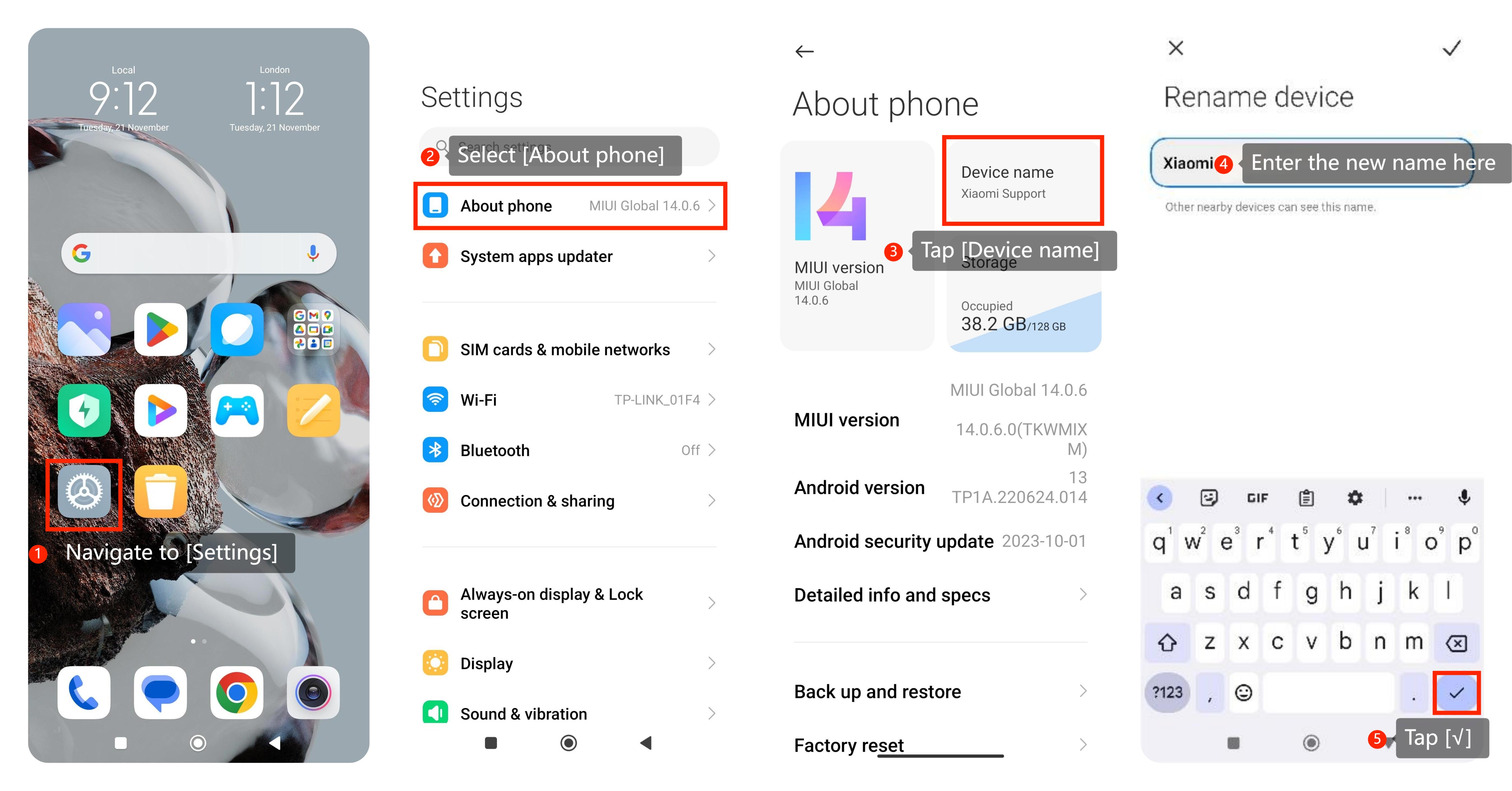
1. Navigate to [Settings]:
Navigate to [Settings] on your Xiaomi smartphone. You can find it on your home screen;
2. Select [About phone]:
In the [Settings] menu, look for and select an option called [About phone];
3. Choose [Device name]:
Within the [About phone] section, you can find and select an option called [Device name];
4. Tap on the current device name:
Select the current name of your Xiaomi smartphone. It may be the model name or a custom name you previously set;
5. Enter the new name:
You can see a screen that allows you to edit the device name. Enter the new name you want for your Xiaomi smartphone;
6. Save the changes:
After entering the new name, tap [√] to save or apply the changes. Make sure to save the changes for the new name to take effect;
7. Restart your device:
Sometimes, changes in device names may require a restart to take effect. You can restart your Xiaomi smartphone to ensure the new name is applied.
1. Navigate to [Settings]:
Navigate to [Settings] on your Xiaomi smartphone. You can find it on your home screen;
2. Select [About phone]:
In the [Settings] menu, look for and select an option called [About phone];
3. Choose [Device name]:
Within the [About phone] section, you can find and select an option called [Device name];
4. Tap on the current device name:
Select the current name of your Xiaomi smartphone. It may be the model name or a custom name you previously set;
5. Enter the new name:
You can see a screen that allows you to edit the device name. Enter the new name you want for your Xiaomi smartphone;
6. Save the changes:
After entering the new name, tap [√] to save or apply the changes. Make sure to save the changes for the new name to take effect;
7. Restart your device:
Sometimes, changes in device names may require a restart to take effect. You can restart your Xiaomi smartphone to ensure the new name is applied.