

To check for MIUI updates on your Xiaomi 13T Pro, you can follow these steps:
1. Open Settings:
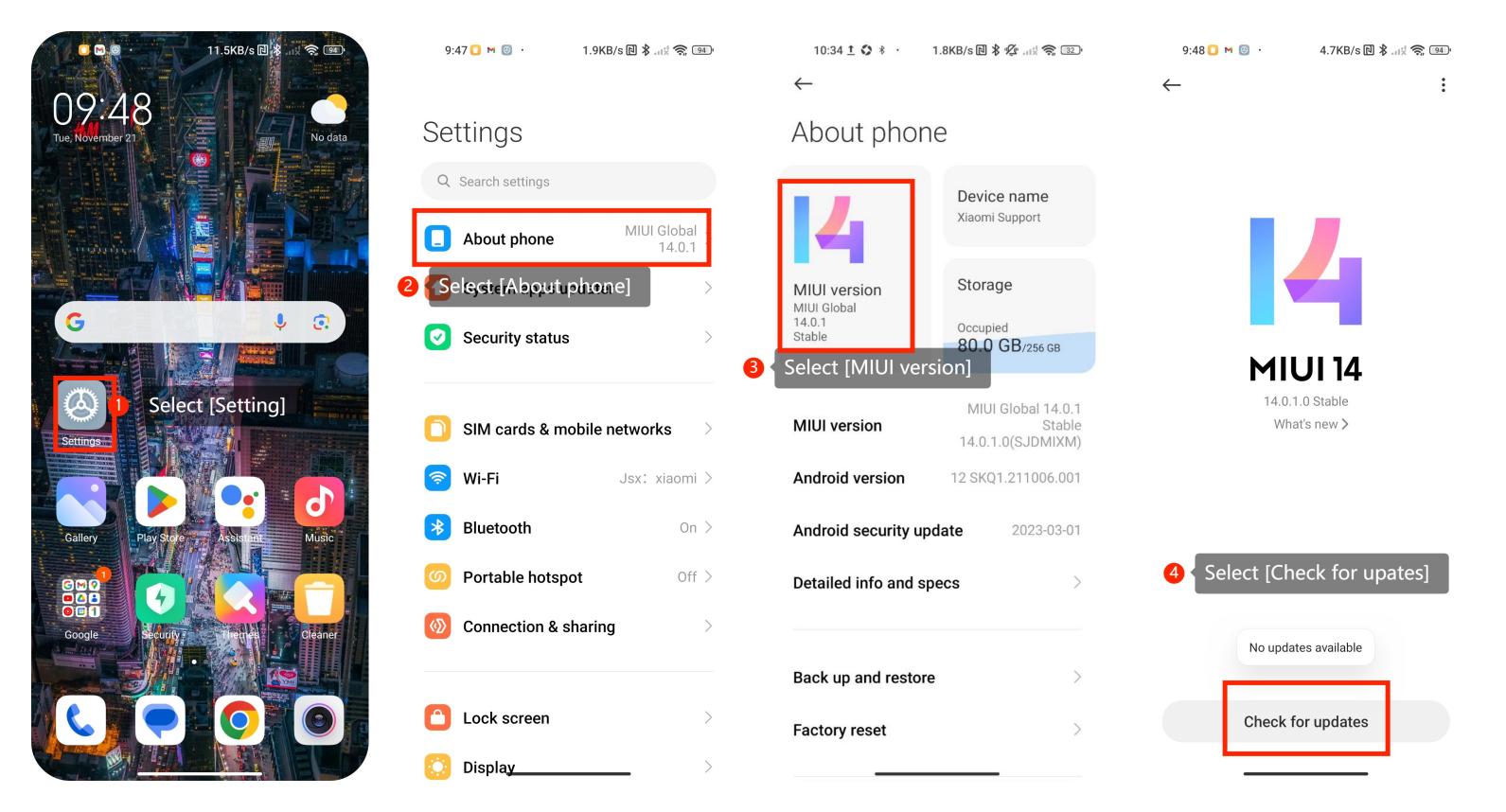
(1). Navigate to [Settings] on your Xiaomi smartphone. You can usually find it on the home screen or in the app drawer.
(2). Look for the [About phone] option in the settings menu. Select [MIUI version].
2. Check for updates:
On the "MIUI version" screen, you should see a [Check for updates] option. Tap on it, and the smartphone will search for the latest MIUI updates.
3. Download and install updates:
If there is an available update, you will be prompted to download and install it. Follow the on-screen instructions to complete the update process.
4. Reboot your smartphone:
After the update is installed, it might be necessary to reboot your smartphone to apply the changes.
Here are some friendly tips:
1. Internet Connection:
Ensure your device is connected to the internet, preferably through Wi-Fi, when checking for updates. This ensures a stable and faster download of updates.
2. Battery Level:
It's a good practice to have your device charged or connected to a power source, especially when downloading and installing updates. This helps prevent any interruptions during the update process.
1. Open Settings:
(1). Navigate to [Settings] on your Xiaomi smartphone. You can usually find it on the home screen or in the app drawer.
(2). Look for the [About phone] option in the settings menu. Select [MIUI version].
2. Check for updates:
On the "MIUI version" screen, you should see a [Check for updates] option. Tap on it, and the smartphone will search for the latest MIUI updates.
3. Download and install updates:
If there is an available update, you will be prompted to download and install it. Follow the on-screen instructions to complete the update process.
4. Reboot your smartphone:
After the update is installed, it might be necessary to reboot your smartphone to apply the changes.
Here are some friendly tips:
1. Internet Connection:
Ensure your device is connected to the internet, preferably through Wi-Fi, when checking for updates. This ensures a stable and faster download of updates.
2. Battery Level:
It's a good practice to have your device charged or connected to a power source, especially when downloading and installing updates. This helps prevent any interruptions during the update process.