

The POCO M5s features adaptive refresh rate technology. It helps you to achieve the best balance between motion smoothness and battery life. When you are playing games, a higher refresh rate can provide smoother graphics, reduce latency, and improve response speed. For video content, a lower refresh rate is usually sufficient for us.
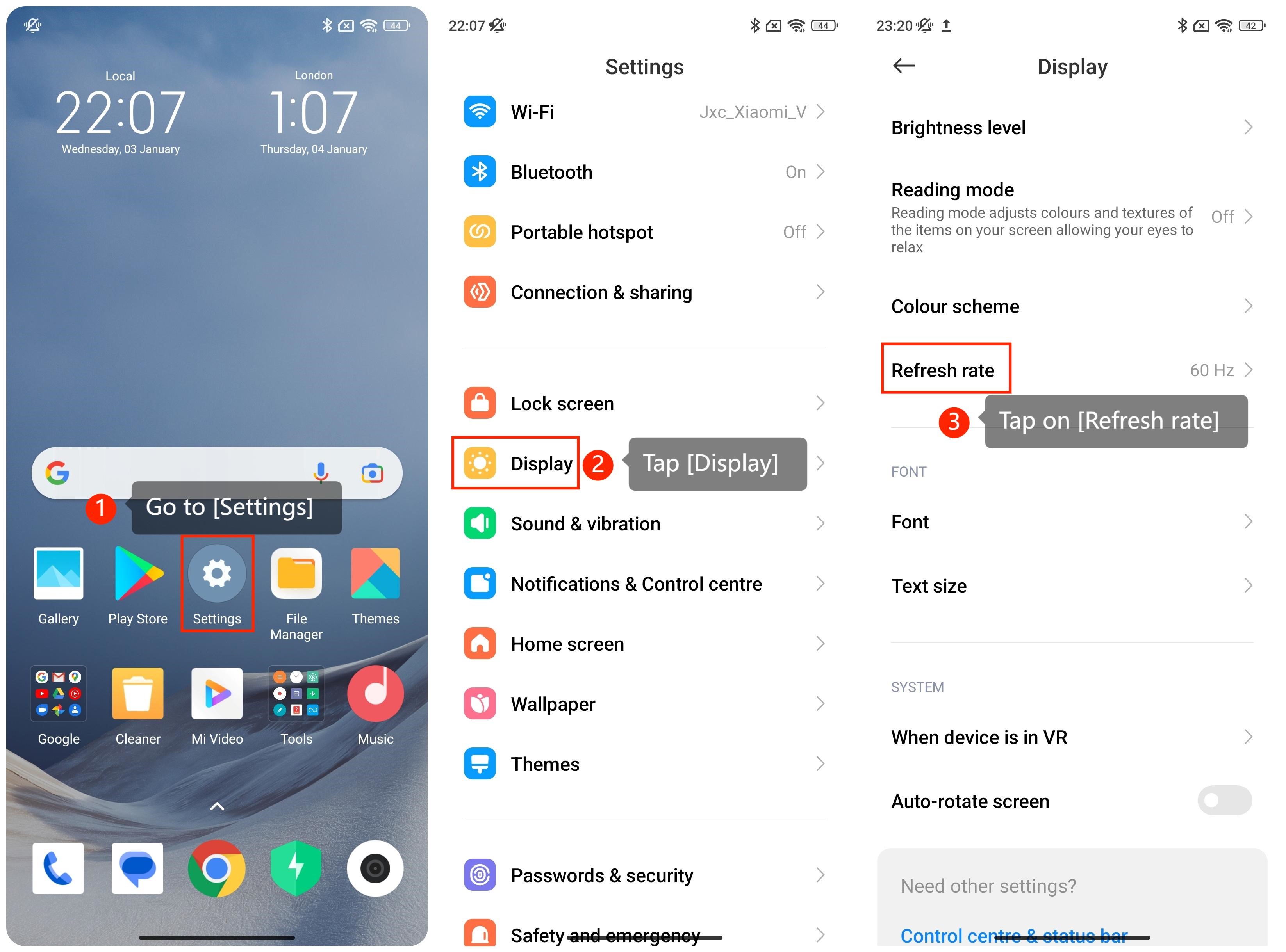
To adjust the refresh rate on the smartphone, please refer to the following steps:
1. Go to [Settings] on the home screen;
2. Tap on the [Display] option;
3. Tap on [Refresh rate];
4. Within the [Refresh rate] interface, choose the refresh rate as your preference.
Note:
In some cases, the refresh rate is adjusted dynamically based on what items are played. It’s hard for us to notice the difference during regular use.
To adjust the refresh rate on the smartphone, please refer to the following steps:
1. Go to [Settings] on the home screen;
2. Tap on the [Display] option;
3. Tap on [Refresh rate];
4. Within the [Refresh rate] interface, choose the refresh rate as your preference.
Note:
In some cases, the refresh rate is adjusted dynamically based on what items are played. It’s hard for us to notice the difference during regular use.