

The REDMI 15 supports the Shutdown alarm feature within the Clock App. Powered by the built-in hardware Real-Time Clock (RTC) for low-power independent timing, the phone can automatically power on and ring the alarm at the set time even when fully shut down. It saves battery power, blocks incoming calls and message disturbances at night, and avoids missed alarms caused by silent mode or system background exceptions. Adopting stable hardware timing, the feature works reliably with a sufficient battery level and is perfect for daily sleep use.
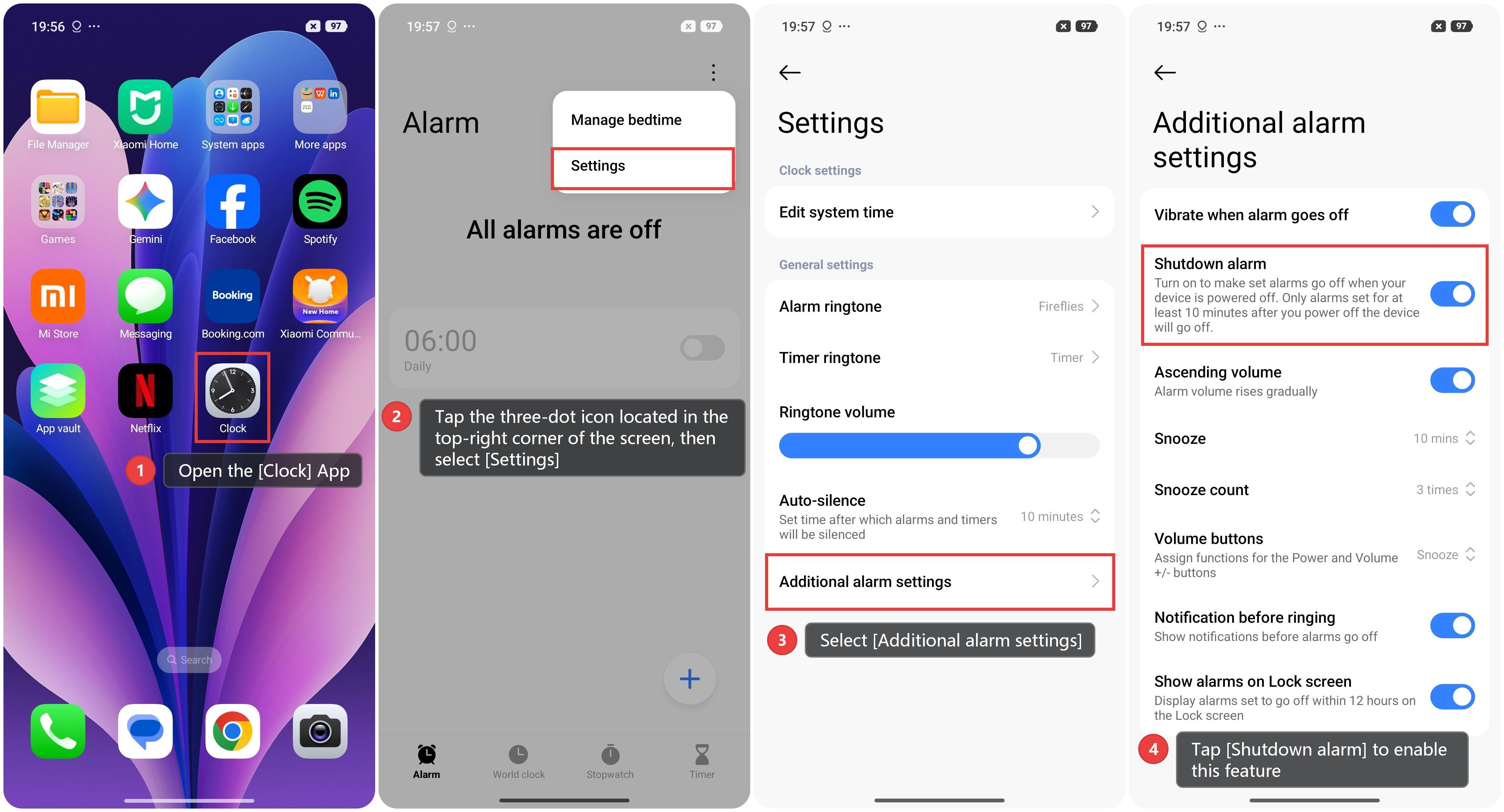
To use the Shutdown alarm feature within the Clock App, please follow the steps below:
1. Open the [Clock] App.
2. Tap the three-dot icon located in the top-right corner of the screen, then select [Settings].
3. Select [Additional alarm settings].
4. Tap [Shutdown alarm] to enable this feature.
Note:
1. Turn on to make set alarms go off when your device is powered off. Only alarms set for at least 10 minutes after you power off the device will go off.
2. This feature requires the phone to retain sufficient battery power; if the battery level is too low, the hardware timer and automatic wake-up functions cannot be sustained, preventing the alarm from sounding properly while the device is powered off. We recommend keeping the battery at 20% or higher when using this feature to avoid missing an alarm due to low power.