

The 240Hz and VRR features of the Xiaomi TV S Mini LED 65 2025 are turned off by default and need to be activated within the HDMI source when required. Once activated, they remain effective within the source, and switching in and out of the source will not turn them off.
However, these options will be turned off if the TV is restarted or put into standby mode, and they will need to be turned on again for subsequent use.
Within the HDMI source, use the remote control to call up the HDMI menu:
For Europe/East Asia/Southeast Asia/Indonesia/Middle East & Africa/Latin America regions, press and hold the Settings Button to call up the menu.

For the CIS region, press and hold the Patchwall Button to call up the menu.

The menu interface is shown below:
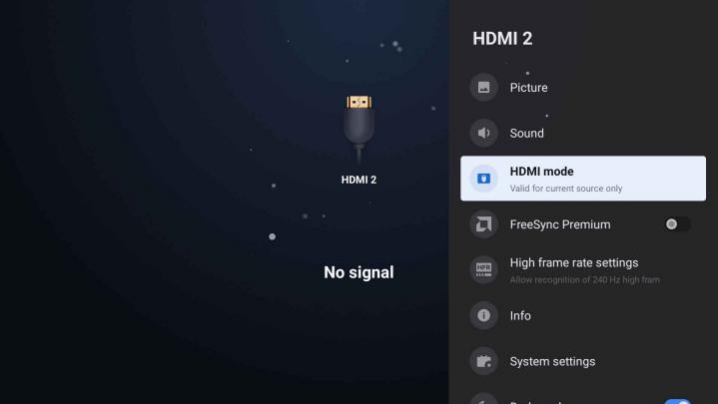
If you want to use the FreeSync function, enable the “FreeSync Premium”.
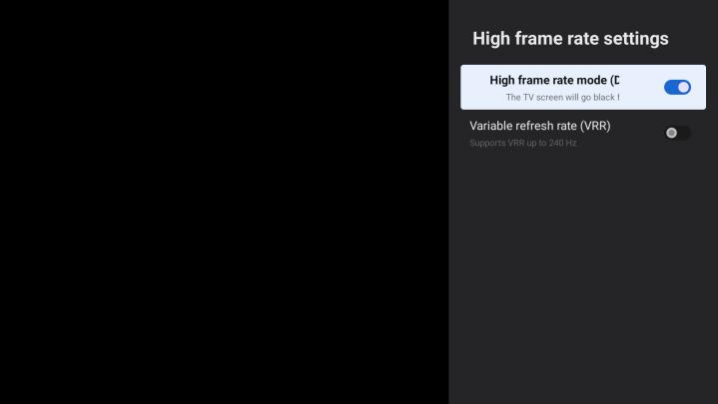
If you want to use 240Hz or the VRR function, select the “High frame rate settings” to enter the secondary menu.
Enable the “High frame rate mode” to use 240 Hz.
Enable the “Variable refresh rate (VRR)” to use the VRR function.
Note:
There are only 3 HDMI ports, but only HDMI ports 1 and 2 support true HDMI 2.1 mode.
HDMI 1 - Support 4K - 120Hz (Enhanced) / 4K - 144Hz (freesync) /1080p - 240Hz(DLG).
HDMI 2 - Support 4K - 120Hz (Enhanced) / 4K - 144Hz (freesync) / 1080p - 240Hz(DLG).
HDMI 3 - Support 2K - 120Hz (Enhanced) / 1080p - 240Hz(DLG).