

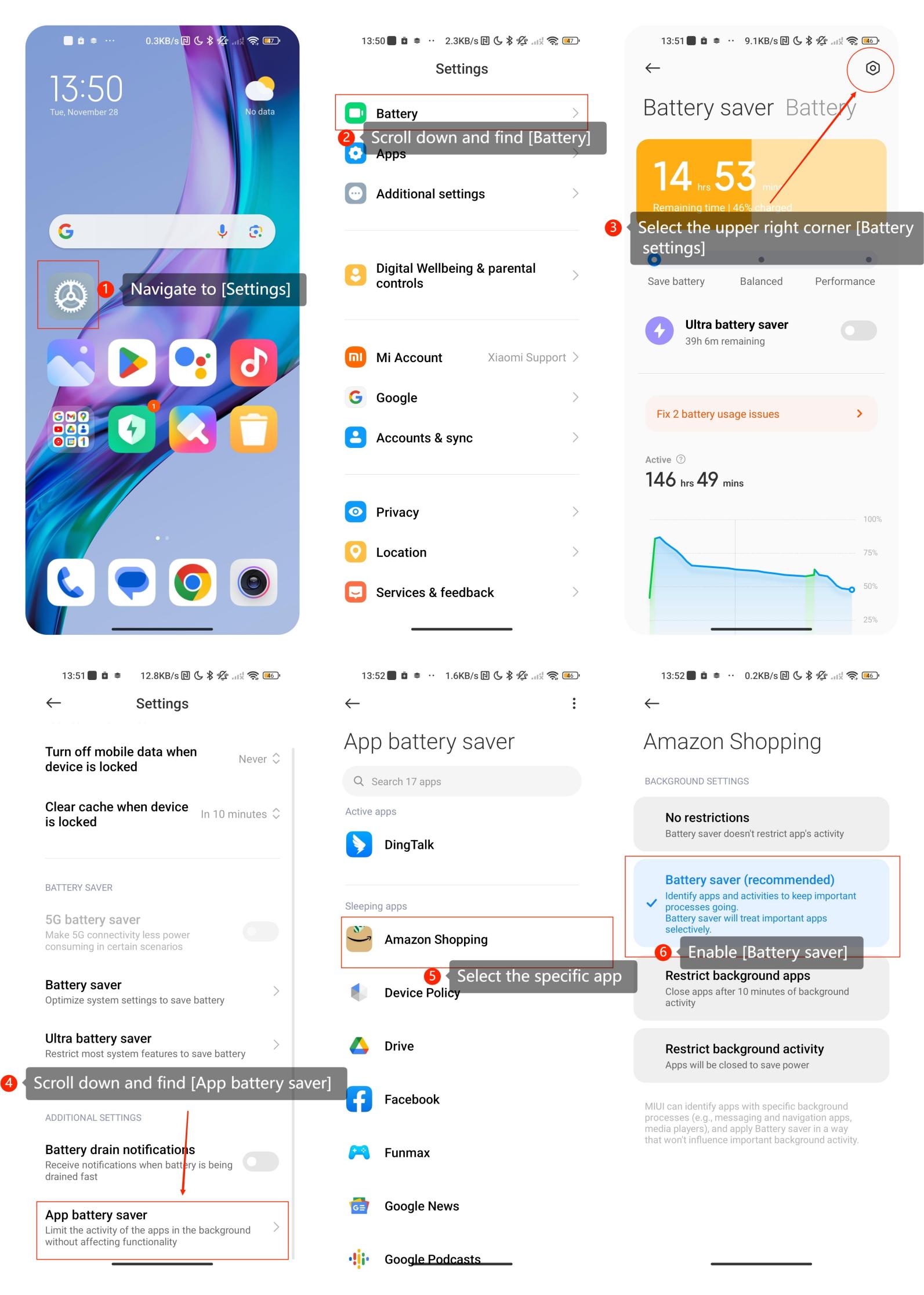
To enable App battery saver on the REDMI Note 11S 5G, please refer to the following steps:
Navigate to [Settings] >> scroll down and find [Battery] >> select the upper right corner [Battery settings] >> scroll down and find [App battery saver] >> select the specific apps for which you want to enable [Battery saver].
Note:
When you enable App battery saver on your smartphone, there are a few considerations to keep in mind:
1. Background Activity Limitations:
App battery saver often restricts background activities for optimized battery performance. This means that some apps may not update or sync data in the background as frequently. Be aware that this could affect the real-time notifications and updates for certain applications.
2. Performance Impact:
Depending on the level of optimization, some apps might experience a delay in response time or may take longer to open. This is because App battery saver may limit the resources allocated to these apps to conserve battery power.
3. Syncing and Updates:
Apps set to battery optimization may not sync data as frequently in the background. This can affect updates for social media apps, email, and other services that rely on background synchronization. If you need real-time updates, consider adjusting the optimization settings for specific apps.
Navigate to [Settings] >> scroll down and find [Battery] >> select the upper right corner [Battery settings] >> scroll down and find [App battery saver] >> select the specific apps for which you want to enable [Battery saver].
Note:
When you enable App battery saver on your smartphone, there are a few considerations to keep in mind:
1. Background Activity Limitations:
App battery saver often restricts background activities for optimized battery performance. This means that some apps may not update or sync data in the background as frequently. Be aware that this could affect the real-time notifications and updates for certain applications.
2. Performance Impact:
Depending on the level of optimization, some apps might experience a delay in response time or may take longer to open. This is because App battery saver may limit the resources allocated to these apps to conserve battery power.
3. Syncing and Updates:
Apps set to battery optimization may not sync data as frequently in the background. This can affect updates for social media apps, email, and other services that rely on background synchronization. If you need real-time updates, consider adjusting the optimization settings for specific apps.