

Xiaomi Wireless Keyboard and Mouse Combo has the following indicators:
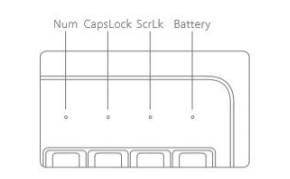
1)When the keypad is switched on, the three white LEDs will light up simultaneously for 3 seconds to indicate that the keypad is in working condition. When the keyboard is low on power, the orange light will flash for 3 seconds after the keyboard is switched on or woken up from hibernation to indicate battery replacement.
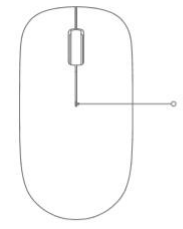
2) When the mouse is low on power, the centre seam indicator light will flash orange for 10 seconds after the mouse is switched on or woken up from hibernation to prompt battery replacement.
Note: The mouse is designed to save power and the indicator light will automatically go into hibernation off state during use, so please use it with peace of mind. The battery life of Xiaomi Wireless Keyboard and Mouse Combo varies depending on the usage environment and workload, about 4 months or more under normal circumstances.
| Indicator status | Light Colour | Keyboard Status | Lighting time |
| Num indicator is always on | White | Numeric Lock On | 3 seconds |
| CapsLock indicator long on | White | Caps Lock On | 3 seconds |
| ScrLk indicator is on | White | Scroll lock On | 3 seconds |
| Battery indicator is always on | Orange | Battery Low | 3 seconds |
2) When the mouse is low on power, the centre seam indicator light will flash orange for 10 seconds after the mouse is switched on or woken up from hibernation to prompt battery replacement.
Note: The mouse is designed to save power and the indicator light will automatically go into hibernation off state during use, so please use it with peace of mind. The battery life of Xiaomi Wireless Keyboard and Mouse Combo varies depending on the usage environment and workload, about 4 months or more under normal circumstances.