

You can change the camera layout, color, and sound.
1. Open Camera settings.
2. Tap Customize to choose customized types.
• Tap Feature Layout to rearrange the icons on both camera start screen and More features screen.
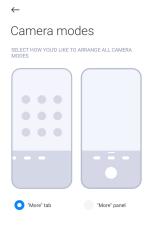
• Tap Camera modes to select "More" tab or "More" panel.
1. Open Camera settings.
2. Tap Customize to choose customized types.
• Tap Feature Layout to rearrange the icons on both camera start screen and More features screen.
• Tap Camera modes to select "More" tab or "More" panel.