

You can adjust the white balance, focus, shutter speed, ISO sensitivity, exposure verification, lenses, and other features to take professional photos and videos.
Pro features
Pro features enables you to adjust different parameters to achieve the effects that you want. You can take creative photos and videos of your own style. The following are Pro features and their functions:
• Tap WB to select the white balance effects. When you shoot in different environments, you can apply the corresponding WB effects such as incandescent, daylight, and cloudy.
• Tap F and drag the slider to adjust the focus. When your camera is close to a subject, you can drag the slider to the left side. When your camera is far away from a subject, drag the slider to the right side.
• Tap S and drag the slider to adjust the shutter speed. When you shoot a stationary scene or portrait, you can lower the shutter speed. When you shoot a moving object, increase the shutter speed.
• Tap ISO and drag the slider to adjust ISO sensitivity. When you shoot in a low-light condition, you can increase the ISO value. When you shoot in a bright condition, decrease the ISO value.
• Tap EV and drag the slider to adjust exposure verification. When you shoot in a low-light condition, you can increase the EV value. When you shoot in a bright condition, you can lower the EV value.
• Tap LENS to select lenses. You can tap
 for ultra-wide photos,
  for wide photos, or
  for telephotos.
Note
Some lens may not be available to your models.
• Tap to select Metering modes.
• Tap
to select Metering modes. | Measure light on the center area of the frame. |
 | Measure light in the whole frame. |
 | Measure light in one spot in the frame. |
Tip
• You can go to ◎Camera > Pro > 昌 > ◎Settings to enable Exposure verification. The feature highlights underexposed areas in blue and overexposed areas in red and helps you to adjust exposure accordingly.
• You can go to Camera > Pro >
  >
>  Settings to enable Focus peaking. The feature places a red highlight on the in-focus area and helps you to adjust focus accordingly.
Take photos in Pro mode
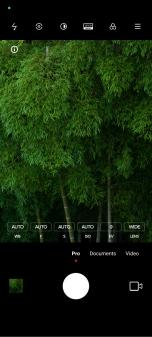
1. Open Camera.
2. Select Pro mode.
3. Adjust the Pro features such as WB , F , S , ISO , EV , LENS , and Metering modes.
4. Tap o to take a photo.
• You can go to ◎Camera > Pro > 昌 > ◎Settings to enable Exposure verification. The feature highlights underexposed areas in blue and overexposed areas in red and helps you to adjust exposure accordingly.
• You can go to
Camera > Pro > > Settings to enable Focus peaking. The feature places a red highlight on the in-focus area and helps you to adjust focus accordingly.Take photos in Pro mode
1. Open
Camera.2. Select Pro mode.
3. Adjust the Pro features such as WB , F , S , ISO , EV , LENS , and Metering modes.
4. Tap o to take a photo.
Take videos in Pro mode
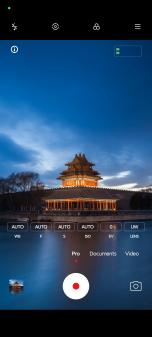
1. Open
 Camera.
2. Select Pro mode.
3. Tap
 to switch to shoot a video.
4. Adjust the Pro features.
5. Tap
 to start shooting.
6. Tap
 to stop shooting.
Note
When taking a video, you can tap
 to pause your shooting and tap
  to continue. You can also tap
  to take a photo while shooting a video.