

You can choose not to display Apps or display the used Apps in the App drawer or display bigger UI elements.
1.Go to Settings >
  Home screen.
2. Tap Home screen to choose App display on Home screen.
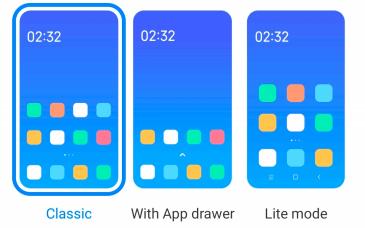
Tap Classic to not to display Apps.
Tap With App drawer to display the used Apps in the drawer when you swipe up on Home screen.
Tap Lite mode to apply bigger UI elements, more accessible calling, and enhanced security.
1.Go to
Settings > Home screen.2. Tap Home screen to choose App display on Home screen.
Tap Classic to not to display Apps.
Tap With App drawer to display the used Apps in the drawer when you swipe up on Home screen.
Tap Lite mode to apply bigger UI elements, more accessible calling, and enhanced security.
Note
To turn off Lite mode , you go to
 Settings and tap the place under the search bar.