Solution:
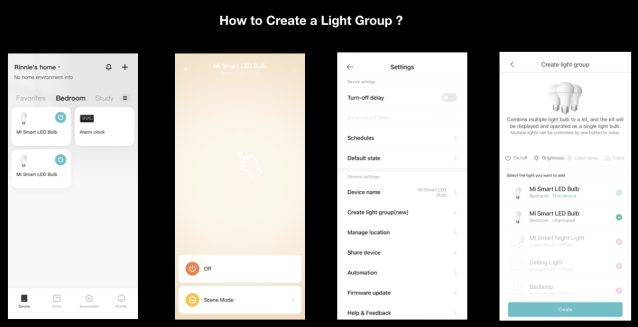
1. Enter the bulb page to control this bulb individually. Click the "three dots" icon in the upper right corner of the control page, in Create Light Group (New), select the bulb you want to add to the light group, and click "Create" at the bottom to complete the creation of the light group;
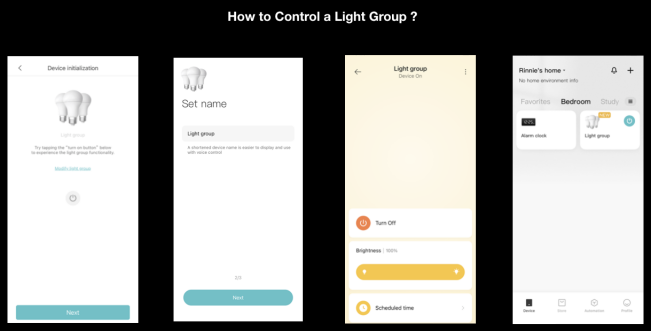
2.After setting the light group name, you can enter the light group page. If you exit the page and return to the device list at this time, the light bulbs will no longer be displayed individually and cannot be controlled individually, but will be displayed in the form of light groups;
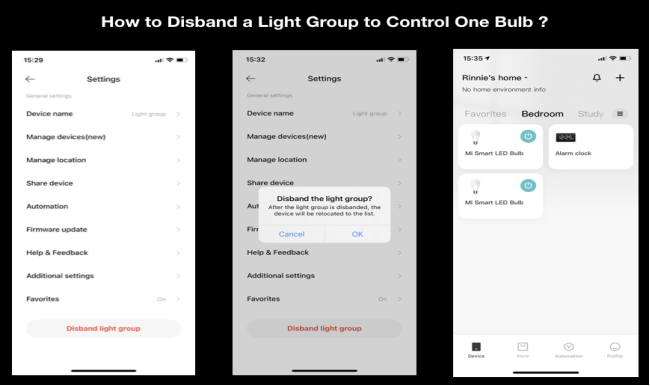
3.If you need to control this bulb separately, please enter the light group control page, click the three-dot icon in the upper right corner, and select Disband the light group, the device list can restore a single light bulb device, and click to enter the single light page.