

Solution:
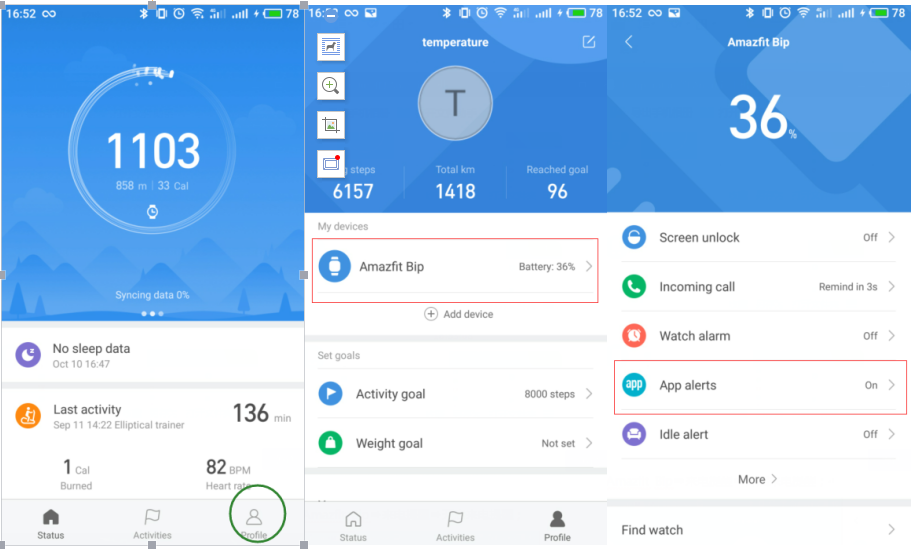
1) Open Zepp Life App and tap on“Profile” in the lower right-hand corner.
2) Tap on My devices-- Amazfit Bip
3) Tap on App alerts to allow Zepp Life access notifications
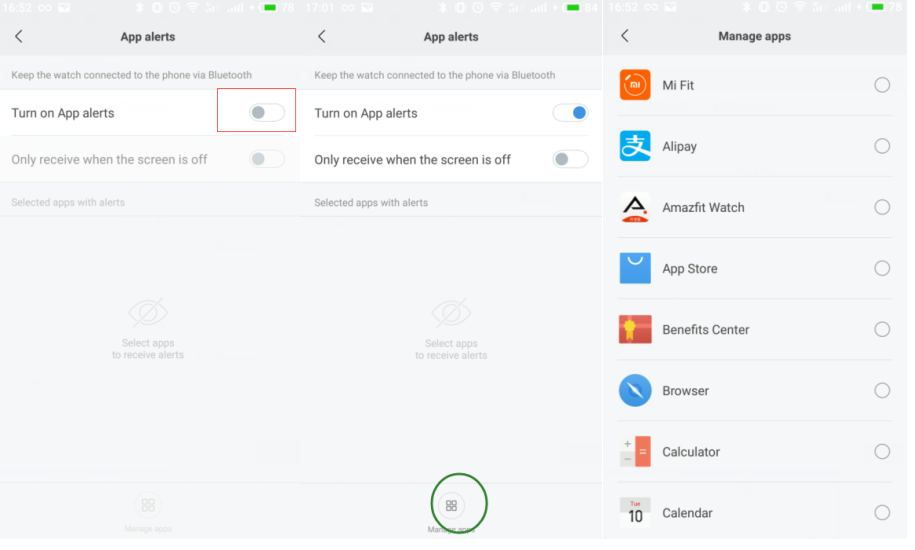
4) Turn on App Alerts
5) Tap on “Manage apps” in the lower middle of the screen and select app to alert.
Note: If you toggle on “only receive app alerts when the screen is off”, you will only receive app alerts when your phone screen is off.
1) Open Zepp Life App and tap on“Profile” in the lower right-hand corner.
2) Tap on My devices-- Amazfit Bip
3) Tap on App alerts to allow Zepp Life access notifications
4) Turn on App Alerts
5) Tap on “Manage apps” in the lower middle of the screen and select app to alert.
Note: If you toggle on “only receive app alerts when the screen is off”, you will only receive app alerts when your phone screen is off.