

Function introduction:
With Dual apps on, a new app can be duplicated and both apps can run at the same time without affecting each other, allowing you to sign into 2 accounts at the same time.
Open path:
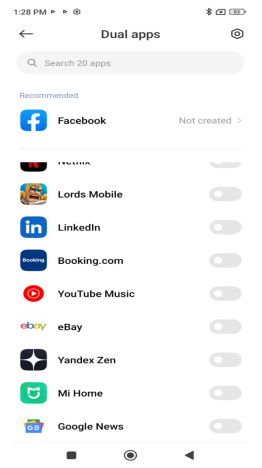
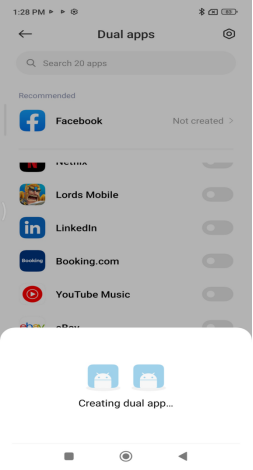
Settings-Dual apps-select APP, choose app to turn it on. Dual apps are currently available for most apps except system apps, which will take a little longer to open the first time.
FAQ
1.Q:Will Dual apps take up too much space?
A:Dual apps will generate a separate copy of the app data. The space taken up by the duplicated app depends on the size of the app data, and the original app data and the Dual apps data are independent of each other.
Deleting the duplicated app will not affect the original app. Deleting the original app will uninstall the associated app and app data together.
2.Q:How to close Dual apps?
A:You can delete the duplicated apps directly from the Home screen, or go to the Dual apps settings page to close them. Closing Dual apps will also delete the app data and cannot be backed up or restored.
3.Q:How to separate Dual apps and how to display notifications?
A:After Dual apps, an special icon will be added to the duplicate app to distinguish whether the notification is from the duplicate app or the original app. 2 apps can be logged into 2 different accounts. If you need to sign in with your Xiaomi account, the initial app can sign in directly to the Xiaomi account signed in your phone, and the associated app can sign in again to a different Xiaomi account.
4.Q:If I open the system split function, can I still turn on Dual apps?
A:If you enable system split, you can turn on Dual apps to generate 2 identical apps in the original system. There is no such switch in the split system for the time being, and you cannot use Dual apps, so up to 3 identical apps can exist including the original app.
Note:
1.Dual apps is a universal design that works for most software and can meet the different needs of different users.
2. If some software strictly prohibits the modification of applications or Dual apps in their terms and conditions or if you are concerned about the use of this feature, you can consult the software developer or decide for yourself whether to use this feature.
3.Double-opening applications cannot be operated through ShareMe.
4.Some apps require Google services, so when you double-open these apps, you will be able to synchronise them with Google services to protect your experience.
5.Double-opening is based on Google's Managed Profile, which is called "work apps" in the native Google, so users can see the traffic or power consumption of "all work apps" in the system, which is actually the consumption of double-opening apps.
With Dual apps on, a new app can be duplicated and both apps can run at the same time without affecting each other, allowing you to sign into 2 accounts at the same time.
Open path:
Settings-Dual apps-select APP, choose app to turn it on. Dual apps are currently available for most apps except system apps, which will take a little longer to open the first time.
FAQ
1.Q:Will Dual apps take up too much space?
A:Dual apps will generate a separate copy of the app data. The space taken up by the duplicated app depends on the size of the app data, and the original app data and the Dual apps data are independent of each other.
Deleting the duplicated app will not affect the original app. Deleting the original app will uninstall the associated app and app data together.
2.Q:How to close Dual apps?
A:You can delete the duplicated apps directly from the Home screen, or go to the Dual apps settings page to close them. Closing Dual apps will also delete the app data and cannot be backed up or restored.
3.Q:How to separate Dual apps and how to display notifications?
A:After Dual apps, an special icon will be added to the duplicate app to distinguish whether the notification is from the duplicate app or the original app. 2 apps can be logged into 2 different accounts. If you need to sign in with your Xiaomi account, the initial app can sign in directly to the Xiaomi account signed in your phone, and the associated app can sign in again to a different Xiaomi account.
4.Q:If I open the system split function, can I still turn on Dual apps?
A:If you enable system split, you can turn on Dual apps to generate 2 identical apps in the original system. There is no such switch in the split system for the time being, and you cannot use Dual apps, so up to 3 identical apps can exist including the original app.
Note:
1.Dual apps is a universal design that works for most software and can meet the different needs of different users.
2. If some software strictly prohibits the modification of applications or Dual apps in their terms and conditions or if you are concerned about the use of this feature, you can consult the software developer or decide for yourself whether to use this feature.
3.Double-opening applications cannot be operated through ShareMe.
4.Some apps require Google services, so when you double-open these apps, you will be able to synchronise them with Google services to protect your experience.
5.Double-opening is based on Google's Managed Profile, which is called "work apps" in the native Google, so users can see the traffic or power consumption of "all work apps" in the system, which is actually the consumption of double-opening apps.