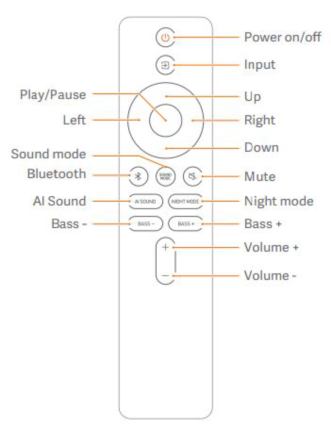
The remote control of the Xiaomi Soundbar 3.1ch offers convenient access to various functions, enhancing your experience.
Here are some common functions typically found on the remote control:
1. Power On/Off: Allows you to turn the soundbar system on and off;
2. Input: Allows you to short press to switch between HDMI, BT, OPTICAL, COAXIAL, and USB;
3. Up/Down: Allows you to Press Sound mode to enter Advanced Sound Setting. You can also Press up/down to switch in Treble/System Bass/Audio Sync. Press OK to start adjustment;
4. Playback Controls: Allows you to play, pause, skip tracks, and navigate through audio content when using Bluetooth or USB playback;
5. Left/Right: When playing music, you can short press to change the next or previous track. Long press to fast forward or rewind;
6. Sound mode: Allows you to press to switch between Standard, Cinema, Music, Game, and News;
7. Bluetooth: Allows you to short press to check BT status. Long Press to start BT pairing;
8. AI Sound: Allows you to press to switch AI Sound on/off. When AI Sound is on, Soundbar will adjust the sound mode automatically to fit the current play;
9. Bass +/-: Allows you to Press to change Subwoofer volume;
10. Night mode: Allows you to Press to switch Night mode on/off;
11. Volume +/-: Press to change Bar volume;
12. Mute: Temporarily mutes the sound output of the soundbar.
Here are some common functions typically found on the remote control:
1. Power On/Off: Allows you to turn the soundbar system on and off;
2. Input: Allows you to short press to switch between HDMI, BT, OPTICAL, COAXIAL, and USB;
3. Up/Down: Allows you to Press Sound mode to enter Advanced Sound Setting. You can also Press up/down to switch in Treble/System Bass/Audio Sync. Press OK to start adjustment;
4. Playback Controls: Allows you to play, pause, skip tracks, and navigate through audio content when using Bluetooth or USB playback;
5. Left/Right: When playing music, you can short press to change the next or previous track. Long press to fast forward or rewind;
6. Sound mode: Allows you to press to switch between Standard, Cinema, Music, Game, and News;
7. Bluetooth: Allows you to short press to check BT status. Long Press to start BT pairing;
8. AI Sound: Allows you to press to switch AI Sound on/off. When AI Sound is on, Soundbar will adjust the sound mode automatically to fit the current play;
9. Bass +/-: Allows you to Press to change Subwoofer volume;
10. Night mode: Allows you to Press to switch Night mode on/off;
11. Volume +/-: Press to change Bar volume;
12. Mute: Temporarily mutes the sound output of the soundbar.