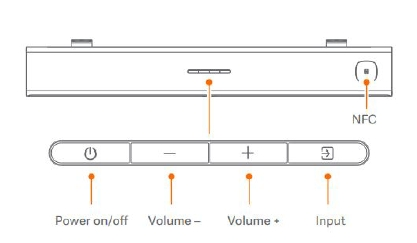
The Xiaomi Soundbar 3.1ch offers not only exceptional audio quality but also convenient controls to enhance your listening experience. Each button serves various functions to control the soundbar and adjust settings.
Here's a general overview of what each button typically does:
1. Power Button: Turns the soundbar on and off;
2. Volume Up Button: Adjusts the volume level of the soundbar;
3. Volume Down Button: Adjusts the volume level of the soundbar;
4. Input Source Button: Allows you to cycle through different input sources such as HDMI, Bluetooth, optical, etc;
5. NFC Button: Allows you to tap your NFC-enabled smartphone or other compatible device against the NFC area on the soundbar to establish a Bluetooth connection.
Note:
Mastering the functions of the buttons on the Xiaomi Soundbar 3.1ch is key to unlocking the full potential of your audio experience. From powering on and adjusting volume to selecting input sources and simplifying Bluetooth pairing, each button plays a crucial role in enhancing your enjoyment of movies, music, and more. By familiarizing yourself with these controls, you can effortlessly navigate your soundbar and immerse yourself in captivating sound quality with ease.