

The Wi-Fi Status Indicator on the Mi Smart Air Fryer provides information about the device's connection to a Wi-Fi network. It typically displays different colors or patterns to indicate various states, such as when the device is connected to Wi-Fi, searching for Wi-Fi networks, or encountering connection issues.
If you are interested with the Wi-Fi Status Indicator mean, here are more details for your reference:
1. When the air fryer is trying to connect to Wi-Fi, the Wi-Fi light blinks slowly as it searches for available networks;
2. If the air fryer loses Wi-Fi connection and tries to reconnect, the Wi-Fi light blinks quickly to show it's trying to reconnect;
3. When the air fryer successfully connects to Wi-Fi, the Wi-Fi light stays on continuously;
4. During a software update, the Wi-Fi light blinks twice to show it's updating through Wi-Fi.
Note:
If the air fryer can't connect to Wi-Fi for 30 minutes, the Wi-Fi light stays on continuously, indicating a connection issue that needs attention.
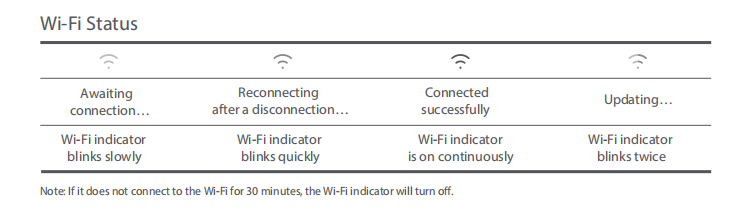
If you are interested with the Wi-Fi Status Indicator mean, here are more details for your reference:
1. When the air fryer is trying to connect to Wi-Fi, the Wi-Fi light blinks slowly as it searches for available networks;
2. If the air fryer loses Wi-Fi connection and tries to reconnect, the Wi-Fi light blinks quickly to show it's trying to reconnect;
3. When the air fryer successfully connects to Wi-Fi, the Wi-Fi light stays on continuously;
4. During a software update, the Wi-Fi light blinks twice to show it's updating through Wi-Fi.
Note:
If the air fryer can't connect to Wi-Fi for 30 minutes, the Wi-Fi light stays on continuously, indicating a connection issue that needs attention.