

The Xiaomi Smart Speaker with IR Control does not have a built-in battery. To power the device, it needs to be connected to the DC power cable provided in the packaging. This means that the speaker must be plugged into a power outlet at all times to function. It's important to use the provided power cable and adapter to ensure proper power supply and avoid any damage to the speaker.
To power the Xiaomi Smart Speaker (IR Control), Please refer to the following steps:
1. To power your Xiaomi Smart Speaker with IR Control, start by locating the provided power adapter;
2. Plug the other end of the power adapter into a standard electrical outlet, ensuring a secure connection;
3. Ensure that the power cable is securely connected to both the speaker and the power outlet to avoid any interruptions in the speaker's operation;
4. When the indicator light lights up, it’s mean that the power adapter are successfully connected to the speaker.
Note:
Make sure that the power cable is not twisted or bent, as this can cause damage to the cable and affect the speaker's functionality. Properly powering your Xiaomi Smart Speaker is key to enjoying its full range of features and functionalities.
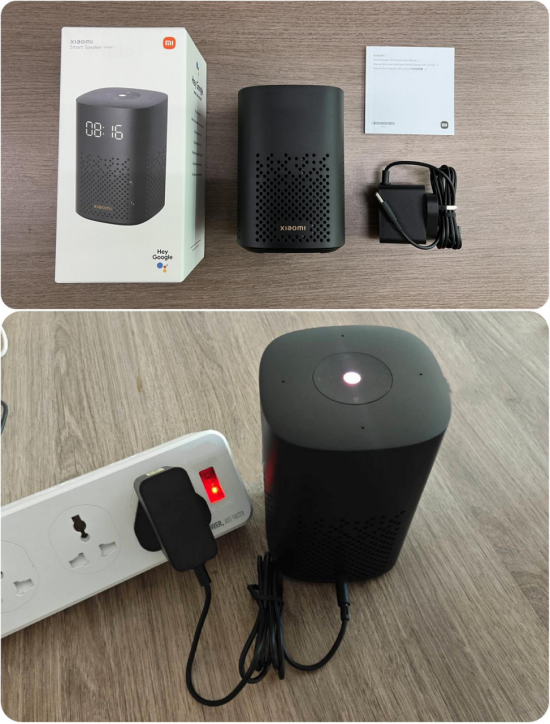
To power the Xiaomi Smart Speaker (IR Control), Please refer to the following steps:
1. To power your Xiaomi Smart Speaker with IR Control, start by locating the provided power adapter;
2. Plug the other end of the power adapter into a standard electrical outlet, ensuring a secure connection;
3. Ensure that the power cable is securely connected to both the speaker and the power outlet to avoid any interruptions in the speaker's operation;
4. When the indicator light lights up, it’s mean that the power adapter are successfully connected to the speaker.
Note:
Make sure that the power cable is not twisted or bent, as this can cause damage to the cable and affect the speaker's functionality. Properly powering your Xiaomi Smart Speaker is key to enjoying its full range of features and functionalities.