

Features:
In MIUI11, the "User Feedback" APP was renamed "Services&feedback".
In order to upload and feedback modem (phone, signal, mobile network), audio, positioning, sensor, WLAN, Bluetooth, camera, charging, freeze logs, and simplify the use process, the user feedback APP has added Logs.
MIUI12、MIUI13:Services&feedback>>Logs
MIUI 11:Services&feedback App >> Services&feedback>> three dots on the top right >> Logs
MIUI 10:User Feedback APP>>Three dots in the upper right corner (more)>>Logs
Instructions:
1. First open the screen recorder and record the fault video
2. Confirm and find the log category that needs to be captured, such as mobile phone signal-related or data network-related problems, and select "Phones,signal,and mobile networks"
3. Click "Start" (signal faults need to switch Airplane mode once, and wait for the SIM card to re-register the network to ensure that the log is effective)
4. Return to the desktop to use the faulty function again (reproduce the problem), (try to keep the signal fault for more than 30 seconds)
5. Go back to the Logs interface and click "Complete and Upload/Complete and Feedback", it will jump to the submission feedback page (Figure 4 below), stop the screen recording at this time, upload the fault video to the user feedback that has been submitted successfully, and enter the description. Check "Send" and submit.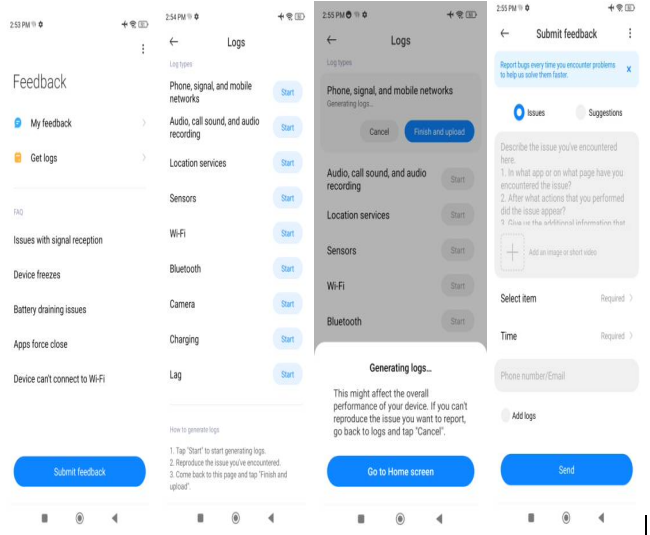
The following 6 Logs are currently supported:
1. Phones,signal,and mobile networks (that is, the early 995log, which is the modem log)
If feedback about modem/RF-related problems, such as data network freeze/disconnected/unable to connect to the Internet/high latency/VoLTE-related anomalies/problems with incoming and outgoing calls/poor or no signal/unrecognized SIM card, etc., you need to use the This function performs Logs
2. Audio, recording, call sound and audio recording
Such as audio related problems, such as speaker noise/speaker abnormal sound/speaker current sound/headphone no sound/headphone unilateral silent/headphone noise abnormal sound/high recording noise/low microphone sound/the other party cannot hear your own voice during the call/ If you can't hear the other party's voice and other related problems during a call, you need to use this function for Logs
3. Location services
If feedback location services related problems, such as positioning drift/offset/slow positioning/unable to locate/weak GPS signal/compass failure/direction recognition error, etc., you need to use this function for Logs
4. Sensor
For example, feedback on the various sensors of the mobile phone (common such as light sensor, distance sensor, gyroscope, acceleration sensor, air pressure sensor, etc.) or related problems (such as abnormal automatic brightness, when the call is not close to the black screen or the black screen cannot be turned on, the gyroscope fails, etc.) , you need to use this function for Logs
5. WLAN, fast transmission (including hotspot, WiFi parallel acceleration and other related derivative functions)
6. Bluetooth
7. Camera, this tool can be used for problems such as the camera cannot be turned on, the shooting is blurred, and the focus cannot be
8. Charging: problems such as slow charging, no charging animation, and no change in power can be captured with this tool
9.Lag: The mobile phone is stuck, the frame is dropped seriously, etc.