

Explain
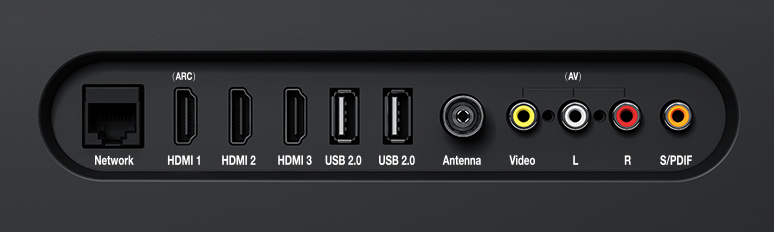
The Antenna interface of Xiaomi TV can be used to connect an external antenna or cable TV. The shape of the Antenna interface is as follows:
Tip:
The basic function of TV products is to watch TV programs, and the standard interface used to obtain the signals of local TV program operators is the antenna interface, that is, the TV interface. Some products are directly marked with the word Antenna. Coaxial cable interface, closed-circuit interface, and closed-circuit TV interface all refer to the antenna interface on the TV side.
Antenna interface and Set Top Box FAQ
The antenna port can also be used to connect the Set Top Box.
Set Top Box, that is, "digital video conversion box", also called digital TV set-top box, is a device that connects a TV with an external signal source. It converts compressed digital signals into TV content and displays it on the TV. The signal of the set-top box can come from cable TV, satellite cauldron, IPTV and terrestrial broadcasting.
Q1: Can the analog signal output interface of the Set Top Box be directly connected to the antenna interface of the TV?
A: Yes. Connect the RF output port of the set-top box to the RF input port of the TV through a coaxial cable, you can watch TV programs, but generally only a few analog channels can be seen, depending on the support of the Set Top Box.
Q2: Why is the Set Top Box rarely directly connected to the antenna port of the TV?
A: With the gradual popularization of "AV interface" in TVs & set-top boxes, in order to pursue a better viewing experience and more programs, many users have gradually abandoned the traditional "directly connected antenna interface" method and switched to "AV composite cable". "connect.
Likewise, digital signal interfaces (such as HDMI) have become popular in recent years. Now many set-top boxes also support HDMI connection, because the digital signal program is clearer, and users are more willing to use the HDMI interface to connect to the TV (of course, the premise is that both the set-top box and the TV support HDMI).
The Antenna interface of Xiaomi TV can be used to connect an external antenna or cable TV. The shape of the Antenna interface is as follows:
Tip:
The basic function of TV products is to watch TV programs, and the standard interface used to obtain the signals of local TV program operators is the antenna interface, that is, the TV interface. Some products are directly marked with the word Antenna. Coaxial cable interface, closed-circuit interface, and closed-circuit TV interface all refer to the antenna interface on the TV side.
Antenna interface and Set Top Box FAQ
The antenna port can also be used to connect the Set Top Box.
Set Top Box, that is, "digital video conversion box", also called digital TV set-top box, is a device that connects a TV with an external signal source. It converts compressed digital signals into TV content and displays it on the TV. The signal of the set-top box can come from cable TV, satellite cauldron, IPTV and terrestrial broadcasting.
Q1: Can the analog signal output interface of the Set Top Box be directly connected to the antenna interface of the TV?
A: Yes. Connect the RF output port of the set-top box to the RF input port of the TV through a coaxial cable, you can watch TV programs, but generally only a few analog channels can be seen, depending on the support of the Set Top Box.
Q2: Why is the Set Top Box rarely directly connected to the antenna port of the TV?
A: With the gradual popularization of "AV interface" in TVs & set-top boxes, in order to pursue a better viewing experience and more programs, many users have gradually abandoned the traditional "directly connected antenna interface" method and switched to "AV composite cable". "connect.
Likewise, digital signal interfaces (such as HDMI) have become popular in recent years. Now many set-top boxes also support HDMI connection, because the digital signal program is clearer, and users are more willing to use the HDMI interface to connect to the TV (of course, the premise is that both the set-top box and the TV support HDMI).