

You can submit the unlock application if you no longer use or have forgotten the phone number or email linked to your Xiaomi Account.
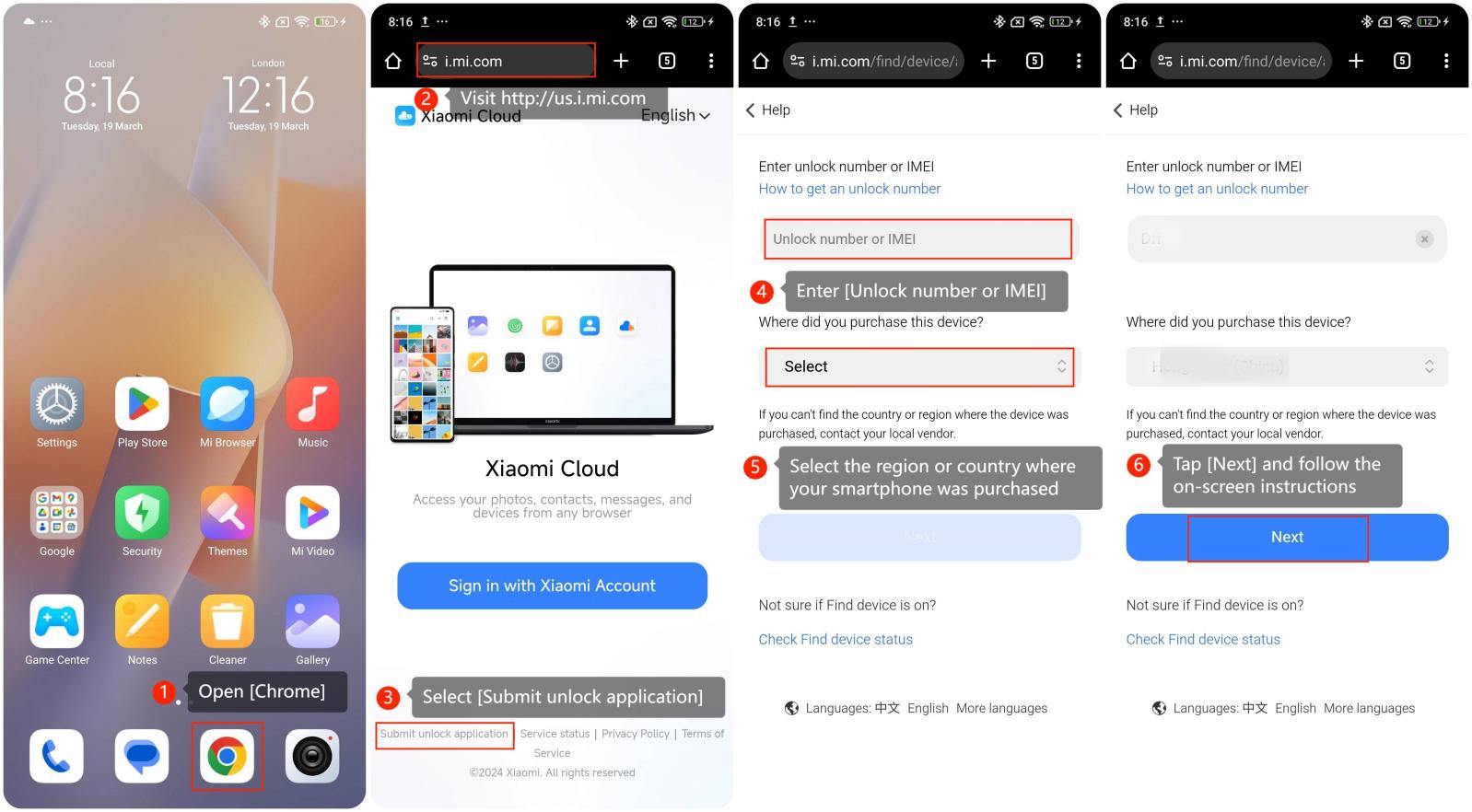
To submit an unlock application of the Xiaomi Account on the REDMI 12 5G with Xiaomi HyperOS, please refer to the following steps:
1. Open [Chrome];
2. Visit https://us.i.mi.com;
3. Tap [Submit unlock application];
4. Enter [Unlock number or IMEI];
5. Select the region or country where your smartphone was purchased;
6. Tap [Next] and follow the on-screen instructions.
To submit an unlock application of the Xiaomi Account on the REDMI 12 5G with Xiaomi HyperOS, please refer to the following steps:
1. Open [Chrome];
2. Visit https://us.i.mi.com;
3. Tap [Submit unlock application];
4. Enter [Unlock number or IMEI];
5. Select the region or country where your smartphone was purchased;
6. Tap [Next] and follow the on-screen instructions.
Note:
1. The IMEI number can be found on the phone's packing or the back of your phone;
2. The unlock code can be seen when prompting to enter the Xiaomi Account password after wiping data and rebooting to exit Recovery mode. Before wiping data or beginning Recovery mode, please back up your data first;
3. After submitting the unlock application, please be patient during the approval process (15 working days).
1. The IMEI number can be found on the phone's packing or the back of your phone;
2. The unlock code can be seen when prompting to enter the Xiaomi Account password after wiping data and rebooting to exit Recovery mode. Before wiping data or beginning Recovery mode, please back up your data first;
3. After submitting the unlock application, please be patient during the approval process (15 working days).