

Adding a bank card via NFC (Near Field Communication) on the Xiaomi 13 Pro with Xiaomi HyperOS can be done using various payment apps or services that support NFC transactions, such as Google Pay or the specific banking app associated with your bank.
To add a bank card via NFC on your phone, please refer to the following methods:
Method 1:
1. Open the [Settings] app on your smartphone;
2. Navigate to [More connectivity options];
3. Turn on [NFC];
4. Tap [Contactless payments];
5. Select [Default payment app] and tap [Google Pay];
To add a bank card via NFC on your phone, please refer to the following methods:
Method 1:
1. Open the [Settings] app on your smartphone;
2. Navigate to [More connectivity options];
3. Turn on [NFC];
4. Tap [Contactless payments];
5. Select [Default payment app] and tap [Google Pay];
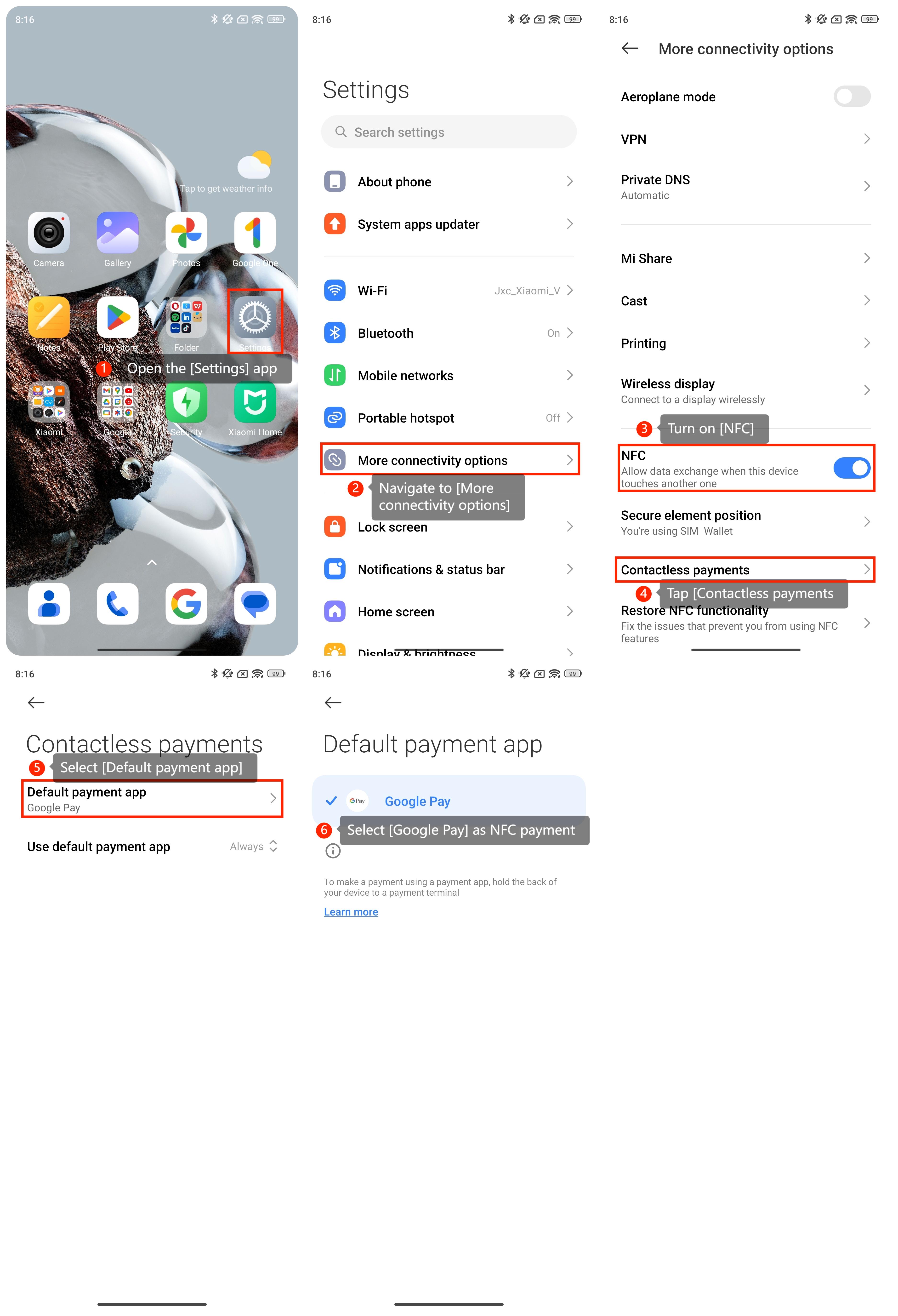
6. If you don’t have it, please go to the Play Store and download the Google Pay app. Then open the Google Pay app and follow the on-screen instructions to add your bank card;
7. Depending on your bank's requirements, you may need to go through a verification process. This may involve receiving a verification code via SMS or email.
Once your card is added and verified, you should be able to use it for NFC payments.
Method 2:
1. Download and Install Your Bank's App if your bank has a dedicated app for mobile payments. Then open your bank's app on your smartphone;
2. Navigate to the section related to payments, cards, or mobile wallets. Then find the option to add a card or payment method and follow the on-screen instructions to add your bank card;
3. Complete any verification steps required by your bank. Once your card is added, you may need to enable NFC payments within the app. After completing the setup, you should be able to use your bank card for NFC payments.
7. Depending on your bank's requirements, you may need to go through a verification process. This may involve receiving a verification code via SMS or email.
Once your card is added and verified, you should be able to use it for NFC payments.
Method 2:
1. Download and Install Your Bank's App if your bank has a dedicated app for mobile payments. Then open your bank's app on your smartphone;
2. Navigate to the section related to payments, cards, or mobile wallets. Then find the option to add a card or payment method and follow the on-screen instructions to add your bank card;
3. Complete any verification steps required by your bank. Once your card is added, you may need to enable NFC payments within the app. After completing the setup, you should be able to use your bank card for NFC payments.