

Solution:
The way to check the MAC address of the smart device connected to the Xiaomi Home APP is as follows:
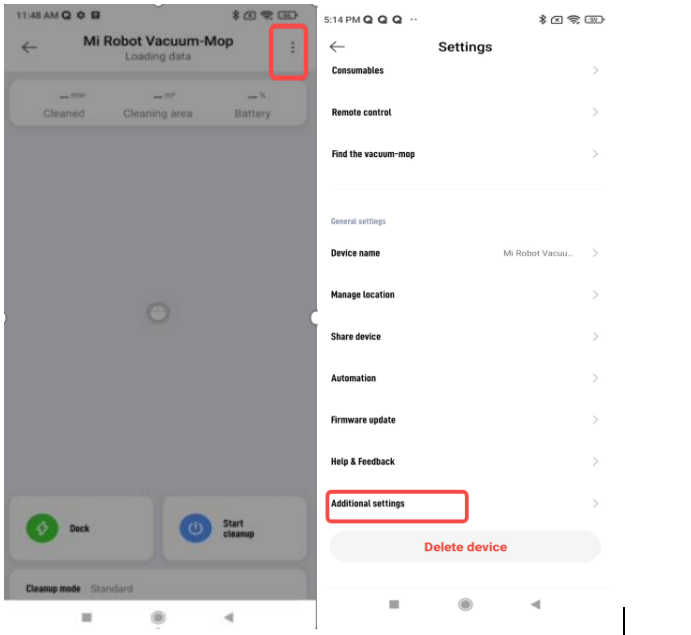
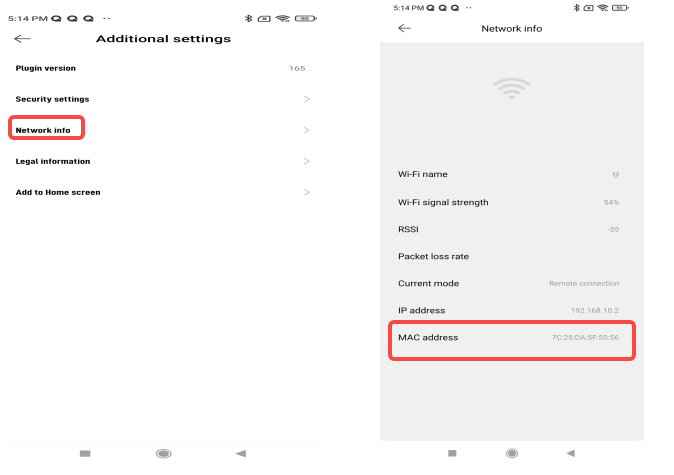
Xiaomi Home APP >> Device you want to view >> "..." settings in the upper right corner >> Additional settings >> Network info, you can view the MAC address, as shown in the figure:
Tips:
The MAC address viewing path of some devices may be different, but they will be found in the settings.
The way to check the MAC address of the smart device connected to the Xiaomi Home APP is as follows:
Xiaomi Home APP >> Device you want to view >> "..." settings in the upper right corner >> Additional settings >> Network info, you can view the MAC address, as shown in the figure:
Tips:
The MAC address viewing path of some devices may be different, but they will be found in the settings.