

Explanation:
At present, some Xiaomi smart devices have been supported to access Homekit (home) on iOS end for use. Specific access methods are as follows (take lamp 1S as an example) :
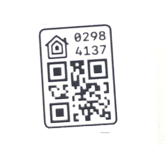
1. Click Homekit -> add or scan accessories ->scan the code pasted on the body-> indicate that the scanning is successful >successfully connected to the room.
2. If the scan fails, you can choose to enter the setting code to add. Click home-> add or scan accessory ->I did not or could not scan the code -> input code (add successfully if the code matches successfully).
Notes:
1. Access to Homekit (home) requires iOS9.0 or above.
2. Homekit setting code is generally on the manual, product packaging box and device body, which can remind you that this code is the only code and should not be lost. After the device resumes factory Settings, add Homekit setting code again. If all setting codes are lost, Homekit cannot be accessed again.
3. The device needs to access The Mijia APP before it can access Homekit (family), otherwise it cannot access Homekit (family);
4. Homekit setup code legend :(This code is unique. Each device has a different setup code.)
5. If "the setting code is incorrect" is prompted during the connection, please conduct after-sales.