

What Is USB-C?
1. USB-C is an industry-standard connector for transmitting both data and power on a single cable. The USB-C connector was developed by the USB Implementers Forum (USB-IF), the group of companies that has developed, certified, and shepherded the USB standard over the years. The USB-IF counts more than 700 companies in its membership, among them Apple, Dell, HP, Intel, Microsoft, and Samsung.
2. This broad acceptance by the big dogs is important, because it's part of why USB-C has been so readily accepted by PC manufacturers. Contrast this with the earlier Apple-promoted (and developed) Lightning and MagSafe connectors, which had limited acceptance beyond Apple products, and became obsolete thanks in no small part to USB-C.
Is USB-C Like Micro USB?
The USB-C connector looks similar to a micro USB connector at first glance, though it's more oval in shape and slightly thicker to accommodate its best feature: flippability.
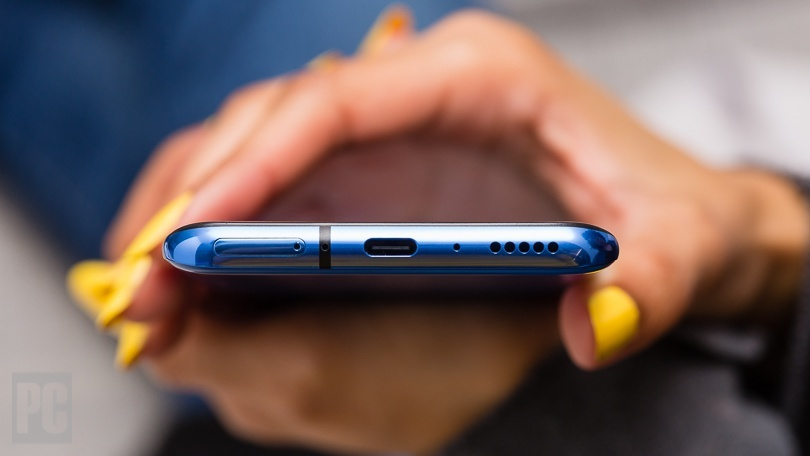
Like Lightning and MagSafe, the USB-C connector has no up or down orientation. Line up the connector properly, and never have to flip it over to plug it in; the "right way" is always up. The standard cables also have the same connector on both ends, so don't have to figure out which end goes where. That has not been the case with all the USB cables people have been using for the past 20 years. Most of the time, there are different connectors at each end.
USB-C and USB 3.2: The Numbers Beneath the Port
1. Where USB-C gets tricky is in the numbers that get attached to the ports. The most common speed that USB-C connectors are rated for is 10Gbps. (That 10Gbps is theoretically twice as fast as original USB 3.0.) USB-C ports that support this peak speed are called "USB 3.2 Gen 1x2."
2. The minor wrinkle is that USB ports with 10Gbps speeds can also exist in the original, larger shape (the USB Type-A rectangles we all know), and are dubbed USB 3.2 Gen 2x1. With the exception of some desktops, though, it's more common to see 10Gbps-speed USB ports with Type-C physical connectors. Note: Some older USB-C ports support just 5Gbps maximum speeds, so it's important to look for a "USB 3.2 Gen 1x2" or "10Gbps" designation to verify that a given USB-C port supports 10Gbps transfers. That said, all of these ports are backward-compatible, just at the speed of the slowest element.
3. Further complicating matters: The number scheme around USB 3 has been in flux since 2019, which has made references to these ports something of a swamp. Until last year, many USB-C ports carried the USB 3.1 label ("USB 3.2" was not yet a thing) in Gen 1 and Gen 2 flavors, and some spec sheets continue to reference the older name, along with SuperSpeed branding. In a confusing twist, the USB-IF decided to eliminate the use of "USB 3.1" in favor of these various flavors of USB 3.2, as outlined below in this handy decoder chart.
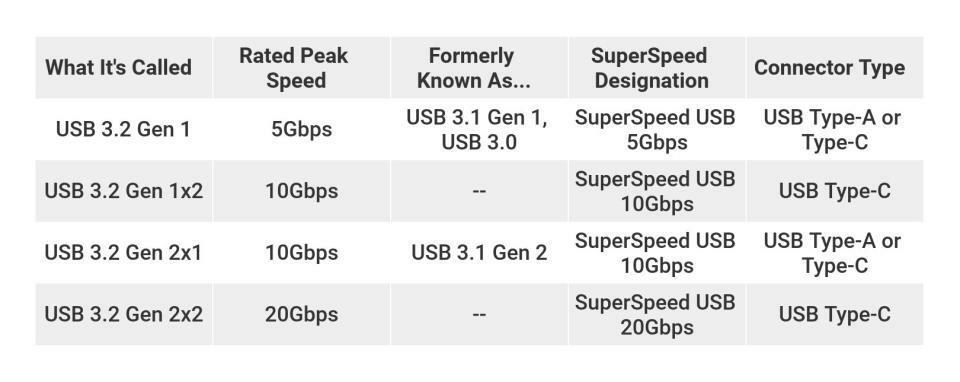
4. The USB 3.2, USB 3.1, and SuperSpeed designations above on each line are equivalent, just differing in name.If there is a USB 3.1 label, it's best to inquire about the maximum transfer speeds of the port directly with the device manufacturer or reseller.
5. As it is shown above, the newest and fastest USB-C ports use the USB 3.2 Gen 2x2 specification, with maximum speeds of 20GBps. The USB-IF decided on "2x2" because the new standard doubles the data lanes within a USB-C cable to achieve the 20Gbps transfer speed. These latest ports are not yet widely available, though PC builders and upgraders can find them on some high-end desktop motherboards.
Underlying Support: The Many Roles of USB-C
1. The old USB Type-A port is like a data port for connecting drives or peripherals like mice. But USB-C, depending on the specific port's implementation, can do much more. One of USB-C's most useful skills, when designed thus, is delivering enough power to charge the host device, such as laptop or smartphone. In fact, many lightweight laptops that have USB-C ports use them in place of a traditional barrel-style connector as the only option for attaching an AC adapter.
2. USB-C's support for sending simultaneous video signals and power means that it can be connected to and power a native DisplayPort, MHL, or HDMI device, or connect to almost anything else, assuming there is proper adapter and cables. (See below for more on adapters.) The USB-C spec even factors in audio transmissions over the interface, but so far it has not replaced the 3.5mm headphone jack on computers to the same degree as it has on phones and tablets.
3. Make sure to check the specs on any PC , because not all USB-C ports are alike. So far, every one people have seen supports both data transfers and connected-device power delivery over USB-C (though not necessarily charging of the host device). But while the USB-C standard supports connecting DisplayPort and/or HDMI displays with an adapter (via the DisplayPort-over-USB protocol), not every PC maker has connected the ports to every system's graphics hardware. Some USB-C ports on a system may support video-out connectivity, while others may not; or none may. The details is important.
Thunderbolt 3: Layering More Speed on USB-C
Perhaps the most useful protocol that a USB-C port can support is Thunderbolt 3. This adds support for up to 40Gbps of throughput, alongside reduced power consumption and the ability to move as much as 100 watts of power over the interface.