

The Mi Mover App is a data migration tool, supporting data transfer not only between Xiaomi phones but also from other Android devices and iPhones to a new Xiaomi phone. It allows you to migrate contacts, messages, photos, videos, music, apps, and other personal data quickly and securely. The entire transfer process is local and peer‑to‑peer, meaning your data is not uploaded to any server, ensuring your privacy is fully protected.
To transfer data using the Mi Mover App, please ensure both phones have at least 30% battery charge and that Bluetooth and Wi‑Fi are enabled on both devices, and install the latest version of the Mi Mover App on both phones.
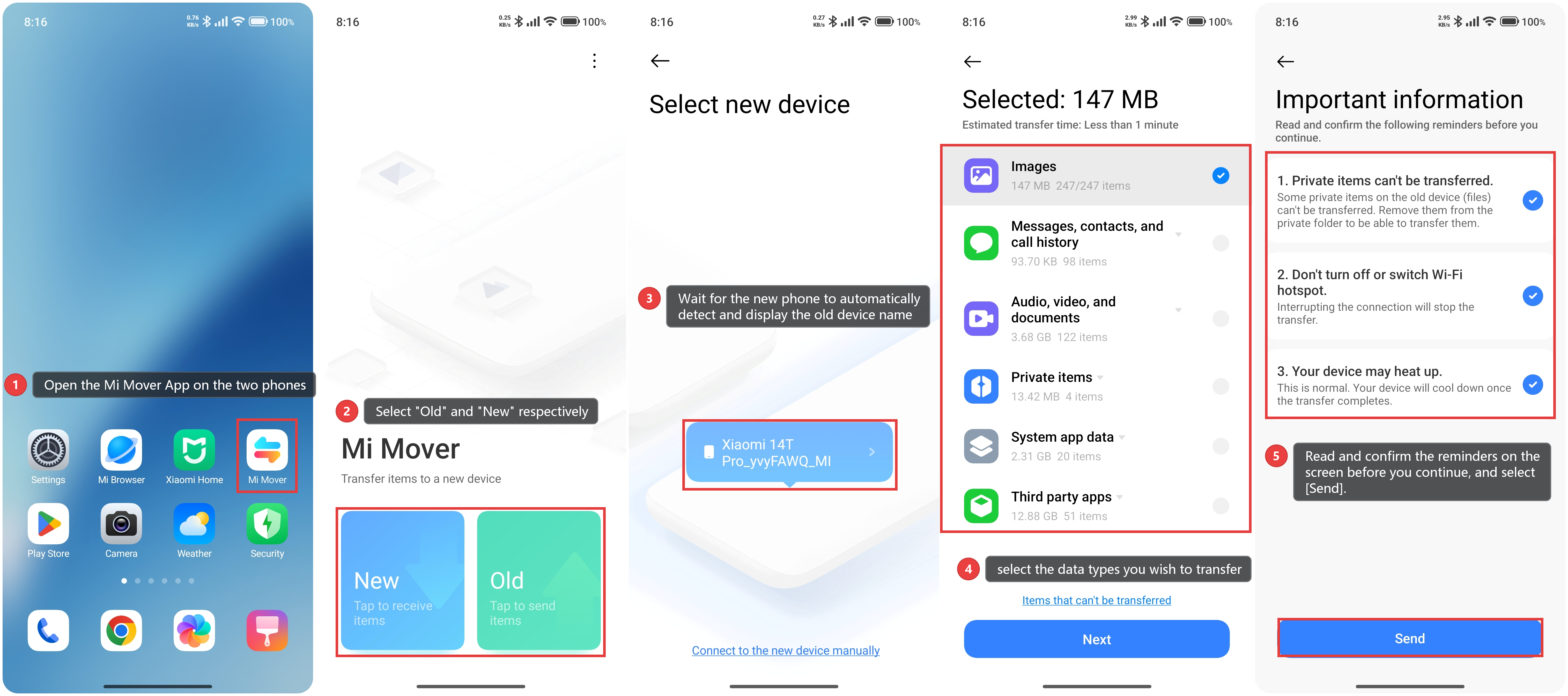
To transfer data using the Mi Mover App, please refer to the following steps:
1. Open the Mi Mover App on the two phones.
2. On the old phone, open the Mi Mover App and tap [Old]. On the new Xiaomi phone, open the Mi Mover App and tap [New].
3. Wait for the new phone to automatically detect and display the old device name, then tap to connect.
4. Once connected, select the data types you wish to transfer.
5. On the new phone, please read and confirm the reminders on the screen before you continue. Tap [Send] and wait for the process to complete – the progress bar will show the remaining time.
Note:
1. The transfer uses Wi‑Fi Direct (WLAN Direct) and does not consume mobile data. Keep both phones close to each other for a stable connection.
2. Keep both phone screens on and do not switch apps during the transfer.
3. The Mi Mover App supports migration from Android devices (including Xiaomi and other brands) and iPhones to new Xiaomi phones. Compatibility may vary depending on the old device model and operating system version.