

Problem Explanation:
A:
Use your phone to scan the QR code in the manual or search the App store for "Mi Home App" to download and install.Make sure your home WiFi surfs the Internet normally.
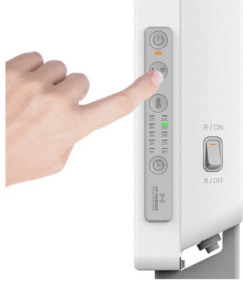
1. Turn on the mechanical switch, gently touch the power button to open the heater, and long press the "Sleep /WiFi button" for 5 seconds. After hearing the prompt, the heater will enter the state of waiting for connection.
2. Open the Mi Home App, click "+" in the upper right corner, and wait for automatic scanning heater, or add it manually;
3. Select the WiFi to be connected to heater and enter the password. Click "Next".If "Mi Home is trying to turn on or off WiFi" pops up during networking, please click "Allow once".
4. After the device is connected to the Internet successfully, click "Use it now".