

About MIUI 9
MIUI 9 is a mobile OS which is designed to make your device lightning fast. It's simple, light, and responsive. In MIUI 9, we put major focus on solving the issues of heating and lagging, while trying to boost the overall user experience. Major software improvements and new features allow you to stay focused and productive. MIUI 9 brings stability, smoothness, and battery usage to a whole new level.
New design
MIUI 9 is designed for lightness & speed. New system animations and animated icons give it an entirely new look. An updated dock & other small features such as the Weather clock widget further improve overall feel. We've even enhanced customizability. Play with new themes and discover your favorite configuration.
Lightning speed
MIUI is the foundation of all Mi phones. We've created our most natural, most intuitive experience yet with MIUI 9. You can expect apps to launch quicker and further optimized system animations and RAM management. We have also added task automation and created a new file system to make your experience even better. MIUI 9 is faster, smoother and more power efficient than its predecessor.
App vault
App vault is a one-stop spot for all your most used features and info. Make use of specific features without searching for them. Call cabs, take notes, view upcoming events, and many more.
Split screen
In MIUI 9, customer can run 2 apps simultaneously on the same screen, and also can adjust the screen space each takes.
Home screen
Just pinch the screen to rearrange icons, add widgets, and uninstall apps.
Notification shade
The new Notification shade now presents information more concisely and comprehensively. It groups all notifications on a by-app basis to reduce clutter. You can even quickly reply to messages without opening the app.
Mi Video
Mi Video supports popular video formats and subtitles. It even intelligently groups episodes by show and allows customer to hide videos wishing to keep private.
Mi Drop
Mi Drop allows seamless transfer of files between devices without requiring an internet connection. From humble origins as a system integration, Mi Drop has evolved into a stand-alone app supported by the devices which run on Android 4.4 and later.
Gallery
Xiaomi have completely redesigned Gallery and added new features. Beautify now works faster and adapts to different lighting. Easily erase lines and objects to focus on what's important. We've even added new stickers and mosaic patterns to give customer more creative tools to play with.
Calendar cards
Calendar is now much more than just a list of upcoming events. Using subscription cards, customer can read the horoscope, learn what happened on a specific day in history, view scheduled sports matches, and more.
Messaging
We send fewer personal texts these days, but receive more verification codes and one-time passwords. MIUI 9 identifies and sorts these automatically. You can then select these in groups and delete or mark them as read. MIUI 9 will also automatically create more readable messages for travel notifications, such as train ticket info.
Silent mode
Silent mode can now be enabled directly through the sound panel, and a time can be configured to automatically disable silent mode.
Button and gesture shortcuts
All customizable button and gesture interactions have been grouped in one easy to access place. Customizing your buttons and gestures has never been easier.
Lock screen
Lock screen in MIUI 9 has been further optimized. Just swipe right to access configured shortcuts such as Mi Home devices, Mi Remote, or your smartphone's torch.
Feature improvements
MIUI 9 has updated the system on all levels, simplifying and making it even easier to access all features.
New design
Light & fast
MIUI 9 is designed for lightness & speed. New system animations and animated icons give it an entirely new look. An updated dock & other small features such as the Weather clock widget further improve overall feel. We've even enhanced customizability. Play with new themes and discover your favorite configuration.
Bringing an OS to life
Home screen animations
The new animations in MIUI 9 extend to system actions, smoothening the feel of everything you do, down to opening and closing an app.
Animated icons
System icons aren't static anymore, and launching and closing them is more satisfying with new icon animations to signify the action.
Simplicity and productivity
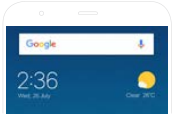
Weather clock widget
We've redesigned the Weather clock widget to show more at a single glance. No need to dig deep into the Weather app if you just need a quick update. All the information is right there when you need it.
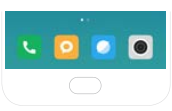
Home screen dock
Icons in the dock are now unlabelled to reduce visual noise. This is your Home screen, so we've left you with everything you need and nothing you don't.
Recents
Switching between recently used apps has gotten even easier. We've made each app card larger and the distance between them smaller. Just swipe to what you need.