

Overview
1. Q:What are the features of MIUI 12?
MIUI 12 is Xiaomi decade's masterpiece, a perfect combination of innovative design and powerful technology that makes every item and movement customers see, as well as every instance of customers' interaction with the screen tangibly real. Lifelike design, powerful privacy-protection tools, and revamped functionality give customers a near-perfect OS for the Android device.
Visual design
MIUI 12 speaks to customer in a new design language that makes familiar things more intuitive and lifelike.
Super wallpapers bring excitement into the mundane actions of swiping through the Home screen, checking the time on the Lock screen, or quickly looking at the Always-on display.
Movement in MIUI 12 follows the physical laws of the real world, making the device a part of it.
Layered icons reflect the trajectory of movement and react to customer's gestures.
Visualization is seamlessly integrated into every corner of the system, replacing and augmenting text wherever possible, which allows customer to get much more information at a single glance.
All these core changes are possible thanks to Mi Light Cone Animation Framework which is the embodiment of Xiaomi new approach to rendering.
Privacy
MIUI 12 provides customer with excellent protection tools, keeping customer to fully informed and in control of own privacy.
Floating windows
Global floating windows are an excellent multitasking solution for mobile devices. Customer can
use floating windows in multiple scenarios, as well as minimize, maximize, or close them using simple gestures.
Control center
MIUI 12 introduces an independent Control center. More space and intuitive animated UI make it
easier for customer to perform quick actions and control the device.
Dark mode
MIUI 12 introduces a lot of improvements for the Dark mode. The new non-linear color inversion scheme makes Dark mode compatible with everything, from third-party apps to wallpapers.
Dark mode also dynamically adjusts the contrast based on the current screen brightness, making the screen look amazing and comfortable in any light conditions.
Notes
Xiaomi fully revamped the Notes app in MIUI 12, arranging items in a more intuitive and convenient way. New dynamic backgrounds will make everything customer write down colorful and elegant and checklists in "Tasks" will add more structure into the planning.
Lite mode
Lite mode is designed for seniors and people who like using only the essential features of
their smartphones. Fonts, layouts, and features are optimized for better perception and more
straightforward usability.
Messaging (available in India)
MIUI 12 groups promotional and service SMS based on their content. Incoming messages from
them turn into informative and concise cards.
Visual design
MIUI 12 speaks to customer in a new design language that makes familiar things more intuitive and lifelike.
Super wallpapers bring excitement into the mundane actions of swiping through the Home
screen, checking the time on your Lock screen, or quickly looking at the Always-on display.
Movement in MIUI 12 follows the physical laws of the real world, making the device a part of it.
Layered icons reflect the trajectory of movement and react to customers' gestures.Visualization is
seamlessly integrated into every corner of the system, replacing and augmenting text wherever
possible, which allows customer to get much more information at a single glance. All these core
changes are possible thanks to Mi Light Cone Animation Framework which is the embodiment of
Xiaomi new approach to rendering.
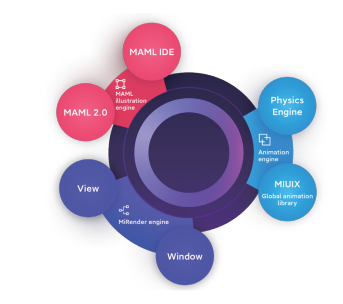
1.Q:System animations
Reproducing real-world movement accurately is key for creating a lifelike visual experience. In
MIUI 12, that's the job that animations do perfectly.
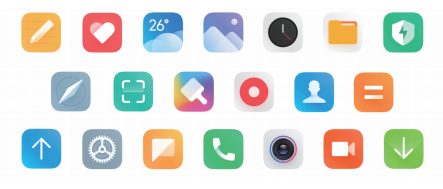
2. Q:Layered icons
Delicate anti-aliasing rounds the corners of the UI elements dynamically to create a perfect fit
with the hardware. Brand new backgrounds of the Weather app reflect the changes in the real
world. Switching between portrait and landscape orientation has become smooth and natural.
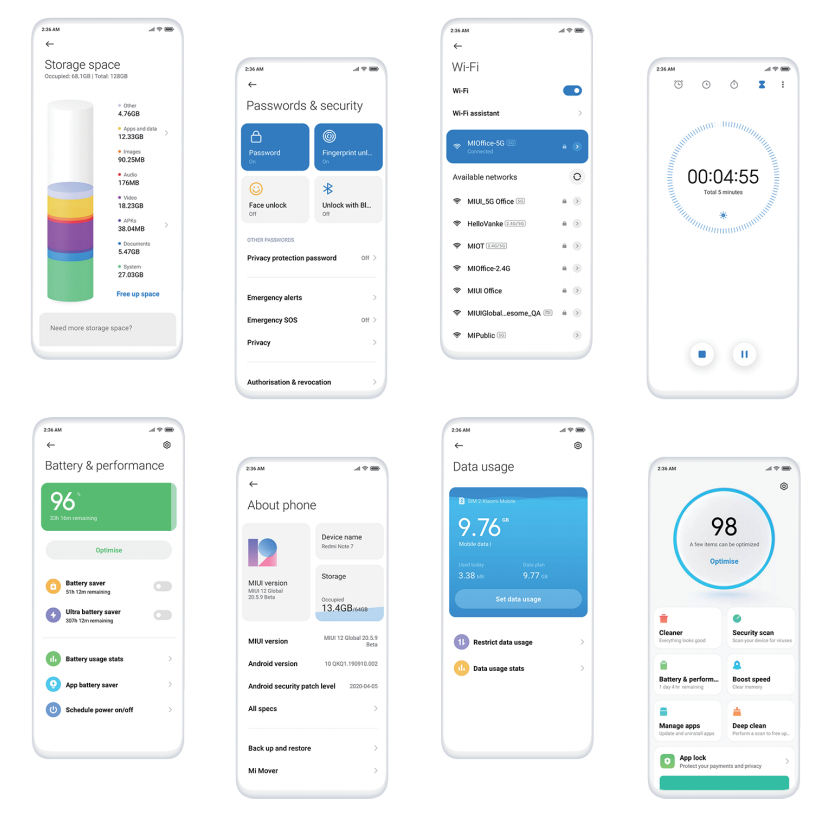
3. Q:Visualization
In MIUI 12, Xiaomi reimagined the way information is displayed. Data, touch controls, statuses, and other objects are now visualized to let customer get much more information at a single glance, skipping repetitive operations and complicated text.
Starting with MIUI 9, Xiaomi began introducing layered icons. MIUI 12 adds dynamics to this concept. With 5 separate layers, each icon is able to imitate trajectories of movement and react to gestures. Icons notice how customer interact with them and respond to every touch differently.
4. Q:Super wallpapers
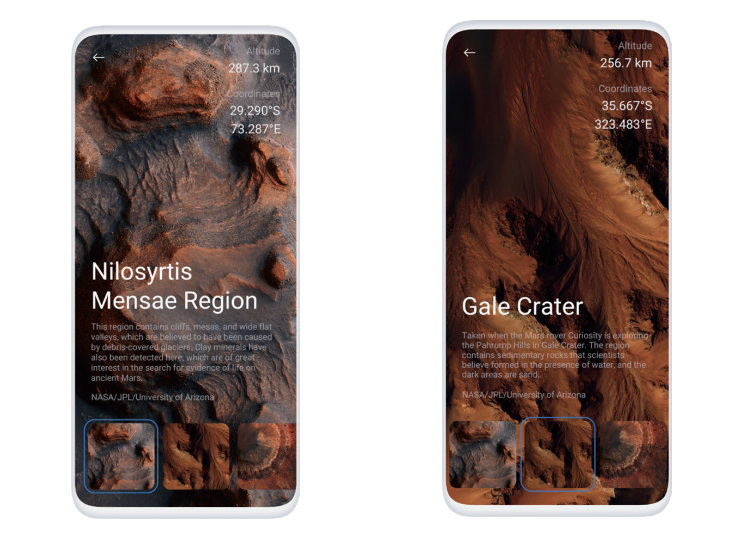
Xiaomi believe that Always-on display is becoming more and more important in terms of mobile design. That's why Xiaomi decided to make personalization options consistent throughout the Home screen, Lock screen, and Always-on display scenes. Now customer can pick a wallpaper and enjoy a wholesome experience, always discovering something new in this unified aesthetic as customer switch between different UI elements.
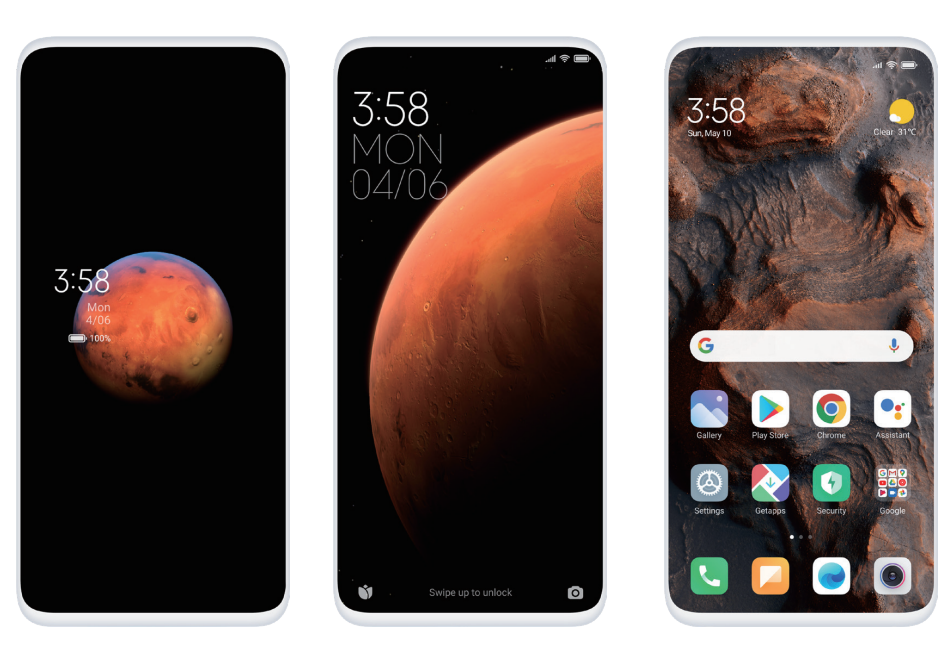
5. Q:3D real-time rendering
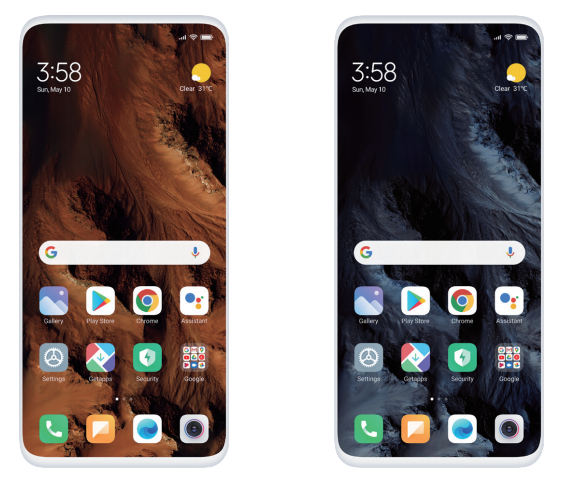
Super wallpapers are rendered in real-time by the Unity 3D game engine. The first set of wallpapers is dedicated to space travel. The images provided by NASA allowed Xiaomi to recreate faraway planets with strikingly high precision. Thanks to real-time rendering, whenever customer turn off the screen, unlock the device or go back to the Home screen, customer will see the same scenes a bit differently. Performing familiar tasks on your phone becomes much more satisfying when a simple swipe feels like an interstellar journey. Super wallpapers work perfectly with Dark mode, making customers' experience truly immersive.
Privacy
1.Q:Recording audio, using the camera, accessing location
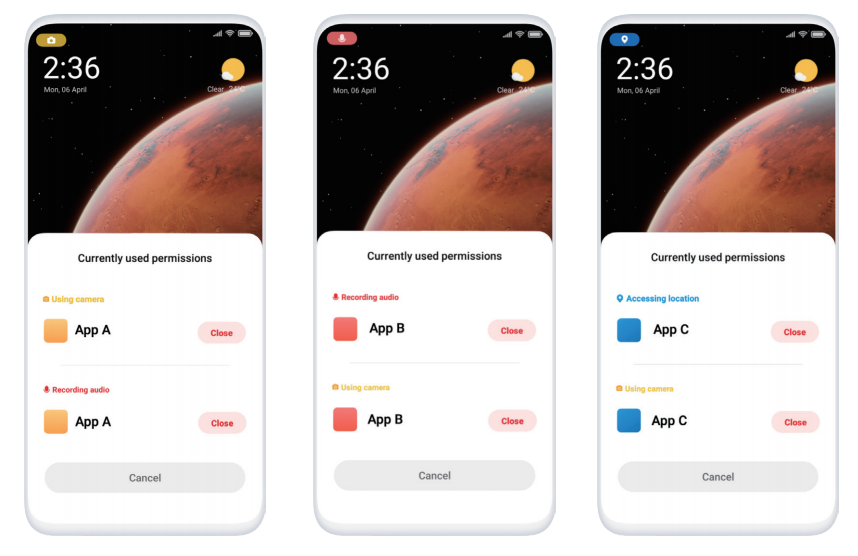
To provide the services, apps may obtain customer's personal information by using the camera, accessing customer's location, and using other permissions. Whenever MIUI 12 detects that an app is accessing the location, taking photos, or recording audio, a color-coded icon in the status bar will appear. At this point, customer will know that own privacy might be compromised. This alert will allow customer to decide whether to adjust the permissions related to location services, camera, or microphone.
2.Q:Sharing photos without metadata
Photos usually contain location info and other sensitive metadata (e.g. the time when the photo
was made and the specs of the device). In MIUI 12, customer can choose to remove such information before items are shared.
Control center
MIUI 12 introduces an independent Control center. More space and intuitive animated UI make it
easier for customer to perform quick actions and control the device.
1.Q:Brand new Notification shade and Control center
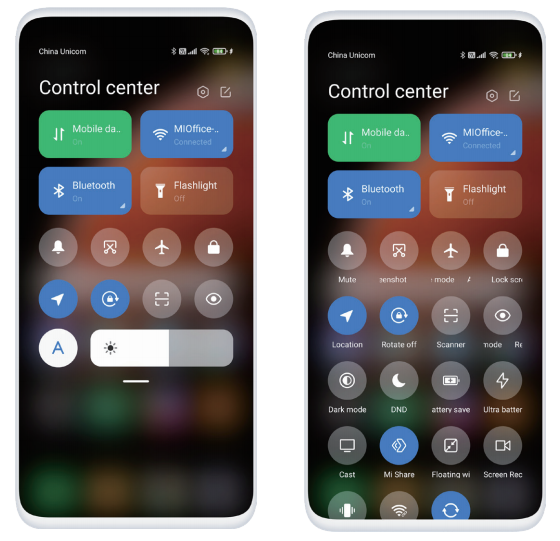
Notification shade and Control center are now separated. Swipe down from the left side of the
status bar to open the Notification shade. Toggles, stats, and controls were moved to the new
Control center which can be opened by swiping down from the right side of the status bar.
2.Q:Switching between Wi-Fi networks, Bluetooth devices, and data SIM cards
In MIUI 12, customer can tap the arrow in the lower right corner of the Wi-Fi switch to see available networks and switch between them. It also works for Bluetooth connections and mobile data.
After selecting the option needed, customer can quickly return to the Control center by
tapping the area outside of the menu. Control center makes frequent actions faster and more
convenient.
3.Q:Toggles
Tap the button in the upper right corner of the Control center to see all available toggles and
choose which one to add. Press and hold, and then drag added to toggles to rearrange them.
Dark mode
MIUI 12 introduces a lot of improvements in the Dark mode. The new non-linear color inversion
scheme makes Dark mode compatible with everything, from third-party apps to wallpapers.
Dark mode also dynamically adjusts the contrast based on the current screen brightness,
making the screen look amazing and comfortable in any light conditions.
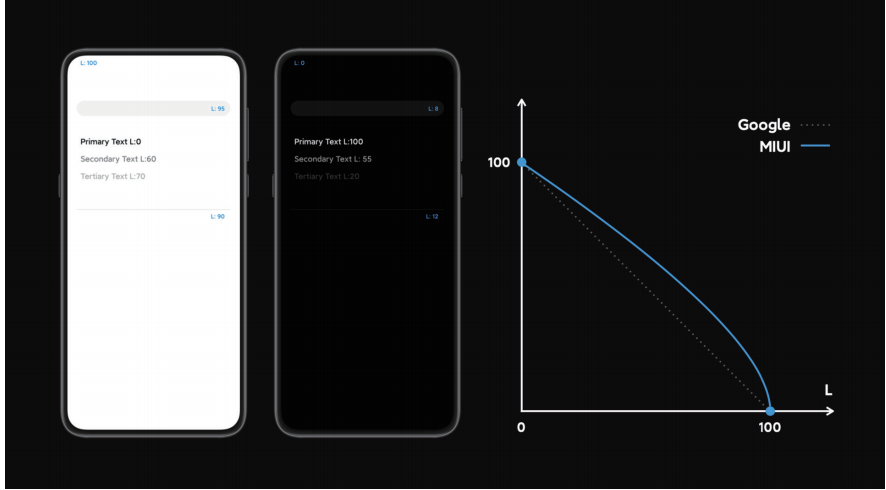
1.Q:Non-linear color inversion
Dark mode's non-linear color inversion accurately identifies the UI elements of the apps, increasing contrast for darker areas.
Pure black is used as the app's background in most cases to blend the UI into the screen bezels
and provide an immersive viewing experience. White separators on dark backgrounds are also
darkened to make them look less prominent and irritating.
2.Q:Wallpaper adaptation
When Dark mode is on, customer can also apply a darker color scheme to high-quality wallpapers.
Pixel-level adjustments will make the wallpaper look more natural alongside the darkened UI.
3.Q:Dynamic contrast adjustment
People are used to looking at their phones with the lights off at night. To decrease the eye
strain caused by this habit, MIUI 12 dynamically adjusts the contrast based on the screen
brightness in Dark mode.
Notes
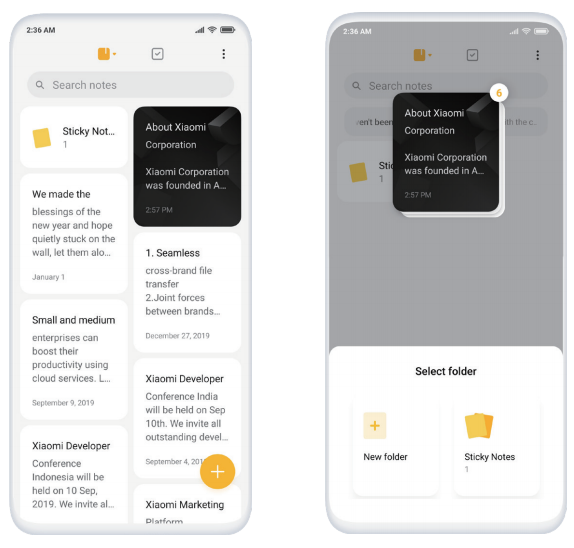
Xiaomi fully revamped the Notes app in MIUI 12, arranging items in a more intuitive and convenient way. New dynamic backgrounds will make everything customer write down colorful and elegant and checklists in "Tasks" will add more structure into the planning.
1.Q:New start page
Notes and folders now coexist on the start page allowing customer to find anything needed faster.
1. Q:What are the features of MIUI 12?
MIUI 12 is Xiaomi decade's masterpiece, a perfect combination of innovative design and powerful technology that makes every item and movement customers see, as well as every instance of customers' interaction with the screen tangibly real. Lifelike design, powerful privacy-protection tools, and revamped functionality give customers a near-perfect OS for the Android device.
Visual design
MIUI 12 speaks to customer in a new design language that makes familiar things more intuitive and lifelike.
Super wallpapers bring excitement into the mundane actions of swiping through the Home screen, checking the time on the Lock screen, or quickly looking at the Always-on display.
Movement in MIUI 12 follows the physical laws of the real world, making the device a part of it.
Layered icons reflect the trajectory of movement and react to customer's gestures.
Visualization is seamlessly integrated into every corner of the system, replacing and augmenting text wherever possible, which allows customer to get much more information at a single glance.
All these core changes are possible thanks to Mi Light Cone Animation Framework which is the embodiment of Xiaomi new approach to rendering.
Privacy
MIUI 12 provides customer with excellent protection tools, keeping customer to fully informed and in control of own privacy.
Floating windows
Global floating windows are an excellent multitasking solution for mobile devices. Customer can
use floating windows in multiple scenarios, as well as minimize, maximize, or close them using simple gestures.
Control center
MIUI 12 introduces an independent Control center. More space and intuitive animated UI make it
easier for customer to perform quick actions and control the device.
Dark mode
MIUI 12 introduces a lot of improvements for the Dark mode. The new non-linear color inversion scheme makes Dark mode compatible with everything, from third-party apps to wallpapers.
Dark mode also dynamically adjusts the contrast based on the current screen brightness, making the screen look amazing and comfortable in any light conditions.
Notes
Xiaomi fully revamped the Notes app in MIUI 12, arranging items in a more intuitive and convenient way. New dynamic backgrounds will make everything customer write down colorful and elegant and checklists in "Tasks" will add more structure into the planning.
Lite mode
Lite mode is designed for seniors and people who like using only the essential features of
their smartphones. Fonts, layouts, and features are optimized for better perception and more
straightforward usability.
Messaging (available in India)
MIUI 12 groups promotional and service SMS based on their content. Incoming messages from
them turn into informative and concise cards.
Visual design
MIUI 12 speaks to customer in a new design language that makes familiar things more intuitive and lifelike.
Super wallpapers bring excitement into the mundane actions of swiping through the Home
screen, checking the time on your Lock screen, or quickly looking at the Always-on display.
Movement in MIUI 12 follows the physical laws of the real world, making the device a part of it.
Layered icons reflect the trajectory of movement and react to customers' gestures.Visualization is
seamlessly integrated into every corner of the system, replacing and augmenting text wherever
possible, which allows customer to get much more information at a single glance. All these core
changes are possible thanks to Mi Light Cone Animation Framework which is the embodiment of
Xiaomi new approach to rendering.
1.Q:System animations
Reproducing real-world movement accurately is key for creating a lifelike visual experience. In
MIUI 12, that's the job that animations do perfectly.
2. Q:Layered icons
Delicate anti-aliasing rounds the corners of the UI elements dynamically to create a perfect fit
with the hardware. Brand new backgrounds of the Weather app reflect the changes in the real
world. Switching between portrait and landscape orientation has become smooth and natural.
3. Q:Visualization
In MIUI 12, Xiaomi reimagined the way information is displayed. Data, touch controls, statuses, and other objects are now visualized to let customer get much more information at a single glance, skipping repetitive operations and complicated text.
Starting with MIUI 9, Xiaomi began introducing layered icons. MIUI 12 adds dynamics to this concept. With 5 separate layers, each icon is able to imitate trajectories of movement and react to gestures. Icons notice how customer interact with them and respond to every touch differently.
4. Q:Super wallpapers
Xiaomi believe that Always-on display is becoming more and more important in terms of mobile design. That's why Xiaomi decided to make personalization options consistent throughout the Home screen, Lock screen, and Always-on display scenes. Now customer can pick a wallpaper and enjoy a wholesome experience, always discovering something new in this unified aesthetic as customer switch between different UI elements.
5. Q:3D real-time rendering
Super wallpapers are rendered in real-time by the Unity 3D game engine. The first set of wallpapers is dedicated to space travel. The images provided by NASA allowed Xiaomi to recreate faraway planets with strikingly high precision. Thanks to real-time rendering, whenever customer turn off the screen, unlock the device or go back to the Home screen, customer will see the same scenes a bit differently. Performing familiar tasks on your phone becomes much more satisfying when a simple swipe feels like an interstellar journey. Super wallpapers work perfectly with Dark mode, making customers' experience truly immersive.
Privacy
1.Q:Recording audio, using the camera, accessing location
To provide the services, apps may obtain customer's personal information by using the camera, accessing customer's location, and using other permissions. Whenever MIUI 12 detects that an app is accessing the location, taking photos, or recording audio, a color-coded icon in the status bar will appear. At this point, customer will know that own privacy might be compromised. This alert will allow customer to decide whether to adjust the permissions related to location services, camera, or microphone.
2.Q:Sharing photos without metadata
Photos usually contain location info and other sensitive metadata (e.g. the time when the photo
was made and the specs of the device). In MIUI 12, customer can choose to remove such information before items are shared.
Control center
MIUI 12 introduces an independent Control center. More space and intuitive animated UI make it
easier for customer to perform quick actions and control the device.
1.Q:Brand new Notification shade and Control center
Notification shade and Control center are now separated. Swipe down from the left side of the
status bar to open the Notification shade. Toggles, stats, and controls were moved to the new
Control center which can be opened by swiping down from the right side of the status bar.
2.Q:Switching between Wi-Fi networks, Bluetooth devices, and data SIM cards
In MIUI 12, customer can tap the arrow in the lower right corner of the Wi-Fi switch to see available networks and switch between them. It also works for Bluetooth connections and mobile data.
After selecting the option needed, customer can quickly return to the Control center by
tapping the area outside of the menu. Control center makes frequent actions faster and more
convenient.
3.Q:Toggles
Tap the button in the upper right corner of the Control center to see all available toggles and
choose which one to add. Press and hold, and then drag added to toggles to rearrange them.
Dark mode
MIUI 12 introduces a lot of improvements in the Dark mode. The new non-linear color inversion
scheme makes Dark mode compatible with everything, from third-party apps to wallpapers.
Dark mode also dynamically adjusts the contrast based on the current screen brightness,
making the screen look amazing and comfortable in any light conditions.
1.Q:Non-linear color inversion
Dark mode's non-linear color inversion accurately identifies the UI elements of the apps, increasing contrast for darker areas.
Pure black is used as the app's background in most cases to blend the UI into the screen bezels
and provide an immersive viewing experience. White separators on dark backgrounds are also
darkened to make them look less prominent and irritating.
2.Q:Wallpaper adaptation
When Dark mode is on, customer can also apply a darker color scheme to high-quality wallpapers.
Pixel-level adjustments will make the wallpaper look more natural alongside the darkened UI.
3.Q:Dynamic contrast adjustment
People are used to looking at their phones with the lights off at night. To decrease the eye
strain caused by this habit, MIUI 12 dynamically adjusts the contrast based on the screen
brightness in Dark mode.
Notes
Xiaomi fully revamped the Notes app in MIUI 12, arranging items in a more intuitive and convenient way. New dynamic backgrounds will make everything customer write down colorful and elegant and checklists in "Tasks" will add more structure into the planning.
1.Q:New start page
Notes and folders now coexist on the start page allowing customer to find anything needed faster.
Does it help?
Yes
No