

Function Introduction:
The application lock can lock for a single or multiple applications. To open the application lock, a password is required, which ensures the confidentiality requirements in certain scenarios.
Setting method:
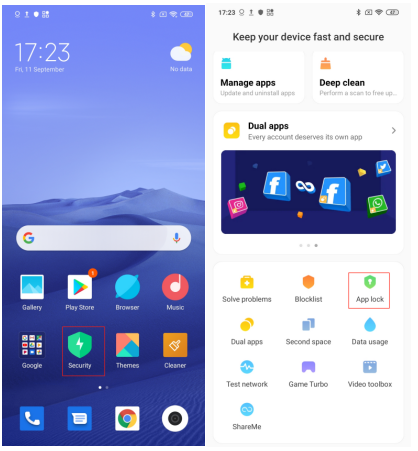
1. Select Security>>App lock, and click the location shown in the figure to enter the application lock setting.
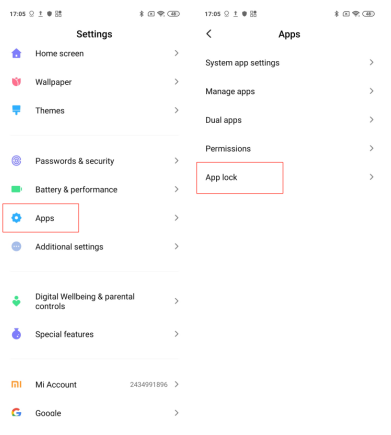
2. Settings>>Apps>>App lock
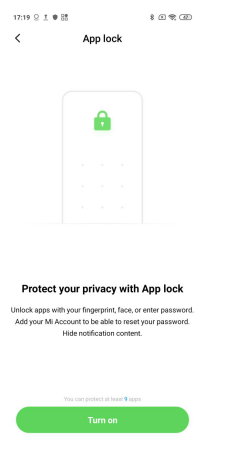
After selecting the application to be locked for the first time, select one key to lock and enter the interface of setting pattern password(MIUI10 supports mixed passwords and digital passwords.)
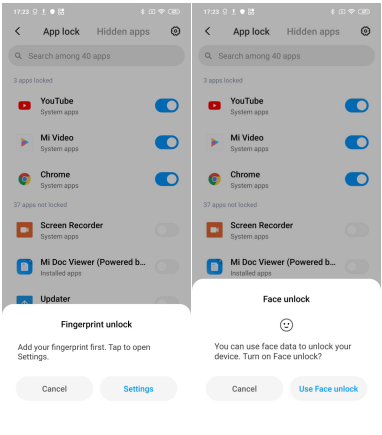
Then can select to set the Fingerprint unlock or Face unlock.
And it is suggested to Add your Mi account to be able to reset the password in case you forget it.