

How to set the Mijia Air Conditioner to turn on automatically when a specified temperature is reached?
When the air conditioner is turned off and the indoor temperature reaches a preset threshold, it will automatically power on. This intelligent temperature control function maintains a comfortable indoor environment without manual intervention, preventing the indoor temperature from becoming too high or too low, and ensuring it always stays within a suitable range. This improves overall convenience, energy efficiency, and comfort.
To set the Mijia Air Conditioner to turn on automatically when a specified temperature is reached, please refer to the following steps:
1. Open the Xiaomi Home App.
2. Select the [Mijia Air Conditioner] device card.
3. Tap [Smart AC] to enter the smart control page for the air conditioner.
4. Select [Smart temperature regulation] to configure temperature-based automation.
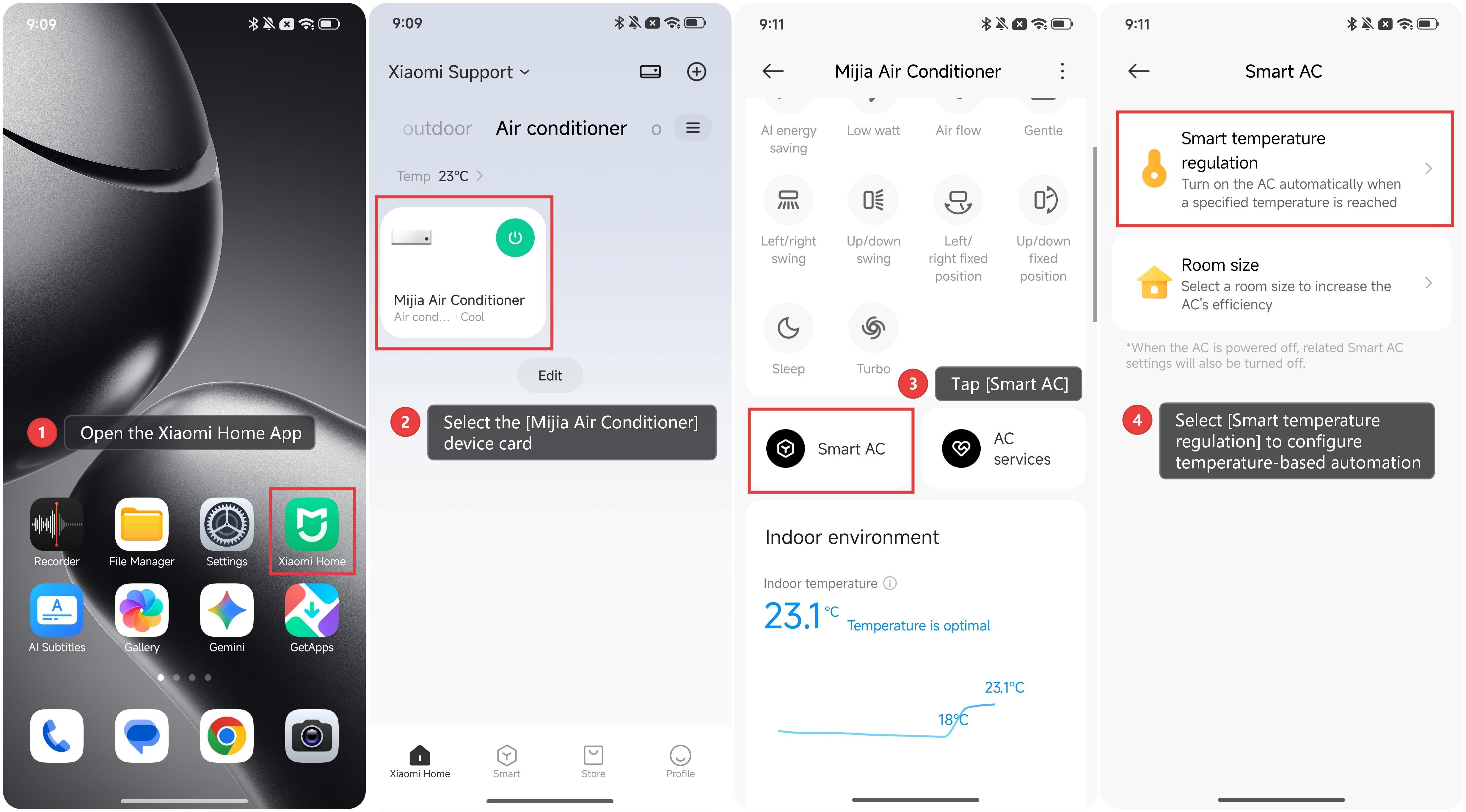
After enabling this function, you can set the trigger temperature for the air conditioner to turn on automatically, as well as the desired operating temperature.
Does it help?
Yes
No