

What to do if the videos recorded by the Xiaomi Smart Camera C302 on the MicroSD card are not smooth and out of sync in terms of sound and image?
If the videos recorded by the Xiaomi Smart Camera C302 in the MicroSD card are not smooth and out of sync in terms of sound and image, please refer to the following steps to troubleshoot:
1. Restart the device to see if it can return to normal.
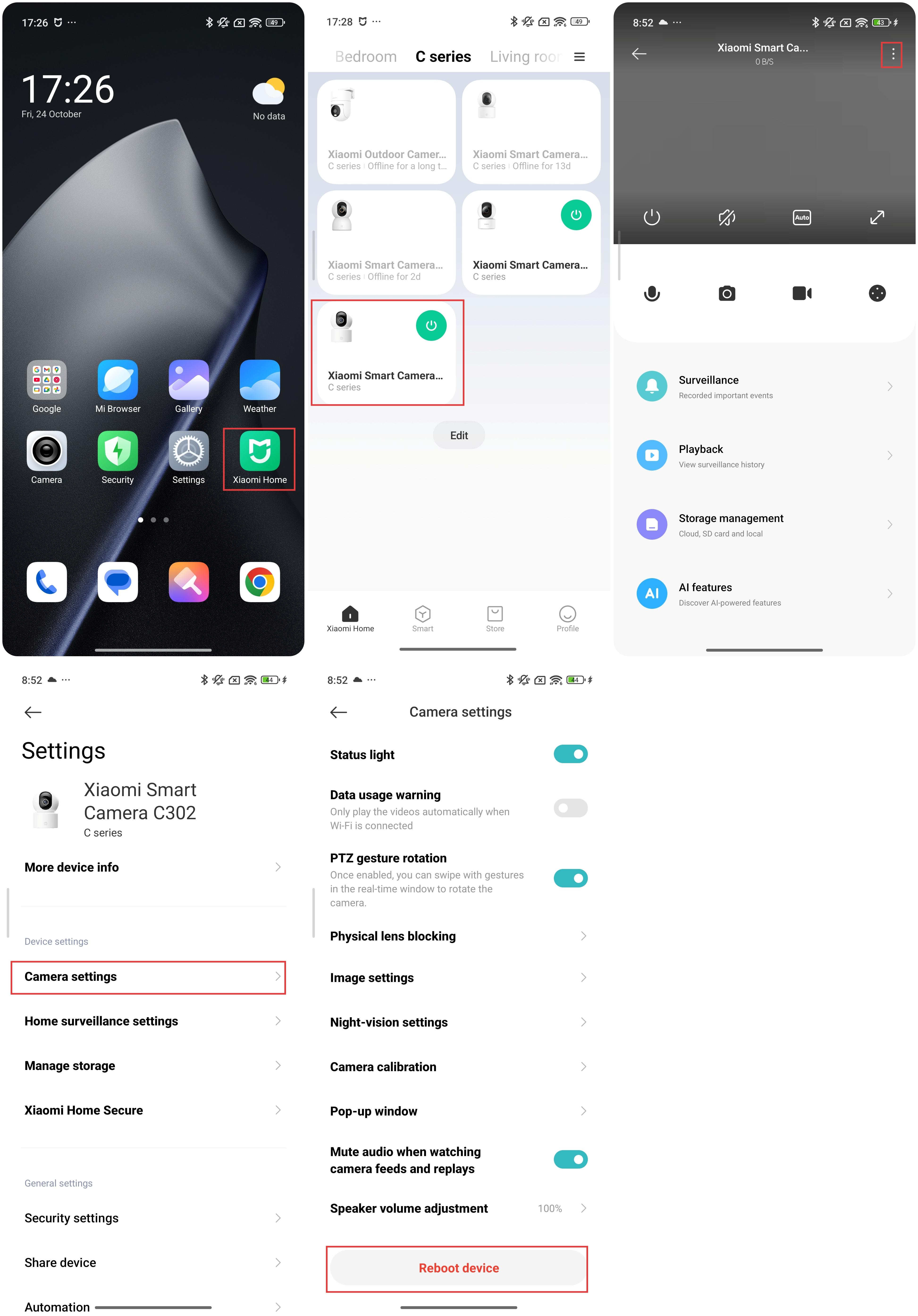
To reboot the device, please refer to the following steps:
- Open the Xiaomi Home App.
- Select the Xiaomi Smart Camera C302.
- Tap the three-dot icon at the upper right corner.
- Select [Camera settings].
- Tap [Reboot device].
2. Please check whether you frequently remove the MicroSD card while the device is powered on. The MicroSD card can only be removed when the camera is powered off. Frequent removal of the MicroSD card can cause it to perform poorly and lead to abnormal issues in the recorded video.
3. Please check whether the MicroSD card's read speed is slow.
4. Replace the MicroSD card. It is recommended that you use a MicroSD card that meets the requirements; otherwise, you may encounter many abnormal issues during use, such as discontinuous recording and memory errors.
Does it help?
Yes
No