

How to adjust the display brightness of the Mijia Air Conditioner Pro Eco Inverter 1.0 HP?
The Mijia Air Conditioner Pro Eco Inverter 1.0 HP supports adjusting the screen brightness of the indoor unit on or off via both the remote control and the Xiaomi Home App.
To adjust the display brightness of the Mijia Air Conditioner Pro Eco Inverter 1.0 HP, please refer to the following methods:
Method 1:
To adjust the display, press the [Light] button on the remote control. This will toggle the display light on or off, depending on your preference.
Method 2:
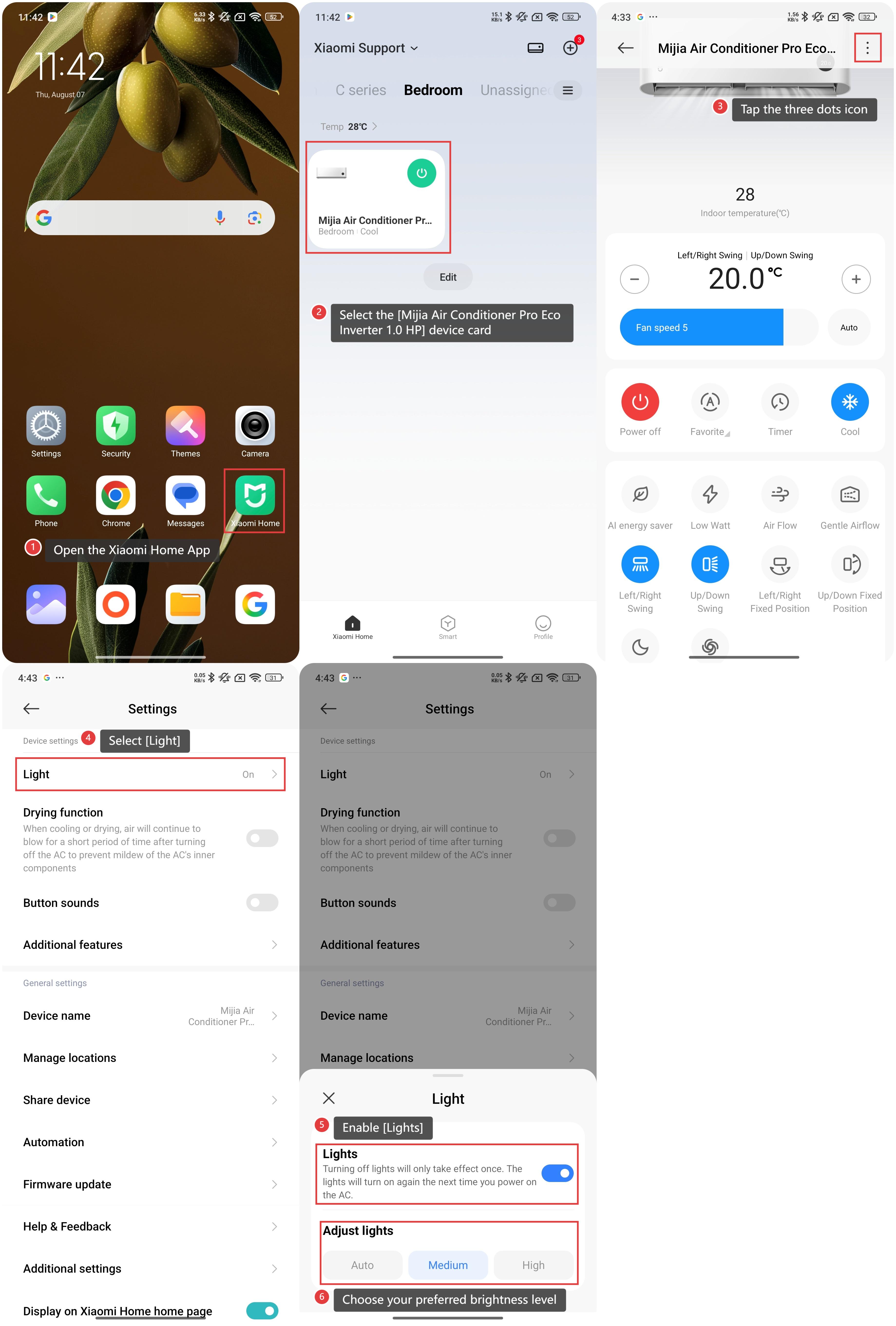
1. Open the Xiaomi Home App on your device;
2. Select the [Mijia Air Conditioner Pro Eco Inverter 1.0 HP] device card;
3. Tap the three dots icon at the upper right corner;
4. Select [Light];
5. Enable [Lights];
6. Choose your preferred brightness level from [Auto], [Medium], or [High].
Note:
The [Light] button only affects the display brightness, not the functionality of the air conditioner itself.
To adjust the display brightness of the Mijia Air Conditioner Pro Eco Inverter 1.0 HP, please refer to the following methods:
Method 1:
To adjust the display, press the [Light] button on the remote control. This will toggle the display light on or off, depending on your preference.
Method 2:
1. Open the Xiaomi Home App on your device;
2. Select the [Mijia Air Conditioner Pro Eco Inverter 1.0 HP] device card;
3. Tap the three dots icon at the upper right corner;
4. Select [Light];
5. Enable [Lights];
6. Choose your preferred brightness level from [Auto], [Medium], or [High].
Note:
The [Light] button only affects the display brightness, not the functionality of the air conditioner itself.
Does it help?
Yes
No