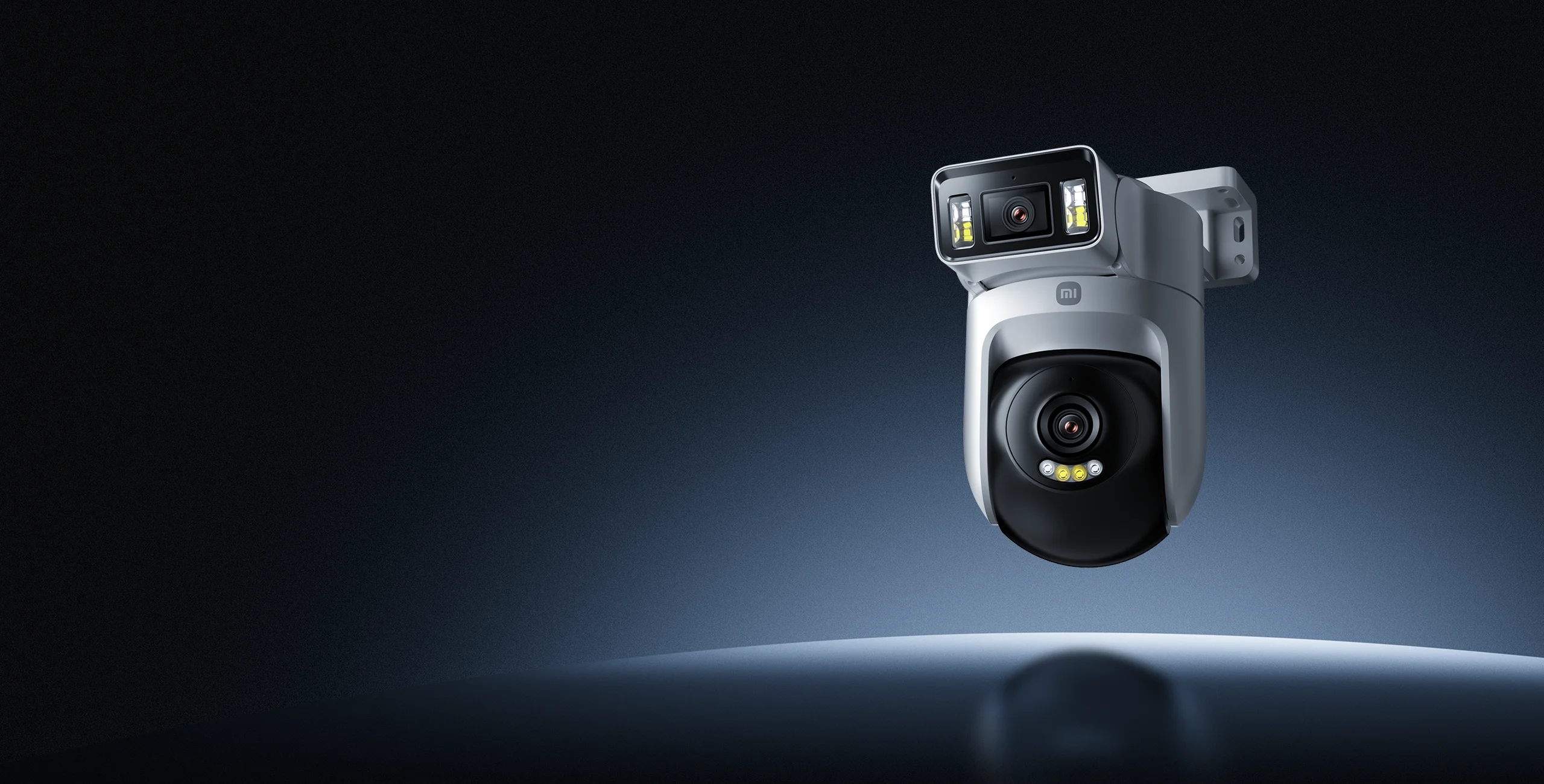
AI human and vehicle detectionAccurately detects people and vehicles
Dual-lens linked trackingFixed lens – Human detectionPTZ lens – Auto tracking
Dual 3MP lenses2K HD image quality with 8-LED smart full-colour night vision
Dual views from one cameraFixed view - courtyardPan-tilt view - entrance
IP66 water and dust resistance
Sound and light alarm
Two-way voice calls
Ethernet and Wi-Fi dual connectivity
Dual-lens panoramic surveillance
Two lenses for wider coverageDual views allow a single camera to monitor two areas simultaneously, reducing blind spots in outdoor security coverage.
Fixed view
Pan-tilt view
Dual-lens linked trackingAccurate detection with continuous trackingWhen the fixed lens detects a person, the pan-tilt lens automatically tracks and follows their movement, so you don't miss critical moments.
Fixed view – Person detected
Pan-tilt view – Continuous tracking
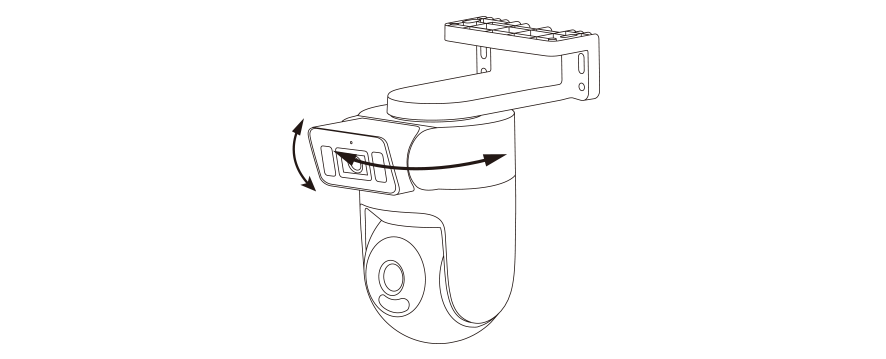
Dual-lens dynamic and static trackingCover multiple angles with one deviceThe dual-motor pan-tilt design allows you to control its movement via the Xiaomi Home app. The fixed lens supports manual adjustment, providing multi-angle coverage and 360° panoramic monitoring.
Fixed lens180°Horizontal rotation
25°Vertical tilt
Pan-tilt lens355°Horizontal rotation
95°Vertical tilt
HD image quality
Dual 3MP lensesCrystal-clear detailBoth the fixed lens and pan-tilt lens feature 3MP sensors and a 2304 × 1296 resolution, paired with large F/1.6 aperture lenses for sharp, detailed footage.
8-LED smart full-colour night visionClear visibility, even at nightBoth lenses feature dual white LEDs and dual infrared LEDs. When a person is detected in low-light conditions, the white LEDs automatically illuminate, delivering full-colour monitoring with enhanced detail.
Infrared night vision
Smart full-colour night vision
Smart dual-lens surveillance
On-device AI algorithms1Accurate human and vehicle detectionBoth lenses support human and vehicle detection. When unusual activity is detected, alerts are sent via the Xiaomi Home app to ensure you stay protected round the clock.
Human detection
Human tracking
Vehicle detection
Privacy zone protectionCustomizable privacy zones allow you to mask designated areas in the camera's field of view, protecting privacy and preventing unintended surveillance.
Masked area — Public zone
Smart active sound and light alarmsIntrusion detected, alarm activated
When unusual activity is detected within the monitored area, the camera activates a siren and strobe lights to deter intruders. The Xiaomi Home app also sends real-time alerts with video footage.2
"You have entered a private area."
Human detection
Strobe warning
Loud siren
Custom alarm voice message
Real-time two-way voice callsClear communication even outdoorsA built-in high-sensitivity microphone, high-power speaker and AI noise-cancellation deliver clear two-way conversations, even in outdoor environments.
Reliable protection
IP66 professional-grade dust and water resistance3Reliable in wind and rainDesigned for outdoor use with IP66-rated protection, it operates reliably in rain, snow, dust and harsh weather conditions.
Built-in MJA1 security chipsetEnhanced privacy protectionEach chip features a unique encryption key for end-to-end encryption of surveillance data, helping prevent tampering, data leaks and unauthorized access with financial-grade security.
Stable connectivity
Next-generation Wi-Fi 6Smooth, reliable, high-speed connectionThe built-in Wi-Fi 6 chipset significantly enhances signal strength and coverage, delivering faster and more stable connectivity, even when viewing HD recordings.
Latency
Transfer speed
Wi-Fi 4Higher
Wi-Fi 6Lower
Wi-Fi 4Moderate
Wi-Fi 6Fast
Ethernet + Wi-Fi dual connectivity4Stable streaming, even over long distancesWhere surveillance areas are far away or wireless interference is severe, an Ethernet connection can be used to ensure stable real-time data transmission.
Wi-Fi connection
Wired connection
Additional features
Time-lapse photographyCapture life's moments, effortlesslyBoth lenses support time-lapse recording. Capture two perspectives at once and condense the changing scenery around your home into stunning time-lapse videos to preserve every memorable moment.
Voice control with Alexa or Google Assistant5Connect the camera to Alexa and Google smart displays to view live footage and control the device using voice commands.
"Hey Google, show the camera"
"Alexa, show the camera"
Maximised storage efficiency with AOR6In Always-On Recording (AOR) mode, the camera records continuously at a low frame rate when no events are detected and switches to a normal frame rate during events. This reduces storage consumption while preserving more complete footage than event-only recording.
Event recording
Storage usage
Provides complete footageUses excessive storage space
Always record
Saves storage spaceProvides fragmented footage
Event recording
Combines "event recording" and "always record" with maximised storage efficiency
AOR
Always record
AOR
Two storage modes
microSD card storage7,8Supports 16GB to 256GB capacity
Cloud storage9Large-capacity cloud storage
Ceiling, wall or poleMounting options to suit your needs
Ceiling mount
Wall mount
Pole mount10
Set up in three simple stepsConnect with ease
Download the Xiaomi Home app11
Power on the camera
Open the app, add device and enable Bluetooth
Installation steps
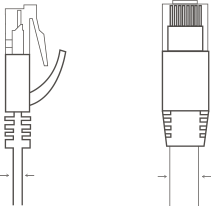
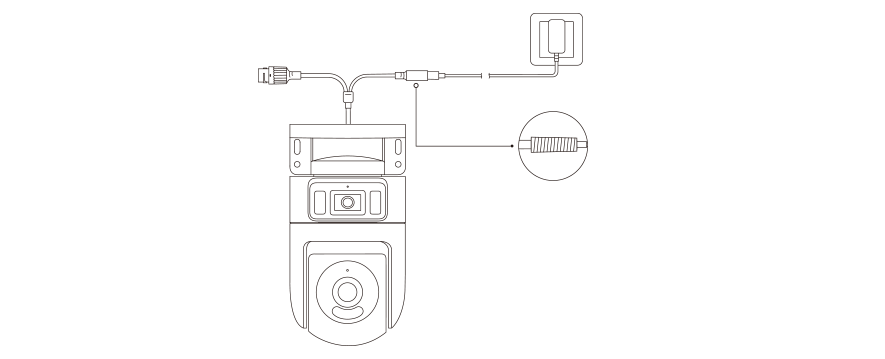
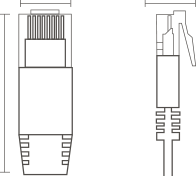
Purchase and installation notice1. Installation service is not included. Please refer to the user manual for installation instructions.2. Package includes a 3m power cable and adapter. Always use the supplied power adapter to avoid device restarts or disconnections caused by incompatible power adapters.3. Do not use extension cords, as high impedance or poor-quality cables may cause restarts or disconnections.4. Ceiling mount: Install at least 50cm from the wall. Ensure the lens is clear of reflective surfaces, such as glass or white walls, as this may cause glare, overexposure, or uneven lighting in your footage.5. The device QR code is located on the camera body. It is recommended to scan the QR code and complete network setup before mounting the camera.6. Wired network connection uses an RJ45 100M Ethernet port and does not support PoE power supply. To avoid signal attenuation, lag, disconnections or unstable connections caused by substandard cables, please use a Category 5 Ethernet cable or above that complies with industry standards. Compatible cable specifications are shown below:
7.9mm2.5mm
11.7mm6.6mm26mm
Not compatibleFlat Ethernet cablesThin Ethernet cablesBoots with latch protectors
CompatibleConnector and boot width: 11.70mmConnector height: 6.6mmCable to connector length: No more than 26mmCable diameter: 6–7mm
7. If you do not use an Ethernet cable, you still need to install the waterproof cover on the Ethernet port.
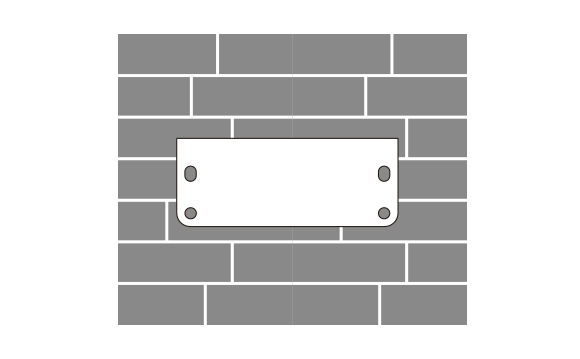
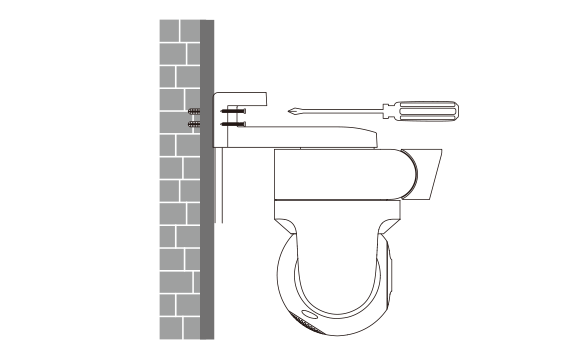
1. Select the installation location, apply the mounting template sticker and drill the holes.
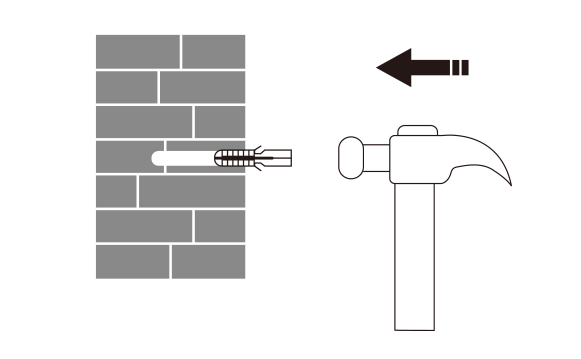
2. Insert the wall plugs into the drilled holes.
3. Insert and tighten screws to secure the wall mount.
4. Wrap the power cord port with the waterproof tape.
5. Secure the camera and manually adjust the angle of the fixed lens.
Notes:1. Some AI features are disabled by default and must be manually enabled in AI functions in the Xiaomi Home app before use. AI performance may vary depending on environmental conditions and actual usage.2. Push notifications are subject to the alert interval set in Home surveillance (default: 10 minutes). Users can adjust settings in Home surveillance via the Xiaomi Home app.3. The included power adapter is not waterproof and is for indoor use only. Avoid use in environments where water ingress may occur.4. Bluetooth must be enabled on your mobile device when pairing the camera via either Ethernet or Wi-Fi. An Ethernet cable is not included and must be purchased separately.5. A compatible Alexa or Google Assistant-enabled device is required. Google Assistant is not available in certain languages and countries/regions. Google, Google Home, and Google Nest Mini are trademarks of Google LLC. Alexa is not available in certain languages and countries/regions. Amazon, Alexa, and all related trademarks are owned by Amazon.com, Inc. For more details, please refer to the respective official websites.6. AOR mode requires a microSD card and must be enabled manually. To enable, go to Settings > Storage settings > SD card status > Recording mode. AOR mode will exit automatically when live view is opened.7. MicroSD card not included and must be purchased separately. It is recommended to use a microSD card (16GB–256GB) from a reputable manufacturer with a minimum speed rating of U1/Class 10. After installing or removing the microSD card, ensure the dust cover above the card slot is securely fitted to prevent water ingress and ensure normal operation.8. MicroSD is a trademark of SD-3C, LLC.9. Cloud storage services require a paid subscription. Cloud storage policies and availability may vary by region (Cloud storage subscription services are not currently available in Russia). For details, please refer to the Xiaomi Home app.10. For pole mounting, use a clamp smaller than 12mm. Clamps must be purchased separately.11. Please download the latest version of the Xiaomi Home app. If you change the camera's connected network or your Xiaomi Home account, you will need to remove the device from the Xiaomi Home app and pair it again.*The Xiaomi Home app provides three months of access to 7-day rolling cloud video storage for this device. For longer video storage, you can subscribe to a cloud storage service or purchase a microSD card separately.*Normal operating temperature: -30℃ to 60℃. Actual performance may vary due to environmental conditions.Do not use in excessively humid environments or where it may be exposed to water ingress, such as steam rooms or underwater environments.*This product does not include a built-in battery and requires a mains power connection. To better showcase the product design, power cables and wiring are hidden in the images on this page. In actual use, the camera must be connected using the supplied power adapter.*Product images, models, data, functions, performance, specifications, UI and other product information on this page are for reference only. Xiaomi may make improvements to the above information. Please refer to the actual product.*Comparisons on this page are made against Xiaomi products. Comparison images are for illustrative purposes only and actual results may vary.*Unless otherwise stated, all data on this page comes from internal laboratory testing. Actual results may vary due to differences in environmental conditions and usage scenarios.